

Google Business Profile management means keeping your business information accurate, responding to reviews, publishing useful updates, and checking performance on Google Search and Maps. You can do that work yourself, give your team software, or hire a managed-service provider.
The right choice depends on who will own the work, how often your locations change, and how much oversight you need. This guide compares those options, then gives agencies and multi-location teams a repeatable management checklist.
Already managing several locations in spreadsheets? Explore Localith listings management to see bulk edits, scheduled hours, and change tracking. Localith is software your team or agency operates; a subscription does not include a person managing your profiles for you.
DIY, software, or a managed service: which should you choose?
| Approach | Best fit | Who does the work? | Cost to consider | Next step |
|---|---|---|---|---|
| DIY with Google’s native tools | A small set of profiles with infrequent changes and a named owner | You or a colleague updates profiles, handles reviews, and checks results | Your team’s time; Google Business Profile itself is free | Use the management checklist below |
| GBP management software | Teams with repeated updates, several locations, or shared reporting | Your team or agency uses software to coordinate and automate tasks | Subscription, location count, and any usage charges | Explore Localith’s listings workflows and pricing |
| Managed service or agency | Businesses that need someone to execute the work and advise on priorities | An external provider works to an agreed scope and response schedule | Service fees and any separate software costs | Compare GBP management agencies |
These options can overlap. An agency may use Localith to deliver its service, while a brand keeps ownership of its Google profiles and approves business information internally.
Choose DIY if someone can reliably maintain the profiles without missed updates. Choose software if your team knows what needs doing but repeats the same tasks across locations. Choose a managed service if you need execution capacity or expertise as well as tools.
Before hiring a provider, agree on locations covered, review-response times, publishing scope, reporting, ownership, and handover when the contract ends. Ask who pays for software and who approves sensitive replies. No provider can guarantee a top-three position: Google says local results depend primarily on relevance, distance, and prominence. Google’s local ranking guidance.

Run every Google Business Profile from one operating dashboard. Localith centralizes listings, reviews, posts, and analytics so your team can manage every location without jumping profile to profile.
Start free trialWhat is Google Business Profile management?
Google Business Profile management is the ongoing work of keeping your listings on Google Search and Google Maps accurate, active, and trustworthy, so every location looks open for business the moment a customer searches. The day-to-day work covers updating hours and business info, answering reviews, publishing Google Posts, adding photos, managing categories and services, controlling who can edit each profile, and reporting on the calls, direction requests, and website clicks the profile drives. Done well, it is not a one-time setup. It is a system that keeps your Google Maps visibility in shape as the business changes around it.
In other words, GBP management is not a setup project. It is an operating model. That distinction matters because many businesses still treat their profile like a one-time verification checklist.
Agencies and multi-location operators know better. They understand that visibility drops when updates lag, trust erodes when reviews go unanswered, and brand consistency breaks when each location improvises its own process.
Who needs Google Business Profile management?
Two audiences tend to feel the pain fastest: agencies and multi-location brands.

Agencies building GBP retainers
Agencies invest in Google Business Profile management to expand beyond generic social posting and broader SEO packages. A strong GBP retainer gives them a recurring engagement tied to real operational outputs:
- profile updates completed on time,
- review responses handled within SLA,
- monthly post calendars executed,
- location-level reporting delivered,
- category, attribute, and listing audits documented.
For agencies, the challenge is consistency. It is easy to promise management. It is harder to deliver it cleanly for ten or twenty client locations without role confusion, missed updates, and reporting gaps.
This is where GBP management becomes less about theory and more about process design, and where a service offer for agencies becomes easier to position as a real operating offer instead of a vague add-on. Agencies that run this as a real offer can also get listed in the GBP agency directory.
Multi-location businesses
Multi-location brands need Google Business Profile management because each location creates more operational surface area. One restaurant group may have:
- local managers updating hours,
- a central marketing team planning posts,
- customer care handling reviews,
- regional operators approving promotions,
- agency partners supporting optimization.
Without shared rules, every location starts to drift. One branch adds new services quickly. Another leaves holiday hours outdated.
A third responds to negative reviews well, while the fourth ignores them. The result is uneven customer trust and weaker local visibility.
If your team has to manage multiple Google Business Profiles, service quality depends on process control as much as marketing skill.
What Google Business Profile management covers in practice
Before you can run GBP work well, you need to know what the work actually is. Many agencies and in-house teams start with a broad promise like “we manage your Google presence,” but strong operational design is more specific than that.
The cleanest way to structure the work is to split it into two buckets:
- core GBP workflows tied directly to the profile itself,
- bundled workflows that connect GBP management to adjacent marketing work.
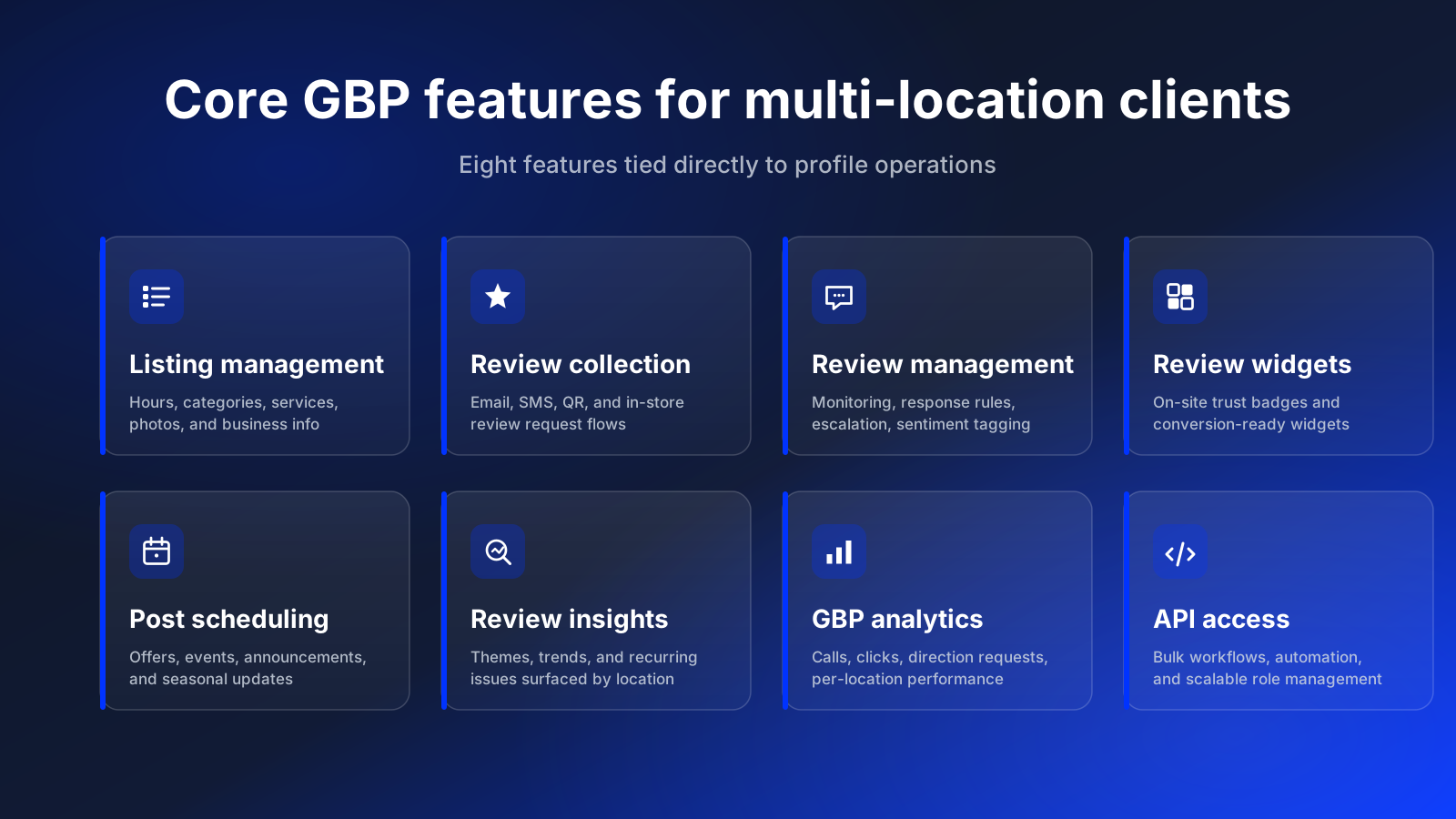
Core GBP features for large and multi-location clients
If you manage enterprise, franchise, retail, healthcare, or restaurant groups, the most valuable features are usually the ones tied directly to profile operations.
GBP business listing management
This covers updating hours, business details, services, categories, menus, photos, and profile fields across locations. For large brands, this is often the operational foundation of the entire engagement.
Google reviews collection
Review collection is not just a reputation tactic. It is part of the service when agencies help clients build repeatable flows through email, SMS, QR codes, in-store prompts, or website review requests.
Google reviews management
This is where service depth becomes visible. A real review management workflow includes monitoring, response rules, escalation paths, sentiment tagging, and performance oversight. Teams using the AI Review Reply Agent can reduce response lag without losing quality control.
For the trust, response, and policy side of the work, the Google reputation management guide is the right companion piece.
Google reviews widgets
A strong upsell when clients want to turn profile trust into on-site conversion support. Agencies can package review widgets, badges, and trust elements as part of web or CRO work.
GBP post scheduling
Posts are often handled poorly because they are treated as optional. In a stronger service model, they become part of a defined publishing cadence with offers, announcements, seasonal content, and location-specific messaging. That is much easier to execute once teams can schedule Google Posts in a centralized workflow.
Google reviews insights
Clients do not just want responses sent. They also want to know what review themes are emerging, which locations are improving, and where service issues are likely to create future reputation problems.
GBP analytics
Good service reporting should show more than vanity numbers. Location-level Google Business Profile analytics help agencies and operators track calls, views, direction requests, review coverage, and location-level trends.
Google Business Profile API access
This matters most once the account becomes operationally complex. The Google Business Profile API supports more scalable role management, bulk workflows, review handling, and automation paths than manual one-by-one profile work.
Bundled GBP workflows for SMEs
Smaller businesses often do not need a large standalone GBP program. For them, GBP management works well as part of a broader marketing bundle.
GBP management as part of social media monitoring
If an agency already handles comments, messages, or social reputation workflows, Google review monitoring is a natural extension.
GBP publishing as part of social media publishing
Teams already planning Instagram, LinkedIn, or TikTok calendars can extend the same editorial system into Google Posts. When an agency is building a custom workflow for the social side, InvisibleAPI’s social media publishing API can post and schedule content for Instagram and X alongside that calendar.
Local SEO as part of a broader SEO engagement
This is where profile optimization, reviews, categories, and local intent can complement site-level SEO work. Agencies often win by packaging local SEO and profile operations together instead of treating them as separate silos. A repeatable local keyword research process keeps GBP categories, services, and on-page content aligned with how customers actually search in each market. For the underlying task list every location still needs, see our GBP optimization playbook for 2026.
Review widgets as part of web design or CRO
When agencies already improve landing pages, a GBP trust layer is a logical add-on.
GBP analytics as part of reporting retainers
If the client already receives monthly marketing reporting, GBP performance should be part of that view rather than a separate afterthought.
Best practices for Google Business Profile management
The teams that manage Google Business Profile work well do not rely on memory. They build recurring workflows.
1. Treat GBP management as a recurring operating cadence
The best GBP programs run on weekly and monthly rhythms, not random check-ins. A healthy cadence often looks like this:
- weekly review-response coverage,
- weekly checks for profile edits and suggested changes,
- monthly business-data validation,
- monthly Google Post planning,
- quarterly category and attribute audits,
- quarterly role and permissions review.
This approach matters for agencies and in-house teams alike. When someone asks how to manage Google Business Profile work consistently, the first answer is not “use more features.” It is “put the work on a schedule.”
If you want that cadence to cover more than profile maintenance, pair it with a broader local SEO audit checklist so rankings, location pages, citations, and GBP health get reviewed together.
2. Standardize profile data before you scale
Before you automate anything, standardize:
- naming conventions,
- categories,
- descriptions,
- service lists,
- hours formatting,
- image naming and upload rules.
Standardization prevents the classic multi-location problem where every location describes the same service differently. It also makes bulk edits easier later. If you plan to scale service delivery, the input quality has to come first, and the step-by-step guide on how to edit Google Business Profiles in bulk covers the field rules to use once the data layer is clean.

3. Set review-response rules and SLAs
Review management is one of the clearest places where service quality becomes visible. Strong teams define:
- which reviews need same-day attention,
- who can respond directly,
- which cases escalate to legal, operations, or customer support,
- how tone and messaging should vary by issue,
- when managers need approval before posting.
For agencies, this is where retainers become sticky. Clients do not just want “review monitoring.” They want confidence that the right response goes out at the right time.

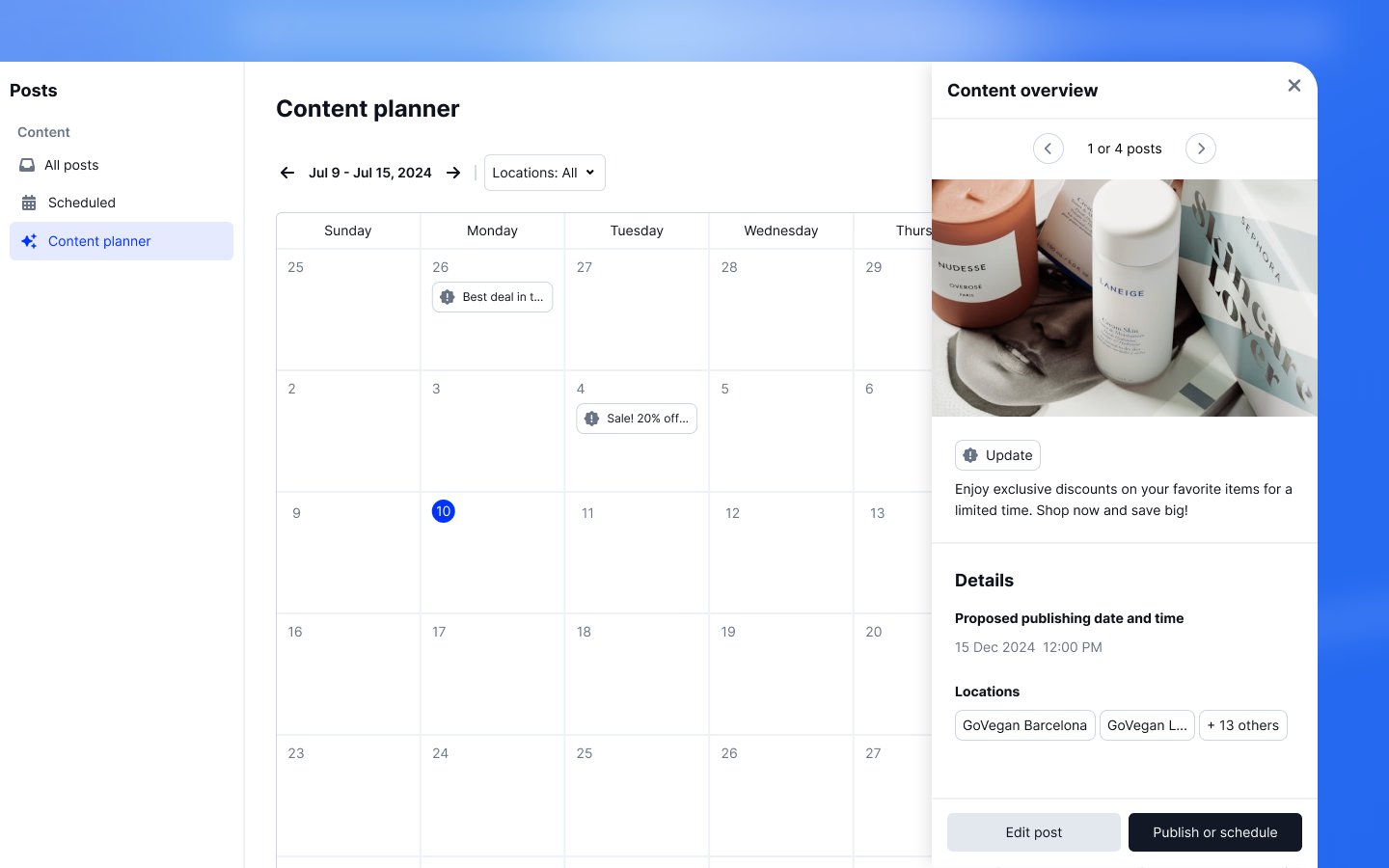
4. Publish Google Posts on a repeatable schedule
Most teams either over-post for a week and disappear, or they never build a usable cadence. A better model is to create a light monthly calendar around:
- offers,
- events,
- local announcements,
- seasonal updates,
- product or service highlights.
That is especially important for brands managing many locations. Once the content is planned centrally, teams can schedule Google Posts in batches instead of relying on one-by-one updates.

5. Use permissions, approvals, and audit trails
A surprising amount of GBP damage comes from unclear ownership rather than bad intent. People edit the wrong location, remove categories, transfer access incorrectly, or respond to sensitive reviews without context. Best practice is simple:
- define who owns strategy,
- define who owns execution,
- define who approves changes,
- keep an audit trail for important edits.
In Localith, Admins have workspace-wide access. Editors can be limited to selected listings and actions. Keep any additional regional sign-off process in your team workflow; these roles do not create a custom approval chain. See team permissions.

6. Measure outcomes by location, not just globally
One global performance chart rarely tells the truth. A 40-location brand can look healthy in aggregate while ten underperforming locations quietly drag the system down. Good operators review:
- calls and direction requests by location,
- review volume and response coverage by location,
- post output by location,
- ranking and visibility shifts by region,
- profile completeness and data quality by location.
That is why location-level Google Business Profile analytics matter so much for agencies and operators making decisions at scale.

Example workflows for GBP management
The following illustrative scenarios show how to assign the work. They are workflow examples, not customer case studies or measured results.
Agency example: 12-location dental group
An agency wins a multi-location dental client with 12 practices across two states. At first, the client asks for “help with reviews and profile cleanup.” Once the engagement starts, the actual scope expands:
- normalize categories across all practices,
- update service descriptions,
- maintain doctor and office photos,
- respond to reviews within 24 hours,
- publish monthly insurance and seasonal updates,
- report on top-performing locations.
The agency quickly learns that the value is not in isolated tasks. It is in running a dependable system. Their best practice is to define a single operating checklist for every location, then create escalation rules for clinical or sensitive review cases.
Restaurant chain example: weekly offers and review coverage
A restaurant group with 18 locations wants to improve local visibility and consistency. Their issue is not lack of activity. It is uneven execution.
Some locations post frequently. Others never do.
Some managers answer negative reviews well. Others ignore them. Holiday hours get updated in one city and forgotten in the next.
The service fix is a centralized weekly workflow:
- head office approves campaign themes,
- local teams provide location-specific photos or offers,
- the marketing team publishes updates in batches,
- reviews are triaged daily with clear response rules.
This is a good example of how to manage Google Business Profile activity without making every location invent its own process. Restaurant-specific category, menu, and attribute setup is in the Google Business Profile for restaurants checklist.
Home services example: seasonal updates and service-area control
A home services brand with eight territories has recurring operational changes:
- weather disruptions,
- seasonal service promotions,
- emergency schedule changes,
- service-area expansion.
Their GBP management service focuses on speed and change control. They need hours, service descriptions, and attributes updated quickly, but they also need one person to confirm that those changes are accurate before they go live.
Best practice here is not just speed. It is controlled speed.
Franchise example: regional approvals with central reporting
A franchise brand wants every location to follow brand standards, but local owners still need some flexibility. Their GBP service model separates three roles:
- central brand team,
- regional approvers,
- location operators.
The local operators can suggest changes. Regional managers approve promotional or operational updates. The central team maintains reporting and final policy.
This creates local agility without losing brand consistency.
The wider picture, including duplicate listings, location page structure and per-location measurement, is covered in our guide to local SEO for franchises.
What to include in your GBP management stack
The right service stack depends on complexity. A single-location business may survive with native Google controls and a lightweight checklist. Agencies and multi-location brands usually hit a wall faster. Our roundup of the best Google Business Profile management tools compares the options if you are deciding what to add.
Native Google workflows
Native tools are enough when:
- location count is low,
- update volume is low,
- one or two people own the work,
- reporting needs are minimal.
Centralized operations and bulk workflows
Once locations, stakeholders, or update frequency grow, manual processes get expensive. Teams start needing:
- bulk edits,
- centralized dashboards,
- role-based permissions,
- approval flows,
- change visibility,
- reusable posting workflows.
Reporting and analytics
A management service is harder to retain if the client cannot see what is happening. Agencies especially need clean reporting to show:
- output completed,
- engagement handled,
- issues resolved,
- location trends,
- visibility or interaction improvements.
API access and automation
The next layer is automation. This matters when teams need to move faster or reduce repetitive manual work. If your service includes review handling, post scheduling, or recurring updates across many locations, the Google Business Profile API becomes part of the conversation.
The point is not automation for its own sake. It is creating a more reliable operating system.
How Localith helps agencies and multi-location brands
Localith brings listing updates, review replies, post scheduling, and location analytics into a shared workspace. Your team still owns the business decisions: which information is correct, which locations need changes, and which replies require a person.
Start with one workflow you already repeat, such as preparing holiday hours. Single-info bulk edits apply the same field change to selected locations; CSV edits let you supply different values. Review the locations and values before submitting, then check the edit tracker. Updates affect live profiles, and Google may take time to process them.
For reporting, you can also use ready-made MCP report prompts in Claude or ChatGPT. The connection requires a paid Localith account, connected profiles, and a supported AI plan. MCP reporting is read-only: confirm the client and location IDs before requesting a report. It does not replace the dashboard for listing edits or publishing.
A 7-day trial plan for your management workflow
Use the trial to evaluate operational fit. Seven days is enough to test a workflow, but too short to establish that software improved search rankings.
| When | What to test | What to record |
|---|---|---|
| Day 1 | Connect the authorized Google account and select a small set of locations | Existing hours, open issues, and time spent on your current process |
| Days 2-3 | Review an actual hours or information correction; submit only an approved change | Locations affected, time to prepare, and the edit-tracker result |
| Days 4-5 | Check pending edits and test the review or publishing workflow your team needs | Missed tasks, manual steps, and any permissions gaps |
| Days 6-7 | Review the same locations with the person who will run the process | Whether the workflow saves effort and what needs resolving before rollout |
Keep a copy of the original values before a bulk edit. There is no automatic bulk undo; reverting requires another update. Activate Protector only after verifying the values saved in Localith, because those are the values its scheduled scans restore.
Start your 7-day Localith trial with a named operator and one task to evaluate. The monthly base plan is $9 for two locations; additional locations cost $6.60 each. AI credits are separate at $0.15 each, with 100 included in the trial. Check the pricing calculator for your location count.
For a larger rollout or client portfolio, book a demo with your location count, current tools, and access requirements. If you need someone to deliver the work for you, compare managed-service providers instead.
Conclusion: Build a repeatable GBP management system
Assign an owner, verify each location’s data, and put reviews, publishing, and reporting on a schedule. Start manually when that is manageable, add software when repetition becomes the bottleneck, and bring in a service provider when execution needs an external owner.
Your next step is to choose one workflow and test it on real locations. Use the listings management overview to see the software workflow, or follow the checklist above with Google’s native tools.