

Google Business Profile optimization used to mean one person, one listing, and a checklist.
Now, it means figuring out which items on that checklist you still have to do yourself, and which ones an AI Agent, a chat assistant, or other AI tools can already do for you.
Most advice on this topic treats GBP optimization as a solo, manual job: write the description, pick the categories, answer every review by hand, one listing at a time. That works fine for one location.
Past a handful, it turns into a part-time job nobody signed up for: stale posts, missed reviews, mismatched hours across branches, and a profile that quietly loses ground to a competitor who simply answered their reviews faster.
So here is the practical version: what to optimize, why it moves the needle, and exactly which parts you can already hand off.

Turn Google Maps SEO into a repeatable workflow. Use Localith to audit profiles, track local heatmaps, prioritize weak locations, and keep every Google Business Profile moving.
Start free trialWhat is Google Business Profile optimization?
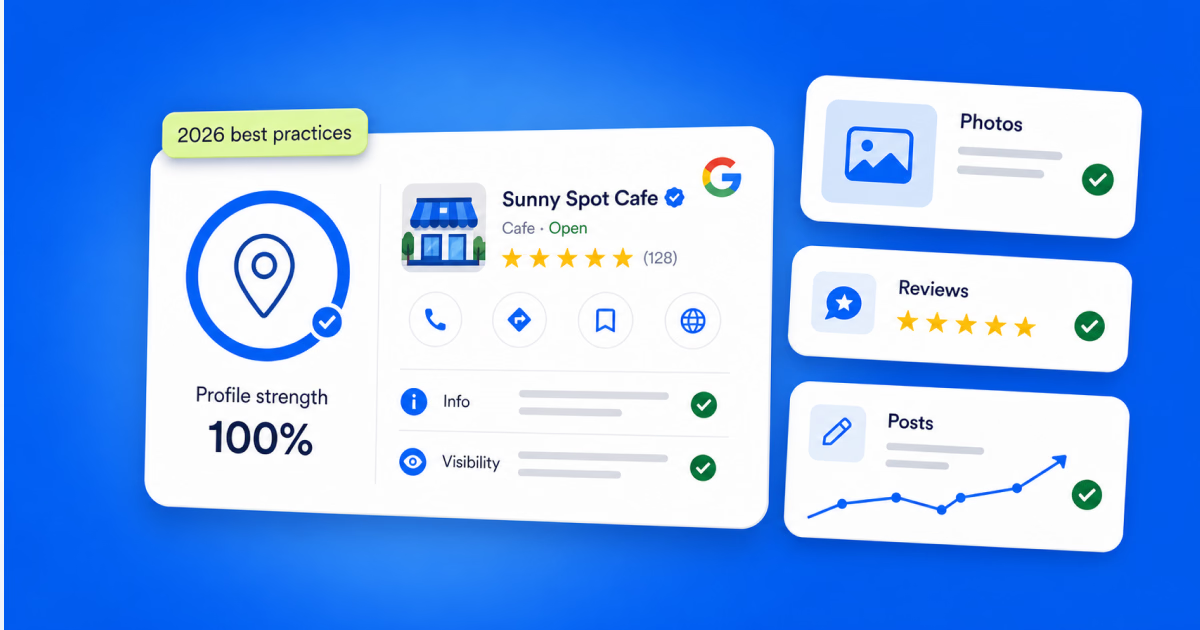
Google Business Profile optimization is the ongoing process of completing, updating, and maintaining every field on your free Google listing (info, photos, posts, and reviews) so it ranks higher in Google Search and Maps and converts more of the people who find it.
It is not a setup-once task. Google rewards profiles that stay current, and it quietly buries the ones that do not. An outdated phone number or a description nobody has touched since 2023 does real damage to how often you show up in local search.
Why most Google Business Profile optimization advice does not scale

The stakes are bigger than most owners realize. Customers are 2.7x more likely to see a business as reputable if its Google Business Profile is complete, and 50% more likely to consider it for a purchase (Google).
Photos matter just as much. Businesses with 100+ photos get 520% more phone calls than those with fewer (BrightLocal, 2019). Reviews carry even more weight, and most businesses are leaving them on the table.
That 83% figure is the whole problem in one number: the overwhelming majority of customers will leave a review if you ask, and most businesses never ask, or ask so inconsistently that it stops mattering.
Now multiply every one of these tasks (descriptions, photos, posts, review requests, review replies) across ten locations, or fifty. That is the part the “7 tips” listicles never mention: the tips are correct, but the execution does not scale past a handful of listings without help.
The 3 layers of automation Localith already has in store
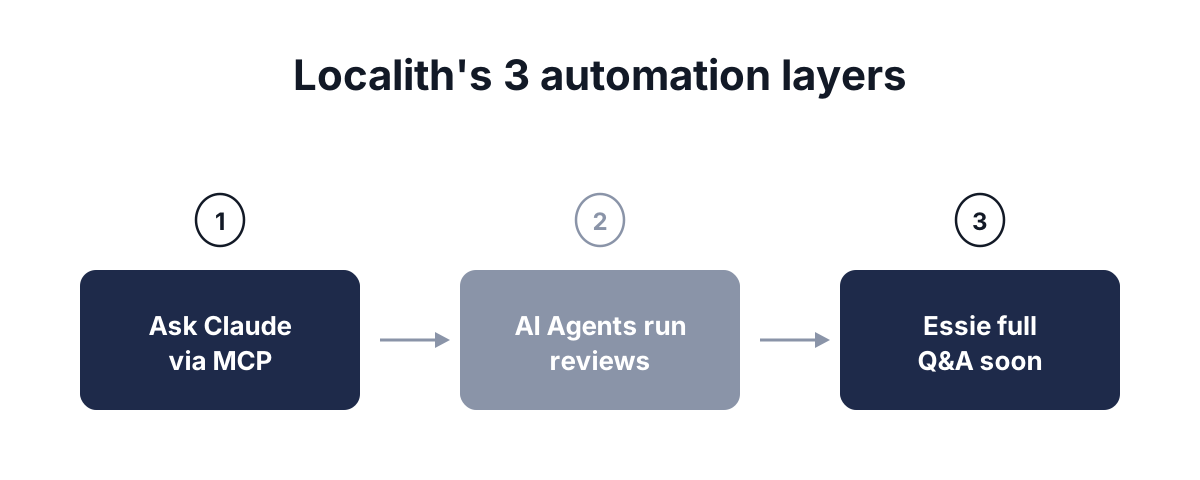
Before we get into the practices themselves, it is worth knowing what is actually available right now, because it changes how you should think about “doing” each one. Localith, our Google Business Profile management platform, has three separate automation layers live today.
Localith MCP
This is the broadest capability available right now. Connect Localith to Claude or ChatGPT through our MCP integration, and you can ask either one directly for a performance report, a review summary, or a comparison across locations. No dashboard-digging required. If you want the full picture of how to measure Google Business Profile performance first, that guide compares the native tab, the dashboard, and this AI route side by side.

AI Agents (Skills)
Localith’s AI Agents (Skills) already act on your behalf, not just answer questions. Build a custom agent for a specific job (replying to reviews, flagging a performance drop) and pair it with an Automation that triggers it the moment a condition is met.

Essie, the AI Assistant
Essie is our in-app chat assistant, and today it is strongest on reviews. It can walk you through auto-responder setup and review sentiment. Within the next couple of months, Essie is set to answer anything about your GBP performance natively, matching what the MCP route already does today.

Considering all of the above, we will first take you through the manual, native methods available to you when it comes to managing and optimizing your Google Business Profile, and then you will get a better and more streamlined method of achieving the same via Localith.
1. Complete every field in your Google Business Profile listing
This is the boring part, and it is also the highest-leverage part. Google’s own data backs this up: a complete profile is not a nice-to-have, it is the difference between showing up and not. That means your name, address, phone number, hours, primary and secondary categories, description, and every attribute Google offers for your category (accessibility, payment options, service options) filled in and kept current.
How to do this in Google Business Profile (native)
Search for your business on Google after signing in with the email that manages it.

Then, just tap Edit profile to access your business information, such as name, hours, categories, description, attributes. Save, then repeat for the next location, because this Search interface edits one listing at a time. Google does have a bulk route for multi-location brands: Business Profile Manager accepts spreadsheet uploads for structured fields like store codes, addresses, phone numbers, and hours.
How to do this in Localith
Doing this once is easy. The native options both get heavy at scale: editing profile by profile eats an afternoon, and the spreadsheet route means preparing, validating, and re-uploading a file for every round of changes, with mistakes landing straight on live listings. Localith’s Bulk Edit lets you update info, hours, and categories across every location from one screen with no spreadsheet round trip, and its edit log keeps a record of exactly who changed what and when.

2. Optimize your Google Business Profile photos and videos
Photos are not decoration. They are the second-biggest driver of clicks and calls after a complete profile, and that 520% jump in phone calls for listings with 100+ photos is not a typo. Upload real, current photos: your storefront, your team, your product, not stock imagery.
How to do this in Google Business Profile (native)

Open the Photos tab, click Add photos, upload the images, and tag it by category: cover, logo, team, product, interior. Repeat per photo, per location. There is no bulk upload in the native manager.
How to do this in Localith
Manually uploading fresh photos to every location’s profile is exactly the kind of task that stops happening once you are past a few listings. Localith’s batch photo upload pushes new images to every selected location in one pass, so freshness does not depend on someone remembering to do it.

3. Post updates that actually get seen
Google Posts show up directly in your knowledge panel and search results, with buttons like Book, Order, or Buy. A standard post stays live until Google archives it after six months, while event and offer posts run only for the date range you set, and it is always the newest post that gets the prominent slot. So this is one practice that rewards consistency over cleverness: post regularly, and give each post a real call to action.
How to do this in Google Business Profile (native)
Open the Posts tab, click Add post, choose a post type, write the copy, attach a photo and a call-to-action button, then publish. It is a clean flow for one location. There is just no way to push the same post to multiple locations at once.

How to do this in Localith
Writing ten posts is fine. Writing and scheduling ten posts a week across every location, on time, every week, is the part that actually breaks down. Localith’s batch post publishing lets you schedule content across every location from one place, so posting stops depending on someone’s memory.

4. Automate the review workflow that used to eat your week
Reviews are where Localith’s automation is furthest along, and it is not close. This is the practice you can hand off almost entirely today.
How to do this in Google Business Profile (native)
Open the Reviews tab, read the review, and type a reply by hand. That is the entire feature set: no templates, no automation, no bulk actions, and no way to route a review to anyone based on its rating or sentiment. Every reply is a manual decision, one review at a time.

How to do this in Localith
You have two automation options here, and they are genuinely different. We have broken down how AI review replies compare to the native method in more depth elsewhere.
A standard auto-responder posts one of five pre-written replies based on star rating alone.
Also, we have an AI Agent (Skill) that reads the actual review and writes a unique, on-brand reply for it, and you can tune its tone and personality to match how your team actually talks.

Build a Custom agent for exactly the job you need (reply to reviews, flag a sentiment shift, whatever fits your workflow), then pair it with an Automation so it fires automatically. Set a rule like “run whenever a 1-star review comes in,” and the agent handles it without anyone opening the dashboard.
Not every agent has to touch reviews directly, either. Localith’s Performance tracker agent watches your Google location performance and notifies you the moment it drops, so you find out from your own tools before you find out from a competitor’s ranking.

Reply to every review across all locations with AI that matches your brand voice. Drafts on-brand responses, routes replies for approval when you turn that on, and works across every location. 7-day trial with 100 AI credits. From $9/mo for 2 locations. 4.4 on G2.
Start free trial5. Search your reviews for insights, not just star ratings
Star ratings tell you how you are doing. The actual text of your reviews tells you why: the specific product line customers keep mentioning, the same complaint showing up across three locations, the phrase your best customers use to describe you.
How to do this in Google Business Profile (native)
The native manager gives you a star-rating filter and a scroll bar. There is no keyword search across reviews and no way to search across more than one location at a time. Finding a pattern means reading everything yourself.

How to do this in Localith
Reading through hundreds of reviews by hand to spot a pattern is not realistic once you are managing more than one location. Localith’s review search lets you search across every review, at every location, for a keyword or theme, turning scattered feedback into an actual signal.

6. Track your Google Business Profile performance before it slips
Views, searches, calls, direction requests, website clicks. Google surfaces all of it in the Performance tab, but a number sitting in a dashboard nobody checks is not monitoring, it is just data. The point of tracking performance is catching a drop before it shows up in your rankings, not explaining it after the fact.
How to do this in Google Business Profile (native)
Open the Performance tab on a listing to see interactions, calls, bookings, direction requests, website clicks, etc. over a chosen date range. It is genuinely useful for a single location, but there is no cross-location view, no alerting, and no way to compare this month to last without doing the math yourself.
Check our breakdown of the Google Business Profile dashboard for what is actually in there.

How to do this in Localith
Localith’s cross-location performance reports put every listing’s numbers side by side, so a drop at one location does not hide inside an average. Ask-anything reporting via Claude or ChatGPT through Localith’s MCP covers the same ground today, for any location, on demand.

Benefits of using Localith to optimize your Google Business Profile
Every practice above works whether or not you use Localith. Here is what changes when you do:
- One dashboard for every location, so no more logging into each listing separately
- Bulk edit info, hours, and categories across every location in one pass
- Batch photo uploads that keep every profile’s visuals current at once
- Batch post publishing, so posting does not depend on anyone’s memory
- Automated review handling, either the standard auto-responder or a custom AI Agent (Skill), triggered by Automations
- Ask-anything reporting today via Claude or ChatGPT through our MCP, and natively through Essie
- Edit logs that keep a record of who changed what, across every team member and every location
- Cross-location performance reports that show you where you are actually gaining or losing ground
None of this replaces good judgment about what to write or how to talk to a customer. It just removes the busywork standing between you and doing it well.
Why pick Localith for your GBP management needs
Every practice in this guide has a native way to do it and a faster way to do it, and the faster way is Localith. Instead of logging into each listing separately, running the same edit ten or fifty times, or hoping someone remembers to check the reviews tab, Localith puts your entire GBP footprint (every location, every listing, every task) into one place, with AI Agents and automations already doing the parts that used to eat your week.

Here is what that actually looks like in practice:
- Localith MCP: ask Claude or ChatGPT anything about your GBP performance, today, for any location, without opening a dashboard.
- AI Agents (Skills) + Automations: build a custom agent to handle reviews or flag a performance drop, then trigger it automatically instead of running it by hand.
- Essie, the AI Assistant: walks you through setting up review automation in-app today, with full GBP performance Q&A landing within the next couple of months.
- Bulk editing: update info, hours, categories, and photos across every selected location in one pass instead of one listing at a time.
- Edit logs: a running record of who changed what, when, and where, across every team member and every location.
- Google publishing: easily post new content on your Google locations to keep your followers and customers informed about your products.
- Cross-location performance reports: see every listing’s numbers side by side, so a drop at one location does not hide inside an average.
None of this replaces good judgment about what to say to a customer. It just clears the busywork standing between you and doing it well.
Google Business Profile optimization checklist
- Complete every info field: name, address, phone, hours, categories, attributes
- Write a description that answers “why pick us,” not a keyword list
- Upload current, real photos, aim well past the 100-photo mark
- Post updates on a real schedule, each with a clear call to action
- Ask for reviews consistently, not just when things go well
- Reply to every review, positive and negative, within a day or two
- Set up an auto-responder or a custom AI Agent (Skill) for review replies
- Pair that agent with an Automation so it runs without manual triggering
- Search your reviews periodically for recurring themes, not just star averages
- Check cross-location performance reports monthly if you manage more than one listing
- Ask Claude or ChatGPT (via MCP) for a performance summary before you assume anything is wrong
Conclusion: Start with the one practice that is currently costing you the most
Google Business Profile optimization in 2026 is not a bigger checklist than it was in 2018. It is the same checklist, but a meaningful chunk of it no longer has to sit on your desk. Complete your profile, keep it current, and stop treating reviews as a manual chore when an Automation can already handle the bulk of it.
Pick the practice above that is costing you the most right now (usually reviews) and fix that one first. Try Localith free and see how much of this week’s GBP work you can hand off before lunch.