Built for multi-location Google publishing

Schedule Google Business posts across every location.

Localith helps agencies and multi-location teams schedule Google Business Profile posts from one calendar. Personalize post descriptions by location or upload a batch of updates with individual schedules.
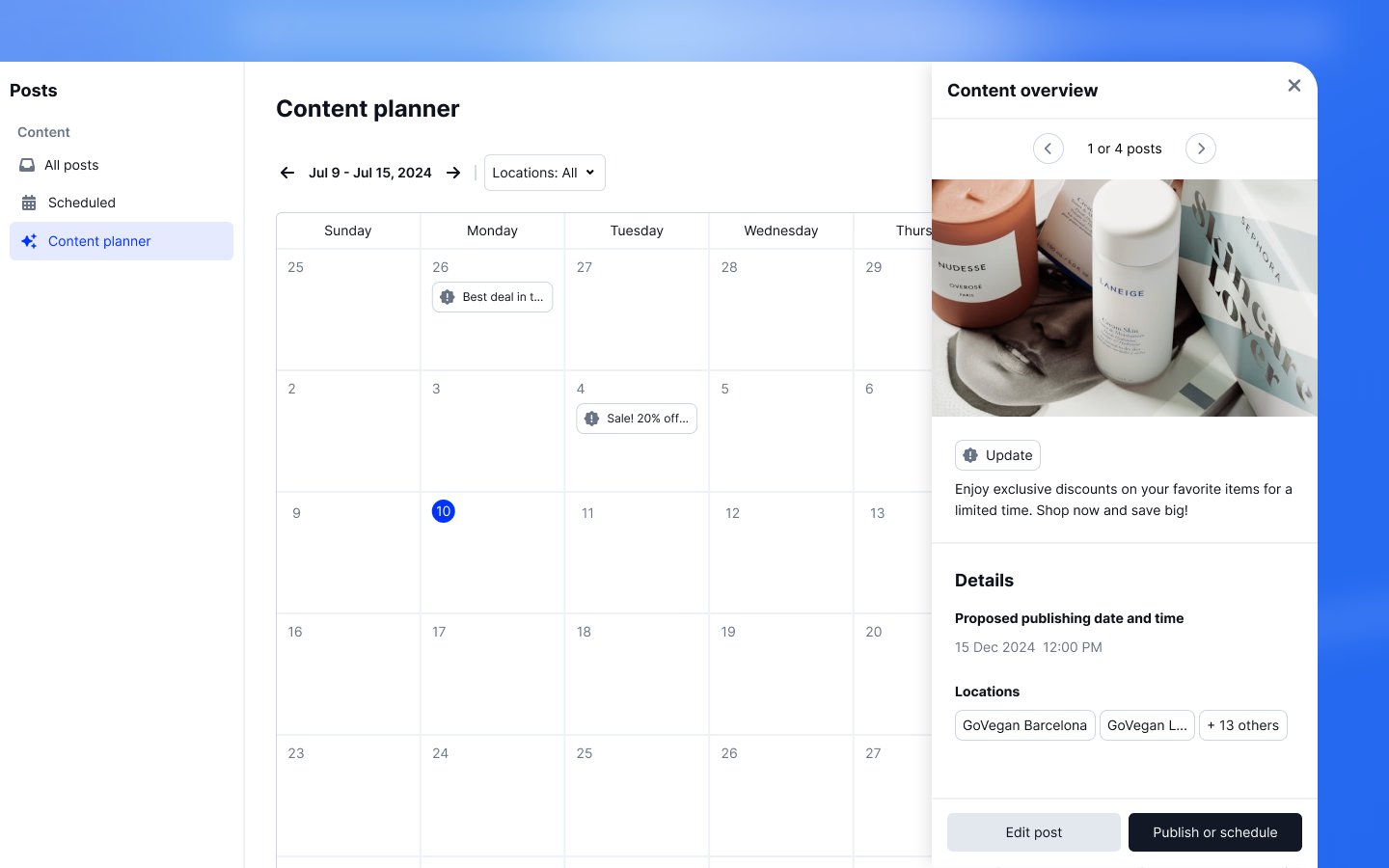

Google Business post scheduling workflow
Rachel Localith customer Manuel Localith customer David Localith customer

100+ brands trust Localith

Choose the workflow that fits

Google already schedules posts. When does Localith help?

You can schedule, repeat, and share posts across profiles directly in Google. As part of our Google Business Profile management software, choose Localith when your team also needs location-specific descriptions, a shared calendar, or a CSV workflow for different posts and dates.

Use Google's native posting tools

A practical starting point when Google's post editor and scheduling options cover the work you need to do.

Read Google's posting and scheduling guide

Use Localith for your location workflow

Plan across client or store locations, reuse a description with Smart Parameters, and check scheduled, published, draft, and failed posts in one calendar.

See how the content calendar works

Schedule Google Business posts around your locations

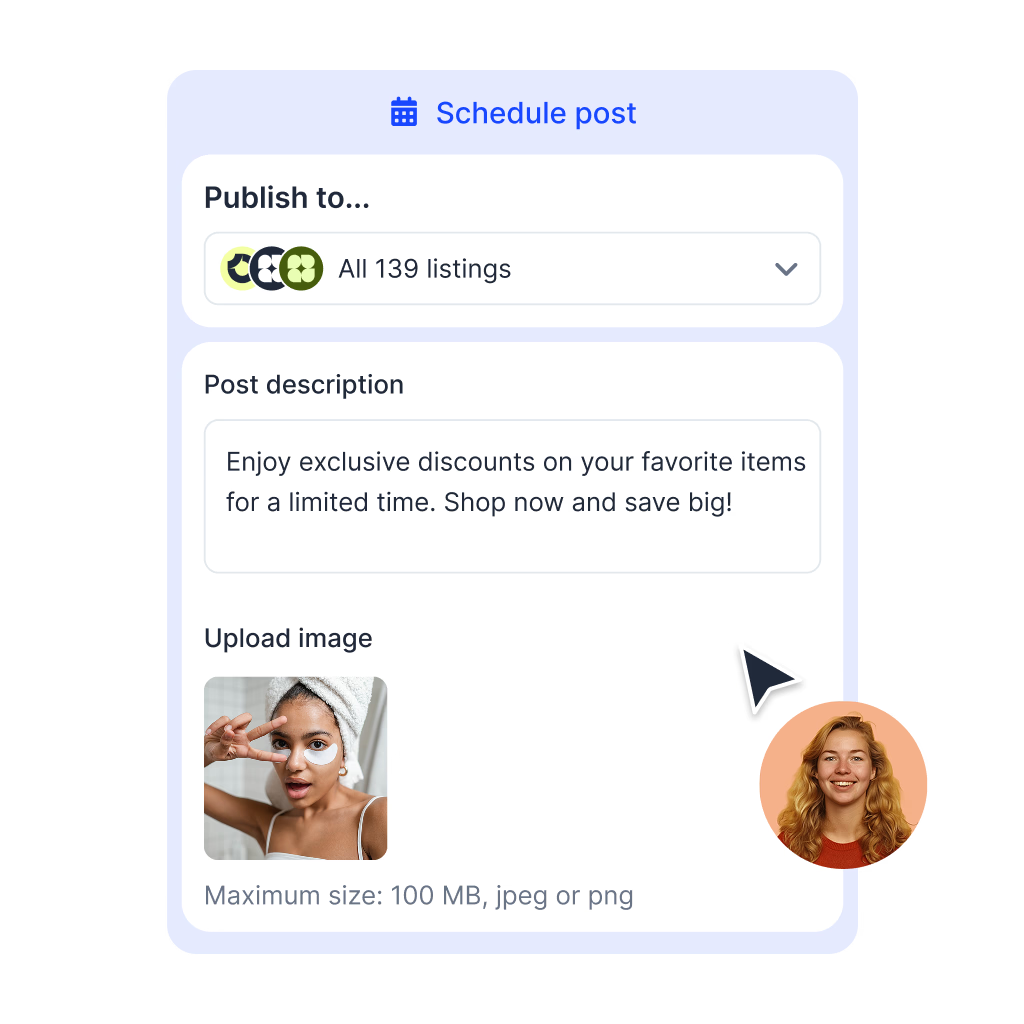
Use the composer for one campaign across several profiles. Use CSV when each location needs its own update and publication time.

Plan across locations

See what is scheduled before adding another post.

Use the Content Calendar to review upcoming posts across your locations. Coordinate posts with our bulk updates editor to align scheduled content with business hours and promotions.

  • Check drafts, scheduled posts, published posts, and failures
  • Create Updates, Offers, and Events in the visual composer
  • Choose target locations and a date and time before confirming
Localith Google Business Profile post scheduler with multiple target locations
Personalize the description

One campaign, with the right city and business name.

Add Smart Parameters to the post description. Localith fills in each location's details when the post publishes. Check the stored profile data first: missing values become blank text.

Use existing profile data

Business name, city, country, street, phone, and website are supported.

Review the template

The composer preview shows raw tags. Values resolve at publication.

Keep shared assets in mind

Images and CTA URLs stay the same across selected locations.

Start with a small group

Check location data before scheduling a wider campaign.

Smart Parameters in the Localith Google Post description field
Schedule a batch by CSV

Different updates and dates for each location.

Prepare a row for each location's update, then upload and review the validation results. The CSV publishing guide covers the template and required fields.

Updates only

Use the visual composer for Offers and Events.

Final text in each row

CSV uploads do not replace Smart Parameter tags.

Dates and UTC times

Convert your intended local publication time to UTC for the CSV.

Validate before scheduling

Fix invalid rows and check the final text. CSV has no visual post preview.

CSV upload interface for Google Business Profile updates
Try it with two profiles

Draft one local update before planning the whole month.

Use your 7-day trial to check a real workflow with profiles you manage. Keep the post as a draft until you are ready to publish.

  1. Step 1

    Connect and choose two profiles

    Check each location's business name and city. In Publishing, create an Update and select those two locations.

  2. Step 2

    Draft and check the template

    Write a useful update with the business name or city parameter. Check the image, shared CTA link, and preview. The tags remain visible until publication.

  3. Step 3

    Schedule when you are ready

    Choose a date and time, confirm the target locations, and check the scheduled post in your calendar. After publication, review its status and the live post.

Start your 7-day trial

Check plans and location pricing before choosing your setup.

More tools in the stack

Post scheduling works better when listings, reviews, and SEO are in the same system

Use the Google posts scheduler alongside profile management, AI review replies, bulk updates, and local SEO heatmaps from one operating layer.

Documentation

Explore every publishing feature

Follow the guides for composing posts, personalizing descriptions, and planning your calendar.

Need the wider content workflow? Explore Localith publishing for AI content planning, post creation, and photo publishing.

FAQ

Frequently Asked Questions

What teams ask before centralizing Google Business post scheduling with Localith.

Yes. Google supports scheduled posts, recurring posts, and posting across multiple Business Profiles. Localith adds a shared publishing calendar, Smart Parameters for location-specific descriptions, and CSV scheduling for batches of updates.
Yes. Google My Business is the former name of Google Business Profile. Localith schedules posts for the Google Business Profiles you connect and manage.
Use the visual composer for Updates, Offers, and Events. CSV upload supports Updates only. Select the locations, review the content, then choose a publication date and time.
The composer preview shows your layout and raw Smart Parameter tags. Values such as city and business name are filled in when the post publishes. Check the stored profile data for every target location before scheduling. A missing value becomes blank text.
No. Smart Parameters work in the visual composer description. CSV rows need final text for each location, with scheduled times in UTC. CSV uploads have row validation rather than a visual post preview.
Failed posts show an error status in Publishing and a warning in the calendar. Check the error details and profile connection before fixing and rescheduling. Google reviews posts, so a scheduled post is not a guarantee that Google will display it.
Yes. Localith offers a 7-day free trial. Connect profiles you manage, create a draft for two locations, review the content and profile data, then schedule when you are ready. You can keep the post as a draft while evaluating the workflow.

Try your first scheduled post across two locations

Create a draft, check the location details, and schedule when you are ready. See whether the workflow fits before planning your next campaign.

7-day free trial. Explore plans and location pricing on our pricing page.

Localith post composer for multiple Google Business Profiles