



100+ brands trust Localith
Edit hours, descriptions, categories, photos, and attributes across hundreds of locations in a single batch. Preview every change before it goes live, and keep a full audit trail.
100+ brands trust Localith
Google's native spreadsheet upload works for small batches, but it has no validation, no version history, and no team controls. Localith gives you purpose-built Google Business Profile management software with a bulk editor that connects directly to the official API.
500+
Locations per update, no hard cap inside Localith
12+
Hours, info, categories, attributes, photos, services, and more
Diff preview
See exactly what changes before anything goes live
Field-level validation catches formatting issues, restricted categories, and duplicate entries before changes reach Google.
Every change is logged with before/after values, timestamps, and the user who made it. Roll back any batch with one click.
Bulk edits live alongside scheduled content via our Google posts scheduler, review responses, and direct GBP API integration. No more switching between spreadsheets and disconnected tools.
Stop downloading spreadsheets, editing rows by hand, and re-uploading to Google. Localith lets you bulk update Google Business Profiles directly — filter by location group, select the fields you want to change, and push updates through the API with validation built in. Every plan includes full access, starting at $9/month for two locations.

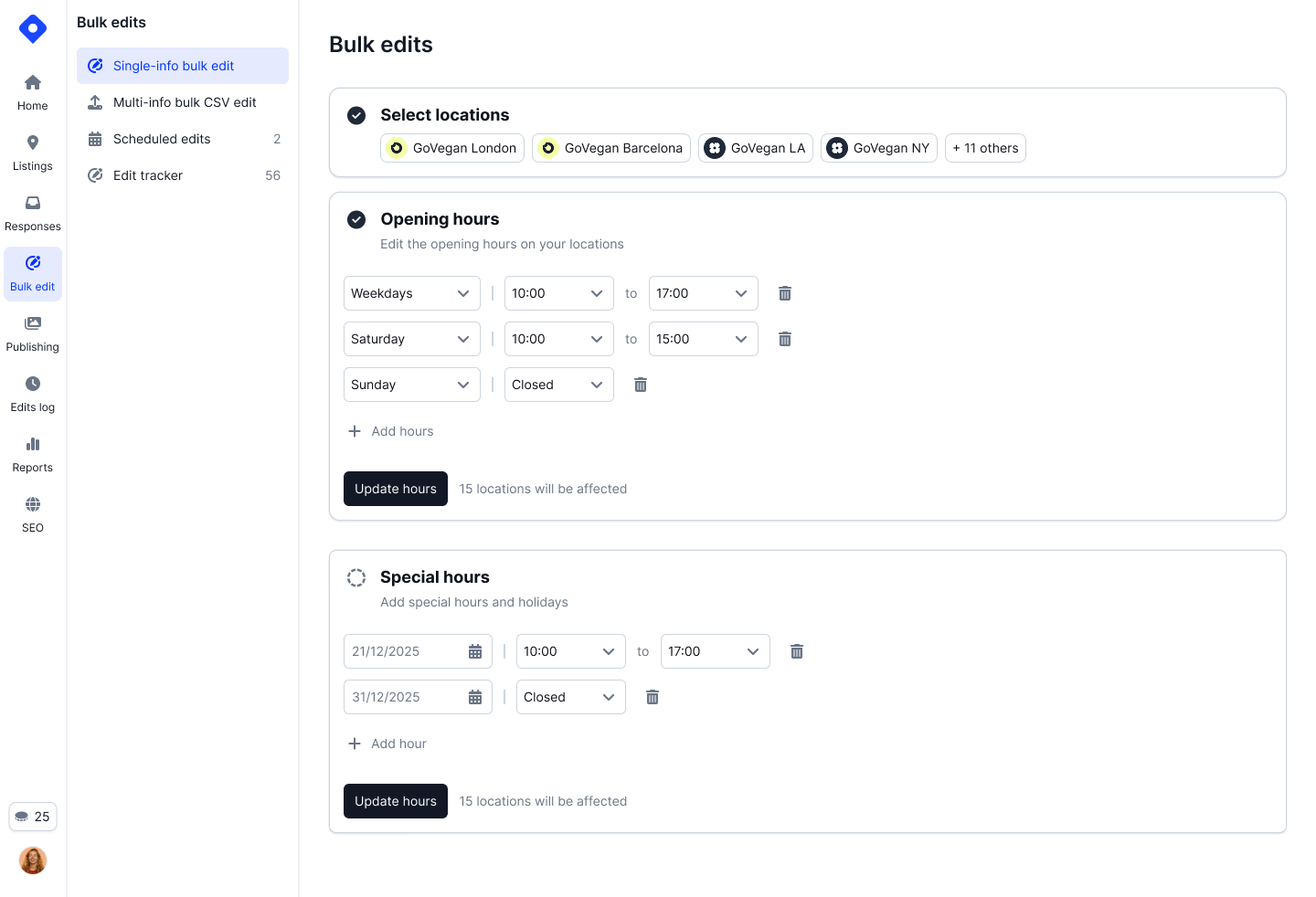
Every bulk edit shows a side-by-side diff — current value vs. proposed value — for every location and field. Review, approve, and publish from the same screen. If Google rejects a change, Localith tells you why and lets you fix and re-push without restarting the batch.
Compare current vs. proposed values
Catch issues before publishing
Fix and retry failed items only
Complete history of every change
Role-based access means regional managers only see the locations they own. Every bulk edit is logged with who changed what, when, and why — so compliance and brand consistency are built into the workflow, not bolted on after the fact.
Assign edit access by location group, brand, or region
Full history of who changed what field, when, and the before/after values
Route sensitive changes through approval before they publish to Google
Revert a batch of changes if something went wrong — one click, all locations

Localith maps directly to the Google Business Profile API so you can bulk edit any supported field without exporting, editing, and re-importing spreadsheets.
Regular hours, special hours, holiday hours
Name, phone, website, description
Primary and secondary categories
Amenities, accessibility, payments
Logo, cover, interior, exterior
Service items, food menus, pricing
Street, city, zip, service areas
Set or update launch dates in bulk
Use the bulk editor alongside post scheduling, AI review replies, profile protection, and local SEO heatmaps from one operating layer.
Management
Manage 100+ locations from one place.

AI Assistant
Chat with AI to manage your listings and get answers.

Publishing
Publish posts to hundreds of locations at once.

AI Agent
Auto-respond to reviews with brand-aligned AI.

Intelligence
Visualize your local search rankings on a map.

Intelligence
Automated local SEO health checks per location.

Reporting
Compare Google Business Profile performance across locations.

Ask about every location in Claude or ChatGPT, or plug Localith into your automations.
Connect Localith to Claude or ChatGPT and ask about locations, reviews and performance in plain language. The connector is read-only, so nothing changes without you.

4.4 on G2 · 100+ active brands
"Holiday hours used to take our team two full days across 200 locations. Now it takes fifteen minutes with the bulk editor and we can preview every change before it publishes."
Sarah Mitchell
Operations Manager, franchise group
"We onboard clients with 50+ locations and the first thing we do is a bulk cleanup — categories, hours, descriptions. Localith made that a same-day job instead of a week-long project."

James Park
Account Director, local SEO agency
80%
less time managing profiles (POOP 911)
200+
franchise locations from one account
4.4
average rating on G2
Multi-Location Dashboard
View and manage all your connected Google Business Profiles from one dashboard. Filter, search, bulk edit, and monitor status at a glance.
Edit Business Info
Update names, addresses, phone numbers, categories, and descriptions for individual or multiple locations.
Bulk Profile Updates
Update business info across hundreds of locations at once. Use the bulk editor for direct edits or import a CSV file for large-scale changes.
Hours Management
Manage regular hours, special hours, and holiday schedules for all your locations from one place (bulk updates included).
Protect Listings
Turn on Protector to make Localith your source of truth and auto-decline unauthorized updates on one listing or on every listing at once.
Review Listing Edits
Read the full edit history for your listings, accept or decline pending changes, and audit every update Protector declined for you.
What teams ask before switching from manual spreadsheet uploads to Localith bulk editing.
Connect your profiles, select the locations and fields you want to change, preview the diff, and publish — all from one dashboard.
7-day free trial. Used by 100+ multi-location businesses. Connect profiles in under two minutes.