

Transferring a Google Business Profile comes down to one question: can anyone with Owner access still sign in?
If yes, add the new person, give it seven days for Google’s new-owner limits to pass, then transfer primary ownership to them. If no, use Google’s request ownership flow.
Many people still search for Google My Business transfer ownership, which is the old name for the same product. The steps below use the current name and Google’s current role names.
Either way, your reviews, posts and photos stay with the profile.
If you look after many profiles, listings management in Localith is where teams handle day to day access without touching Google owner roles.
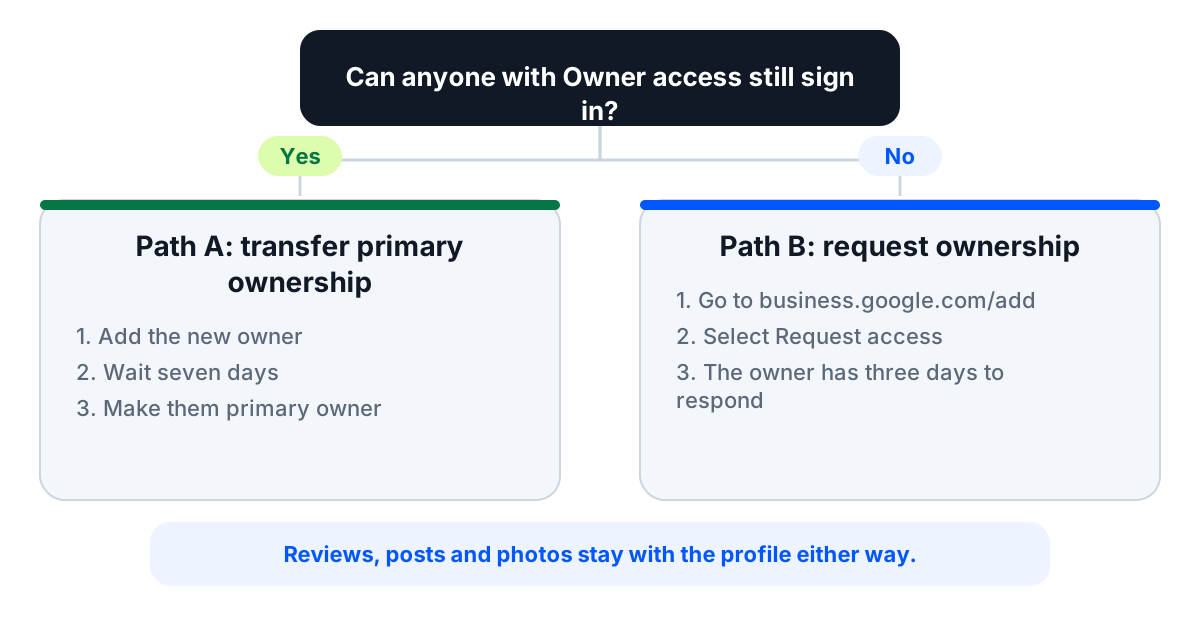
Transfer or request ownership: which situation are you in?
Find your situation in the table. The second column decides your path.
Path A means you transfer primary ownership to someone who is already on the profile. Path B means you ask Google for access because nobody on the profile can sign in.
| Your situation | Can an Owner still sign in? | Your path |
|---|---|---|
| You are selling the business | Yes, you can | Path A: transfer primary ownership to the buyer’s Google account |
| You are leaving the company | Yes, you can | Path A: transfer primary ownership to a company account |
| The employee or agency left with the login | No, if they were the only Owner | Path B: request ownership |
| You bought a business | Only if the seller is reachable | Path A if the seller responds, otherwise Path B |
| A new agency is taking over | Yes, the business can | No transfer needed: add the agency as a Manager |
| The owner’s email no longer works | No | Path B: request ownership |
| A franchisee or new hire needs access | Yes, the business can | No transfer needed: add them as a Manager |
If your row says no transfer needed, you only need to invite a Manager. That takes a few minutes and does not touch ownership.
Jump to Path A: transfer primary ownership or Path B: request access.
Google Business Profile owner and manager roles in 60 seconds
Google lists three access levels in People and access: Primary owner, Owner and Manager. Use these names when you follow the steps below.
| Role | What it can do | Limits |
|---|---|---|
| Primary owner | Full Owner access, and the only role that can transfer primary ownership. A profile has only one primary owner. | Must transfer primary ownership before removing themselves |
| Owner | Full control: add or remove users, edit all profile info, delete the profile | Transfers go through the primary owner. New Owners wait seven days before they can remove users, delete the profile or transfer primary ownership |
| Manager | Edit profile info, reply to reviews, publish posts, download insights | Cannot add or remove users or remove the profile |
The distinction matters because Google’s transfer page says only the primary owner can transfer primary ownership. Google’s access screen also describes Owners as able to transfer ownership, so use the primary owner’s account. A Manager cannot do it.
Google used to call Managers Site managers, so older guides that mention that role mean Manager today. Each person needs their own Google account, and Google does not accept Google Groups as owners or managers.
For the full invite walkthrough, see our guide to add users to your Google Business Profile. Google documents the roles on its owners and managers help page.
How to transfer primary ownership of a Google Business Profile
Use this path when you, or another Owner, can still sign in. It takes three steps, and one of them is waiting.
Before you start, have three things ready: the Google account email of the new owner, the name of the current primary owner, and a list of who else should keep access afterwards.
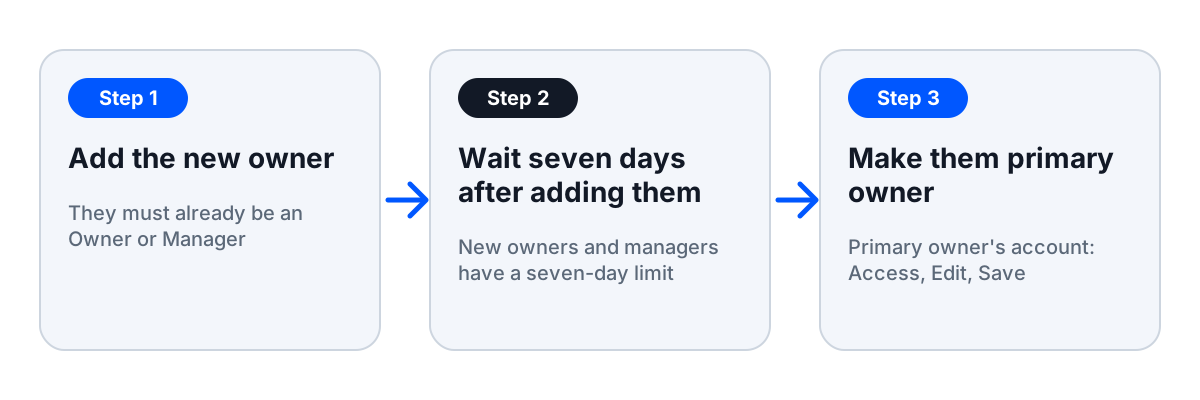
Step 1: add the new owner to the profile
The new primary owner must already be an Owner or Manager on the profile. Google says a profile needs at least one other Owner or Manager to transfer primary ownership to.
- Sign in with a Google account that is an Owner on the profile.
- Open your Business Profile, select More, then Business Profile settings, then People and access.
- Select Add at the top left and enter the new person’s Google account email.
- Choose Owner or Manager under Access, then select Invite.
- Ask them to accept the invitation. You get an email when they do.
To cancel an invite, find the person under Pending and select Cancel invitation.

Where you can, add a Google account the business controls rather than a personal one. A personal account is the reason many profiles end up stuck when that person leaves.
The full flow is in our guide to add users to your Google Business Profile.
Step 2: wait seven days for the new-owner limits to pass
Google limits newly added Owners and Managers for their first seven days. During that time they get an error if they try to delete the profile, remove other owners or managers, or transfer primary ownership.
Google’s transfer page adds that an existing owner or manager who tries to transfer primary ownership in their first seven days gets an error. Google lists the limits on its transfer page and its owners and managers page.
Google does not say the person receiving ownership has to wait. But a new primary owner cannot remove other owners for seven days, so add them at least seven days ahead and use the time to confirm they can sign in.
Plan for the wait. If a sale closes or a departure happens within a week, send the invite now rather than on the last day.
If Google still says no after the wait, check four things:
- The invitation was accepted.
- The person making the transfer has had access for more than seven days.
- You are signed in as the current primary owner.
- The person is an Owner or Manager on this exact profile.
Step 3: make them the primary owner
Do this from the current primary owner’s account. Google says only the primary owner can transfer primary ownership.
- Sign in as the current primary owner.
- Open your Business Profile, then select More and Business Profile settings.
- Select People and access.
- Select the person who should become primary owner.
- Next to Access, select Edit, choose Primary owner and select Save.

Google’s transfer primary ownership page shows the current screens, which can differ slightly between Search and Maps.
When the transfer is done, open People and access again and remove anyone who should no longer be on the profile. Only Owners can remove people.
Removed users get an email, and their past replies and posts stay on the profile. A former primary owner can remove themselves by selecting their name and Stop managing.
How to transfer a Google Business Profile to another email
Moving a profile to a new email for the same person follows the same three steps. The new email is a different Google account, so it needs its own invite.
- Add the new Google account as an Owner.
- Wait seven days after it accepts the invite.
- Transfer primary ownership to the new account.
- Remove the old account from People and access.
Remove the old account last, and only after you can sign in with the new one. A primary owner cannot remove themselves before the transfer anyway. If you cannot sign in to the old account at all, you are on Path B.
What stays with the profile after a transfer
The profile keeps its content, not the person. Google says transferring primary ownership keeps business info, like reviews, in place. Past replies and posts from users you remove stay too.
A transfer changes who controls the profile, not the profile itself. Only the people with access change. To hand over a business, transfer primary ownership, not only add an Owner.
That is also why creating a new profile is not a shortcut. Google’s guidelines say not to create more than one profile for a location, and you would lose the history.
How to request access to a Google Business Profile
Use this path when nobody can sign in. Google’s request flow is the only legitimate route, and there is no backdoor.
No service can get your profile back faster than that flow, so be wary of anyone who says otherwise.
How to request ownership of a Google Business Profile
First check that you are not already the owner. If a profile has no “Claim this business” or “Own this business” button, you may own it already.
Then start the request, using the Google account that should hold the role.
- Sign in to the Google account that should get access.
- Go to business.google.com/add.
- Enter the business name and address, then choose the business from the list.
- When Google says “Someone else may manage this Business Profile”, select Request access.
- Fill in the form and select Submit.
Only request ownership if you are authorized to manage the business. Google describes each screen on its request ownership page.
You get a confirmation email, and the current owner is notified by email. To check the status, sign in to your Business Profile or use the link in the confirmation email.
Service area business without a shop or office
If your business serves customers at their location and has no physical shop or office, this form is not the route. Google tells these businesses to contact Google support instead.
In the “Tell us what we can help with” field, enter “Transfer ownership of listing”. Select the same option as the issue description when you submit.
What happens next: approved, denied or no response
The current owner has three days to respond, according to Google’s request ownership page.
Do not send the same request again and again. One request starts the three-day clock, and the owner sees it by email.
There are three outcomes:
- Approved: you get an approval email and can manage the profile. New owners and managers face a seven-day limit on some features.
- Denied: you get a rejection email. You can still suggest an edit to the profile, and you can try to appeal the decision.
- No response: after three days without a reply, you may be able to claim the profile. Open the confirmation email, select View request, then Verify, and follow the on-screen steps.
The claim option is not always available. You can also sign in to your Business Profile and look for a Claim or Verify button.
When the owner’s email no longer works
Sometimes the company has closed, the person is unreachable or the domain has lapsed. Use the same request flow.
A dead mailbox simply means the owner will not respond, so the no response outcome applies after three days.
If the old account was on a company domain, also ask your Google Workspace admin whether the account can be recovered. A recovered account can transfer primary ownership on Path A.
You bought a business and the seller won’t respond
This is one of the most common scenarios in the Reddit threads on this topic. The fix is easiest before closing.
Ask the seller to transfer primary ownership to your account before the sale closes. Add your account as an Owner at least seven days before closing, so the new-owner limits are over by closing day.
If closing already happened and the seller is unreachable, use the request flow above. Make sure you are authorized to manage the business before you request.
How to check who has access to your Google Business Profile
Open the profile in Google Search or Maps, go to Business Profile settings, then select People and access. The list shows every Owner and Manager with their role, plus pending invites.
Treat that list as a security check, not only a reference. Old agency logins and former employees are typical ways a profile ends up with someone it should not have.
Make this a quarterly habit:
- Remove anyone who has left the company or stopped working with you.
- Cancel pending invites you no longer need.
- Confirm that the primary owner is the business, not a person or an agency.
- Check that agencies and teammates are Managers.
Want one place to see who can do what? Invite teammates in Localith and review changes in the activity log.
Start free trial →How to set up Google Business Profile access so this never happens again
Most ownership emergencies share one cause: the profile belonged to a person, not the business. Fix the structure once and you rarely need this guide again.
On Google: one primary owner, everyone else a Manager
The business should hold primary ownership, through a Google account the company controls.
Agencies, franchise HQ and teammates should be Managers, ideally through a Google Business Profile group or an organization account. Add individual Google accounts, because Google does not accept Google Groups as owners or managers.
An agency should never be the primary owner. If the relationship ends, the business then keeps control without a request.
If you are an agency, see how Localith for agencies supports teams that look after many client profiles.
In Localith: team access without Google owner roles
Connect your Google account to Localith once, then manage your locations from there. Your teammates work inside Localith instead of on Google.
In team management, account owners choose each teammate’s role, Admin or Editor, and which listings they can manage.
Editors can be allowed or denied posting, replying to reviews, generating reports and editing business information.
A new hire who looks after 30 listings can have access to those 30 listings on day one, with no Google owner role and no shared password.
When someone leaves, you remove one Localith user instead of reworking Google ownership.

When someone leaves, a short handover routine keeps the profile safe:
- Remove them from Localith, which ends their work on your listings.
- Remove them from People and access if they ever had direct Google access.
- Confirm the primary owner is still the business.
- Review the activity log for their recent changes.
The activity log shows who changed what, so handovers are easy to check. Localith does not change Google ownership: your primary owner stays the business.

Running many profiles brings its own challenges. Our guide to manage multiple Google Business Profiles covers them.

Run every Google Business Profile from one operating dashboard. Localith centralizes listings, reviews, posts, and analytics so your team can manage every location without jumping profile to profile.
Start free trialConclusion: Keep Google Business Profile ownership with the business
If an Owner can still sign in, add the new person, wait seven days, then transfer primary ownership. If nobody can, request ownership through Google and give the current owner three days to respond.
After that, keep ownership with the business, make everyone else a Manager, and do day to day work in Localith so access never depends on one login.
Give your team access to your listings without handing out Google owner roles.
Start your free trial →Want to compare plans first? See Localith pricing.