When a customer searches for your business on Google, they are not only checking your address or opening hours. They are deciding whether you look trustworthy enough to call, visit, book, or buy from.
That first impression is shaped by your Google Business Profile, star rating, review responses, photos, local pack visibility, branded search results, and the way your business shows up across Google Search and Google Maps. A few unanswered negative reviews, outdated business hours, or a fake review attack can quietly cost you customers before they ever reach your website.
That is why Google reputation management matters. It gives you a repeatable way to monitor what people see, improve the signals that build trust, and protect your business from reputation problems before they become search problems.
In this guide, you will learn what Google reputation management means, how to manage your reputation on Google, which best practices matter most, and how a third-party review reply workflow can help multi-location teams manage reviews, profiles, and reporting from one place.

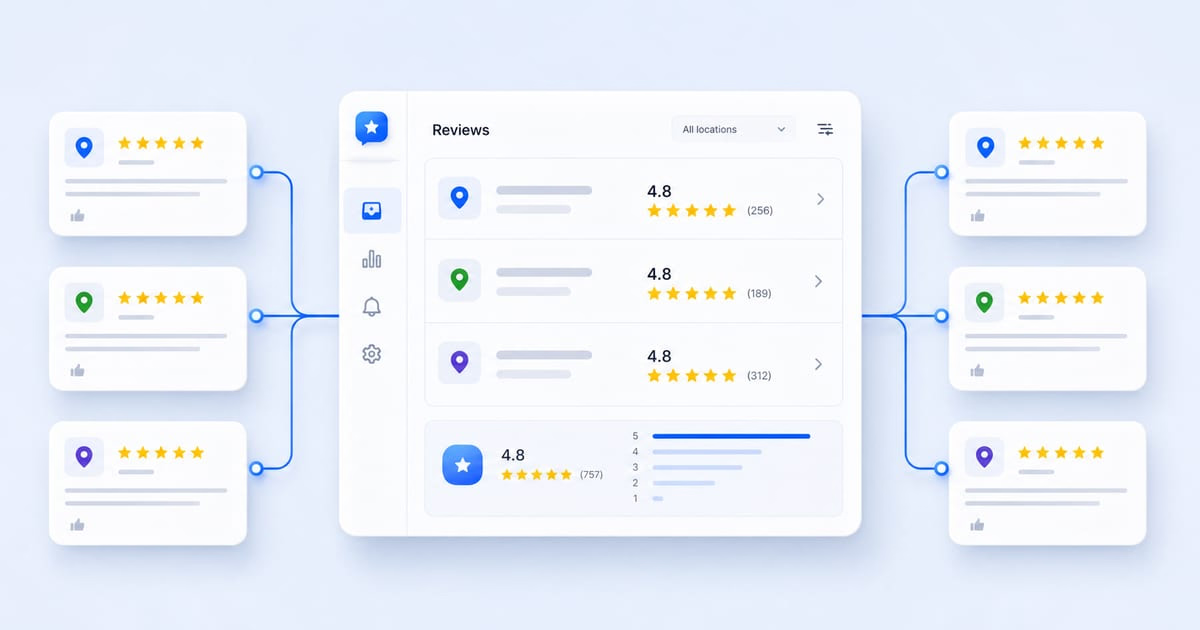
Manage Google reviews for all your locations from one dashboard. Centralize replies, automate with AI, and track review trends across every branch.
Start free trialWhat is Google reputation management?
Google reputation management is the process of monitoring, improving, and protecting how your business appears across Google Search, Google Maps, and your Google Business Profile.
For local businesses, it usually includes:
- Keeping Google Business Profile information accurate
- Monitoring and responding to Google reviews
- Asking real customers for honest reviews
- Reporting fake, spammy, or policy-violating reviews
- Tracking star rating, review volume, sentiment, and response time
- Watching branded search results, People Also Ask results, Reddit threads, and other pages that can shape perception
- Publishing helpful content that gives Google and customers a more accurate picture of your business
In practice, Google online reputation management is not about hiding criticism or trying to delete every bad review. It is about building enough trust, recency, transparency, and operational consistency that one unhappy customer or one unfair review does not define the whole business.
For a single-location business, that may mean checking reviews every morning and replying before the end of the day. For a multi-location brand, it means building a system: location owners, approval rules, review response guidelines, escalation paths, reporting, and a clear way to see which branches need attention. Our guide on managing Google reviews across multiple locations walks through that operational layer in detail.
How to manage your reputation on Google
Good Google reputation management is ongoing. You do not fix it once and move on. You build a rhythm that keeps your business accurate, responsive, and visible.
Here are the core strategies to focus on.
Optimize your Google Business Profile first
Your Google Business Profile is often the first thing people see when they search for your business name or a local service you offer. If your profile is incomplete, outdated, or inconsistent, customers may lose confidence before they even read your reviews.
Start with the basics:
- Correct business name
- Accurate address, phone number, and website
- Current opening hours and holiday hours
- Primary and secondary categories
- Services, products, menus, or amenities
- High-quality photos
- Clear business description
- Active posts, offers, or updates where relevant
Real-world scenario: A customer searches for a dental clinic at 6 pm, sees that one location is listed as open until 7 pm, drives there, and finds the doors closed. Even if the service is excellent, the reputation damage starts with inaccurate Google information.
Localith pro tip: Use local listing management to manage Google Business Profile data across multiple locations from one dashboard. Instead of updating each profile manually, teams can keep hours, photos, business details, and profile health more consistent across the full location network.
Respond to Google reviews strategically
Review replies are one of the clearest public signals that your business is listening. A thoughtful response can reassure future customers, soften the impact of a negative review, and show that the business is active. If a reply will not post or the Reply button is missing on Google reviews, diagnose verification, account, and access first before rewriting the response.
For positive reviews, avoid the empty “Thanks!” reply. Mention something specific from the review, thank the customer naturally, and invite them back.
For negative reviews, stay calm. Acknowledge the issue, avoid arguing, explain the next step, and move sensitive details offline. For ready-to-use templates and tone guidance, follow how to respond to negative Google reviews.
Real-world scenario: A restaurant receives a two-star review about slow service during a busy weekend. A defensive reply makes the business look careless. A calm reply that apologizes, explains that the team is reviewing weekend staffing, and invites the customer to contact the manager shows accountability.
Localith pro tip: Localith’s AI review reply agent can draft personalized responses in your brand voice, then route sensitive replies for human review before publishing. This helps teams answer faster without turning review management into a copy-paste exercise. For the framework behind those drafts, see AI review replies best practices; for high-volume operations across many locations, the scale Google review replies with AI playbook covers the approval flow and quality checks.

Collect more authentic reviews consistently
A strong Google reputation depends on real customer feedback. A business with a 4.8 rating from three years ago may look less trustworthy than a competitor with recent, detailed reviews from the past few weeks.
Ask customers for reviews when the experience is fresh:
- After a completed appointment
- After a successful delivery or service visit
- After a customer support issue is resolved
- After a repeat customer gives positive feedback in person
- In follow-up emails or SMS messages where allowed
Do not offer incentives for reviews, do not ask only happy customers, and do not pressure customers to mention specific keywords or staff names. Google’s review policies are clear that reviews should reflect genuine experiences, and manipulative review collection can put a profile at risk.
Real-world scenario: A home services company has 40 locations. Ten branches ask for reviews consistently and build a steady flow of fresh feedback. The other branches only ask during campaigns, creating suspicious spikes and long quiet periods. The reputation gap becomes a location-level performance gap. For the exact customer-side flow those branches are trying to trigger, see the steps to leave a Google review.
Localith pro tip: Use review analytics to compare review volume, recency, response rate, and rating trends by location. That makes it easier to spot branches that need a healthier review request rhythm.
Monitor brand mentions and search results
Your Google reputation is bigger than your review count. It also includes the pages and conversations that appear when people search your brand.
Monitor:
- Branded Google Search results
- Google Maps reviews
- People Also Ask questions
- Reddit threads
- Local news mentions
- Review sites and industry directories
- Social posts that rank or get indexed
- Competitor comparison pages
Google Alerts can help with basic mention tracking, but it will not replace location-level review monitoring or GBP reporting.
Real-world scenario: A frustrated customer posts about a service issue on Reddit. The thread starts ranking for the brand name, and prospects see that before they see the company’s own explanation. A team that monitors branded results can respond appropriately and create helpful content before the thread becomes the whole story.
Localith pro tip: Pair external monitoring with Localith’s review analytics. If a complaint theme is showing up in reviews and off-platform conversations, that is not just a PR issue. It is an operations issue your local teams need to see. A quick way to confirm a theme is real is to run a keyword search across your Google reviews and check how often it actually appears across locations.
Report fake or policy-violating reviews
Not every negative review can be removed. If the review reflects a real customer experience, the best response is usually a professional public reply and a real attempt to resolve the issue.
But you should report reviews that appear to violate Google’s policies, such as:
- Fake engagement
- Spam
- Conflicts of interest
- Harassment or hate speech
- Off-topic content
- Personal information
- Reviews from people who did not have a genuine experience with the business
Real-world scenario: A business suddenly receives five one-star reviews from accounts with no customer record, no detail, and similar wording. The team should document the pattern, flag the reviews through Google Business Profile, and reply carefully if the reviews remain visible.
Localith pro tip: Use Localith to track review patterns across locations. If one branch gets a sudden rating drop or multiple suspicious reviews at once, your team can investigate faster and keep a record of what happened.

Track reputation metrics that connect to local SEO
Google reputation management works best when you measure it. Otherwise, teams end up reacting to the loudest review instead of improving the full reputation system.
Track metrics such as:
- Average star rating
- Review count
- Review recency
- Response rate
- Average response time
- Sentiment trends
- Common review topics
- Location-level rating gaps
- Profile completeness
- Local ranking changes for priority keywords
Real-world scenario: One location has a 4.7 rating but rarely replies. Another has a 4.4 rating but responds to every review and gets new feedback weekly. Without reporting, leadership may focus only on the rating and miss the habits that are improving or weakening reputation over time.
Localith pro tip: Localith’s reporting makes review management easier to connect with GBP performance, profile health, and local SEO visibility. That helps teams move from “we need better reviews” to “these three locations need faster replies, fresher photos, and more consistent review requests.”
If your team needs a clearer framework for packaging that data, our guide to online review reporting shows how to turn review analytics into stakeholder-ready reports and next actions.

Publish positive, useful content around your brand
Google search reputation management also includes the content that ranks around your business name. If the only pages ranking for your brand are review sites, complaints, thin directories, or outdated profiles, you have less control over the story.
Build a stronger branded footprint with:
- Helpful blog posts
- Location pages
- Case studies
- FAQs
- Google Posts
- Customer stories
- Updated service pages
- Community or local involvement pages
This is not about burying valid criticism with fluff. It is about making sure customers can find accurate, useful, current information when they search.
Real-world scenario: A local healthcare group has strong reviews but weak branded search results. By publishing physician pages, location FAQs, updated service pages, and patient experience content, the group gives Google more reliable assets to show for branded and local searches.
Localith pro tip: Use a Google Posts workflow and AI SEO workflows to keep location content current, especially for teams that manage many profiles and cannot manually publish updates for every branch every week.
Why should you worry about your Google reputation?
Your Google reputation influences how customers evaluate you before they speak to your team. It affects trust, local visibility, click behavior, and conversion.
Here is why it deserves attention.
Customers use Google as a trust filter
Most customers will not read your whole website before deciding whether to call. They scan your star rating, photos, review snippets, and replies. If the visible story feels weak, they move on.
A strong reputation reduces hesitation. A weak one creates doubt at the exact moment a customer is ready to act.
Reviews can affect local search performance
Google says local results are influenced by relevance, distance, and prominence. Reviews are part of how customers and search engines understand prominence, trust, and real-world activity.
That does not mean one reply will suddenly move you into the local pack. But a steady pattern of fresh reviews, engaged responses, accurate profile data, and strong customer sentiment can support the broader local SEO picture.
Negative reviews are public customer service moments
A bad review is not only feedback from one customer. It is a public support ticket future customers can read.
When you respond well, you show prospects that your business is reasonable, accountable, and active. When you ignore negative reviews, you let the complaint stand alone.
Fake reviews and scams are real risks
Reddit threads around Google reputation management are full of business owners asking about fake reviews, review attacks, suspicious “review removal” agencies, and real reviews disappearing. The pattern is clear: people are not only worried about bad feedback. They are worried about losing control.
The safest approach is to avoid shady removal promises, document suspicious activity, use Google’s official reporting process, and keep collecting genuine customer reviews.
Multi-location inconsistency compounds quickly
One unmanaged location can damage a brand’s reputation. Ten unmanaged locations can create a pattern. If some branches reply quickly, others ignore reviews, and others have outdated profile data, customers get an uneven impression of the whole company.
Google reputation management gives multi-location businesses a way to create consistency without making every location sound identical.
Streamline Google reputation management with a third-party tool
You can manage a small Google reputation workflow manually. You can check your profile, reply to reviews, set up Google Alerts, and ask customers for feedback.
But manual work breaks down when you manage many locations, many reviews, multiple team members, and approvals.
That is where Google reputation management tools and Google review management software become useful.
With Localith, multi-location teams can centralize the work that usually gets scattered across inboxes, spreadsheets, individual Google Business Profiles, and ad hoc Slack messages. If the same team is also operating many profiles, the broader guide on how to manage multiple Google Business Profiles is the natural next step.
Localith helps with:
- Managing multiple Google Business Profiles from one place
- Monitoring Google reviews across locations
- Drafting review replies with AI
- Keeping brand voice consistent
- Routing sensitive reviews for review or approval
- Tracking review response activity
- Comparing location-level performance
- Updating GBP information at scale
- Publishing Google Posts
- Reporting on reputation and local SEO trends
The goal is not to automate away judgment. The goal is to make the repetitive parts faster so local managers and marketing teams can focus on the reviews that need real attention.

For example, a franchise team could use Localith to monitor every location’s new reviews each morning, generate first-draft replies, flag low-star reviews for manager approval, and review weekly reports showing which locations are falling behind on response time or review recency.
That turns reputation management from a reactive task into an operating system.
Best practices for managing your Google reputation
Use these best practices to keep your Google reputation healthy without crossing policy lines or overwhelming your team.
Keep your Google Business Profile accurate
Audit your profile information regularly. Pay special attention to opening hours, holiday hours, phone numbers, categories, services, and photos. If customers arrive with the wrong expectation, the review problem has already started.
Reply to both positive and negative reviews
Positive reviews deserve acknowledgment. Negative reviews deserve calm, specific, professional replies. Customers read how you respond because it shows how you handle problems.
Personalize responses without overcomplicating them
Templates are useful, but obvious templates make a business look inattentive. Mention the customer’s experience, the location, the service, or the next step where appropriate. For wording you can adapt, see these examples of how to ask for Google reviews.
Ask for reviews consistently
Build review requests into natural customer moments. Avoid sudden bursts, incentives, review gating, or selective requests. A steady flow of authentic reviews looks healthier and is easier to sustain. If you need to size the ask (say, how many 5-star reviews it takes to lift a 4.2 average to a 4.5), our Google Review Calculator does the rating math for you.
Do not buy reviews or hire suspicious removal services
If an agency promises guaranteed Google review removal, be careful. Reviews are removed when they violate policy, not because a vendor has secret access. Paying for fake reviews or manipulative removal tactics can create bigger problems than the original review.
Document suspicious review patterns
If you suspect fake reviews, record dates, usernames, wording similarities, customer records, and any unusual timing. Documentation helps your team respond clearly and gives you a better basis for escalation.
Use Google Alerts, but do not rely on it alone
Google Alerts can catch some branded mentions, but it will not give you a full reputation dashboard. Use it as one layer alongside review monitoring, GBP reporting, and branded SERP checks.
Watch Reddit and People Also Ask
People Also Ask questions and Reddit threads can influence how customers understand your brand or category. If the questions around your brand are negative, confusing, or outdated, create better content that answers those concerns directly.
Connect reputation insights to operations
If reviews repeatedly mention slow service, billing confusion, parking, staff attitude, cleanliness, or missed calls, do not treat that as a marketing problem only. Reputation data is customer experience data.
Create a location-level accountability rhythm
For multi-location businesses, define who owns review replies, who approves sensitive responses, how quickly reviews should be answered, and how performance is reported. Without ownership, reputation management becomes everyone’s job and nobody’s job.
Conclusion: Take control of your Google reputation before issues escalate
Google reputation management is not a one-time cleanup project. It is a practical system for showing customers that your business is accurate, active, trustworthy, and responsive.
Start with the basics: keep your Google Business Profile clean, respond to reviews, ask for genuine feedback, report policy-violating content, and track the metrics that show whether your reputation is improving.
Then build a workflow that can scale. For multi-location teams, Localith gives you a central place to manage reviews, profiles, AI-assisted replies, reporting, and local SEO visibility without losing control of brand voice or customer care.
Your Google reputation is already shaping customer decisions. If you want one place to actively manage reviews, replies, profiles, and reporting, start a free trial of Localith.

Turn Google review activity into reports your team can act on. Use Localith to compare locations, export review reports, track response activity, and surface the patterns behind rating changes.
Start free trial