![How to Manage Google Business Profile for Restaurants [+Checklist]](https://images.localith.ai/blog/google-business-profile-for-restaurants-checklist/restaurant-google-business-profile-checklist.avif)


Your restaurant’s Google profile can be accurate on Monday and wrong by Friday. Hours change, menu items sell out, reservations move to a new provider, and a fresh review needs a careful reply.
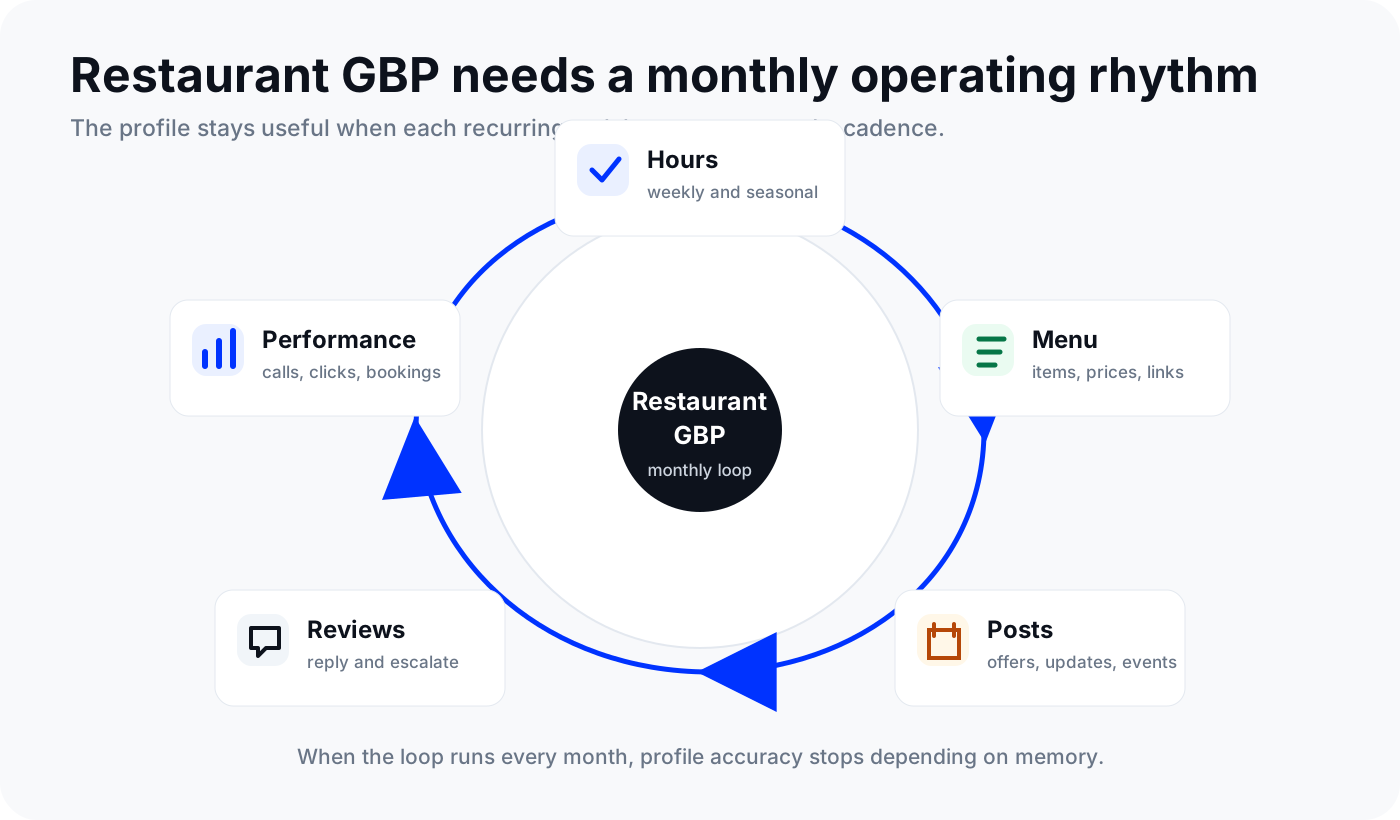
That is why Google Business Profile for restaurants is not a one-time setup task. It needs a repeatable operating rhythm.
This guide gives you that rhythm: a monthly restaurant GBP checklist, a 30-day Google Posts calendar, and a review reply library your team can adapt. If you manage several locations, Localith’s business listing management workflow helps you keep listings, reviews, publishing, and local SEO moving from one place instead of checking every profile by hand.

Publish Google posts across all your locations from one dashboard. Create, schedule, and manage Google Business Profile posts for every location. Use AI to generate content, publish with CSV, and keep your brand consistent.
Start free trialQuick terminology note: Google My Business is the old name. Google now calls it Google Business Profile. People still search for “Google My Business for restaurants,” but your page, team process, and reporting should use the current name.
Why restaurants need a monthly GBP system
For restaurants, a Google profile is more than a map pin. Google’s restaurant Business Profile guidance highlights hours, dining and delivery options, menu content, photos, ordering, reservations, reviews, and updates across Search and Maps. Those details influence whether someone calls, gets directions, books a table, or orders from a competitor.
The problem is that restaurant data changes constantly. A single-location owner might remember to update holiday hours.
A five-location group might miss two stores. A larger brand can end up with stale menus, old photos, broken links, and profile edits nobody noticed.
The goal is not to “optimize GBP” once. The goal is to maintain the profile surfaces guests actually use:
- Can they see when you are open?
- Can they find the current menu?
- Can they order, reserve, call, or get directions without friction?
- Are recent photos and reviews helping them trust the location?
- Do posts show current offers, events, or seasonal updates?
- Do you know which locations are gaining or losing local demand?
For multi-location teams, this becomes an operating system. Localith gives restaurant operators one place to manage recurring work across Listings Management, reviews, publishing, analytics, and AI-assisted local SEO.
The restaurant Google Business Profile checklist
Use this checklist every month. Some items need weekly attention, but a monthly review keeps the profile aligned with the real restaurant.
| Area | What to check | Restaurant example | Cadence |
|---|---|---|---|
| Ownership | Profile is claimed, verified, and assigned to the right team | New GM has manager access, former employee removed | Monthly |
| Name, address, phone | Data matches signage, website, reservation platform, and delivery apps | Phone routes to the host stand, not an old number | Monthly |
| Primary category | Main category reflects what customers search | “Italian restaurant” instead of generic “restaurant” | Quarterly |
| Hours | Regular, holiday, seasonal, and kitchen hours are current | Brunch hours, late-night kitchen cutoff, holiday closures | Weekly during seasonal changes |
| Menu | Menu link, menu photos, prices, and items are current | New lunch menu, removed seasonal dish | Weekly |
| Ordering and reservations | Links point to the correct provider and location | Reserve link works for the right restaurant | Monthly |
| Photos | Recent food, interior, exterior, menu, and team photos are visible | New patio photos before spring | Biweekly |
| Reviews | New reviews are answered and escalations are assigned | Service complaint routed to manager | Daily or weekly |
| Posts | Offers, events, and updates are current | Wine dinner, catering push, Taco Tuesday | Weekly |
| Performance | Calls, directions, menu clicks, bookings, and offers are reviewed by location | One location gets views but few calls | Monthly |
Google’s menu editor documentation says restaurants can add menu items, descriptions, prices, menu photos, and menu URLs. It also notes that updating menus across multiple Business Profiles requires the Business Profile API. That matters for restaurant groups: manual menu maintenance becomes repeated low-value work very quickly.
Inside Localith, tie the monthly profile check to clear owners:
- Marketing owns posts, offers, and seasonal campaigns.
- Operations owns hours, closures, and menu accuracy.
- Guest experience owns review replies and escalations.
- Local SEO owns categories, photos, reporting, and optimization ideas.
- Leadership reviews location trends in Analytics.
30-day Google Posts calendar for restaurants
Google Business Profile posts can be updates, offers, or events. Google’s Business Profile posts documentation confirms posts can include text, photos, videos, action buttons, dates, and scheduling. That gives restaurants a lightweight way to keep Search and Maps fresh without waiting for website updates.
The common mistake is posting only when there is a major event. Restaurants have weekly reasons to post: specials, new dishes, seasonal menus, private dining, catering, happy hour, delivery reminders, and local events.
Use this calendar as a practical starting point.
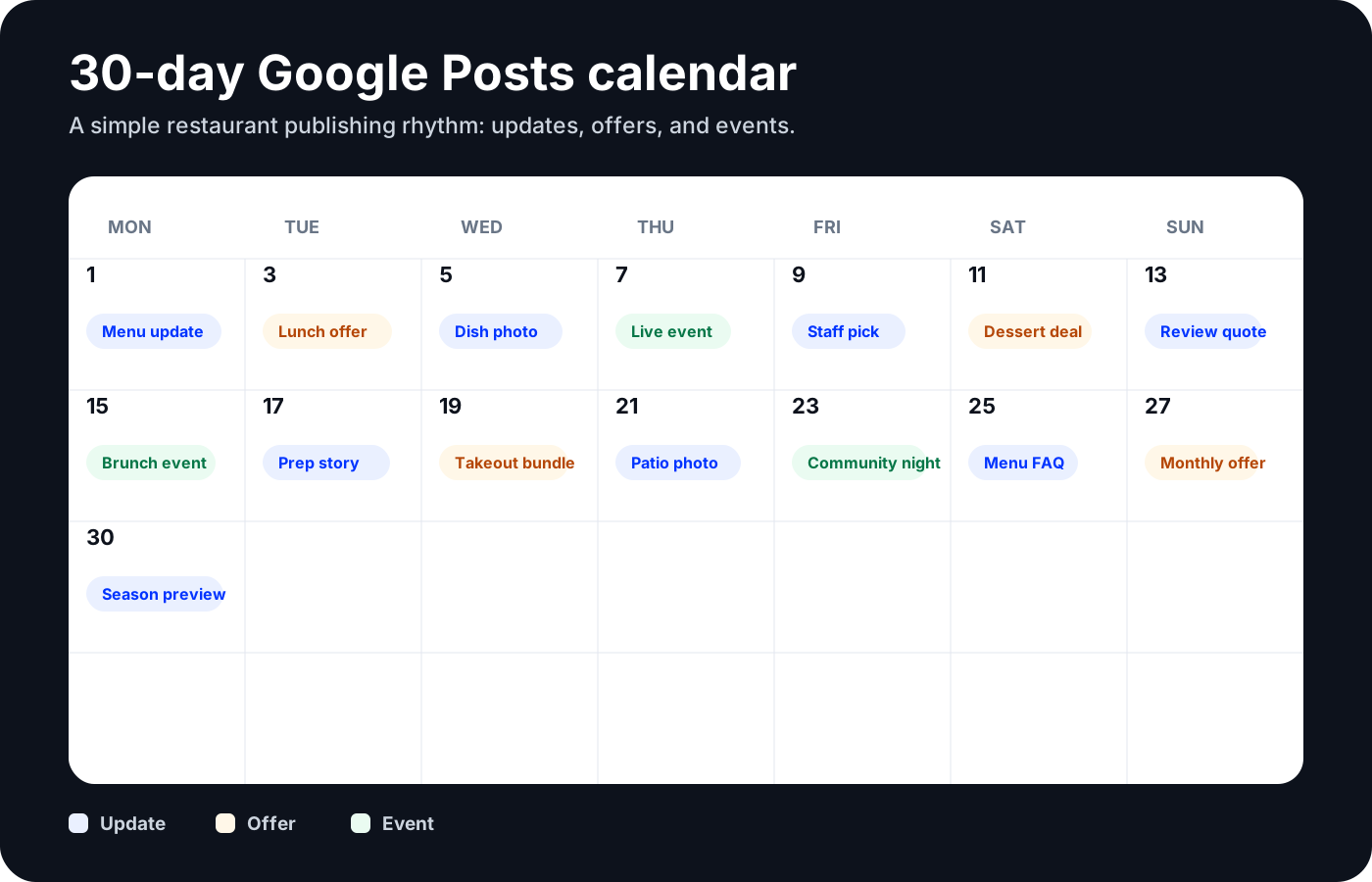
| Day | Post type | Post idea | CTA |
|---|---|---|---|
| 1 | Update | New month menu highlight | View menu |
| 3 | Offer | Weekday lunch special | Order online |
| 5 | Update | Fresh photo of a signature dish | Reserve |
| 7 | Event | Live music, tasting, pop-up, or trivia night | Book a table |
| 9 | Update | Staff pick or chef recommendation | View menu |
| 11 | Offer | Limited-time dessert, drink, or family meal | Order now |
| 13 | Update | Customer review quote with a food photo | Get directions |
| 15 | Event | Weekend brunch, holiday meal, or private dining reminder | Reserve |
| 17 | Update | Behind-the-scenes prep or sourcing story | Learn more |
| 19 | Offer | Delivery or takeout bundle | Order online |
| 21 | Update | Patio, dining room, or atmosphere photo | Get directions |
| 23 | Event | Community event, game night, or seasonal tasting | Book a table |
| 25 | Update | Menu FAQ: gluten-free, vegan, kids menu, parking | Call |
| 27 | Offer | End-of-month limited offer | Redeem offer |
| 30 | Update | Next month’s seasonal preview | View menu |
For a single location, this can live in a spreadsheet. For multiple locations, the challenge is localizing one campaign without rewriting it 20 times. A group might need the same brunch promo, but with each location’s city, booking link, patio status, and offer terms.
That is where Localith’s Publishing workflow helps. Teams can build one campaign, personalize it by location, and keep the posting cadence moving without asking every manager to start from zero.
Restaurant review reply library
Google says verified businesses can reply to reviews, and those replies appear publicly under the guest’s review. For restaurants, that public reply is part of the guest experience. It shows future diners how your team handles praise, delays, mistakes, and complaints.
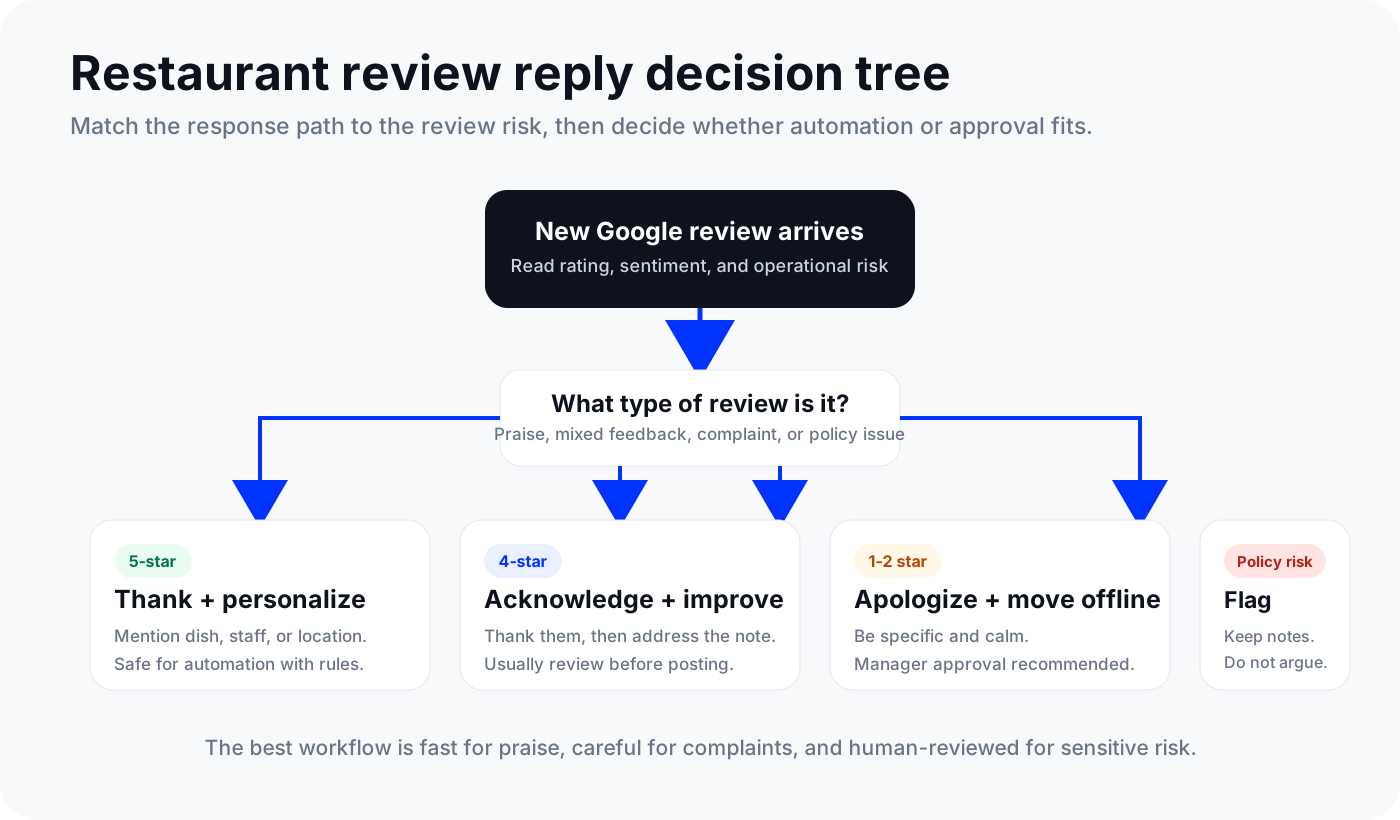
Good restaurant review replies are specific, calm, and useful. They should not sound copied. Use these examples as starting points.
| Situation | Reply template |
|---|---|
| 5-star dine-in review | Thanks for joining us, [Name]. We are glad you enjoyed [dish or service detail]. I will share this with the team, and we hope to see you again soon. |
| 5-star delivery review | Thanks for ordering from us, [Name]. Happy to hear [dish] arrived well and hit the spot. We appreciate you taking the time to leave a review. |
| 4-star review with a small issue | Thank you for the thoughtful review, [Name]. We are glad you enjoyed [positive detail], and we appreciate the note about [issue]. We are sharing that with the team so the next visit feels smoother. |
| Slow service complaint | Thank you for telling us, [Name]. That wait is longer than we want for guests, especially during [meal period]. We are reviewing the shift flow with the team. If you are open to it, please contact us at [contact] so we can learn more. |
| Food quality complaint | We are sorry the meal did not meet expectations, [Name]. That is not the standard we want attached to [dish or order]. Please reach us at [contact] with your visit details so our manager can follow up directly. |
| Wrong menu or hours complaint | Thank you for flagging this, [Name]. You are right to expect accurate hours and menu details before making the trip. We are checking the profile and updating the information now. |
| Large party or reservation issue | We are sorry the booking experience was frustrating, [Name]. Large parties need clear communication from our side. Please send the reservation details to [contact] so we can review what happened. |
| Aggressive or sensitive review | Thank you for sharing this. We take this seriously and want to understand the details directly. Please contact [manager or contact] so we can review the visit with the right context. |
For restaurant groups, the challenge is consistency without sounding robotic. A brand lead wants one tone.
A local manager has the context. A guest wants a reply that sounds human.
Localith’s AI Review Reply Agent helps teams balance those needs. Use automation for easy 5-star replies. Keep human approval for sensitive complaints, food safety issues, discrimination claims, payment disputes, or anything that could become a legal or PR issue.

Automate your Google review replies today. Set up AI-powered responses and brand voice controls for all your locations in minutes. 7-day trial with 100 AI credits. From $9/mo for 2 locations. 4.4 on G2.
Start free trialWhat to track every month
Restaurant GBP reporting should connect visibility to customer action. Google’s Business Profile performance documentation says performance data can include views, searches, directions, calls, website clicks, bookings, menu interactions, offers, and other metrics depending on the profile and enabled features.
Use a monthly scorecard like this:
| Metric | What it tells you | What to do next |
|---|---|---|
| Searches | How people find the profile | Look for cuisine, neighborhood, and intent terms |
| Views | Whether the profile is being seen | Compare to posts, photos, and local campaigns |
| Direction requests | Dine-in intent | Check location pages, parking info, and map accuracy |
| Calls | High-intent guest questions | Fix missing info if calls spike around the same topic |
| Website clicks | Research or ordering intent | Make sure location pages match the profile |
| Bookings | Reservation conversion | Check provider links and availability |
| Menu interactions | Food consideration | Refresh menu photos, links, and popular items |
| Offer views and clicks | Promotion interest | Repeat strong offers and retire weak ones |
| Review volume and rating | Trust and guest experience | Assign reply SLAs and escalate repeat issues |
The most useful view is by location. If one restaurant has high views but low direction requests, the issue may be conversion.
If another has strong menu interactions but weak orders, inspect the ordering path. If a location has a sudden drop in calls, confirm phone number, hours, and category changes.
Localith location reporting helps teams compare locations, spot outliers, and export reporting for stakeholders. If your restaurant group is centralizing replies, ratings, and guest trust across locations, the Google reputation management guide gives you the bigger framework.
How multi-location restaurants should manage GBP at scale
Managing one restaurant profile is a checklist. Managing 20 is a system. For a fuller walkthrough of that operational system, read how to manage multiple Google Business Profiles.
The system needs four parts.
First, create one source of truth for core location data. Names, addresses, phone numbers, hours, categories, URLs, and location-specific notes should not live in scattered spreadsheets and old email threads. A central profile workspace gives teams a place to manage profile data and reduce location-by-location edits.
Second, separate brand standards from local details. The brand defines tone, photo rules, response standards, and offer templates. Local managers provide context such as local events, parking notes, sold-out items, staff changes, and guest issues.
Third, use reusable campaign structures. A restaurant group can publish one seasonal campaign with localized fields for city, menu item, booking URL, delivery link, and date. Smart Parameters make that personalization easier at scale.
Fourth, review location performance on a schedule. Localith’s AI SEO Agent can help analyze reviews, keywords, engagement, and opportunities per location, then suggest next actions for the team.
Here is a simple weekly cadence:
| Day | Team action |
|---|---|
| Monday | Check weekend reviews and urgent profile edits |
| Tuesday | Publish weekly offer or update |
| Wednesday | Refresh menu, ordering, and reservation links if needed |
| Thursday | Upload new photos or approve location-submitted photos |
| Friday | Check holiday hours, event posts, and weekend booking paths |
| Monthly | Review performance by location and assign fixes |
For franchises or agencies, add permissions and approvals. Not every local manager should change every profile field.
Not every review should auto-publish. Localith supports role-based workflows and approvals so teams can keep local execution moving without losing central control.
Common restaurant GBP mistakes to fix first
If you only have one hour this week, fix the issues that directly affect diner decisions.
Old menus. If the menu link is broken, prices are stale, or the menu photo is unreadable, trust drops quickly.
Missing holiday hours. A wrong open or closed status creates frustrated guests and wasted trips.
Generic categories. “Restaurant” is weaker than a specific category when your concept is clear.
Stale photos. Old, dark, or empty-room photos make the location feel inactive.
Posts that stop after launch. A grand opening post from months ago does not help someone decide today.
Copied review replies. “Thanks for your feedback” is not enough when someone complains about a two-hour wait.
No location owner. Every location needs a person or team responsible for profile accuracy, reviews, posts, and monthly follow-up.
Turn your restaurant GBP into a weekly operating system
The restaurants that get more value from Google Business Profile are usually not doing something complicated. They are doing the basics consistently: current menus, accurate hours, recent photos, weekly posts, useful review replies, and monthly performance checks.
That consistency gets harder as you add locations. Manual profile work starts to hide in spreadsheets, inboxes, and manager reminders.
Localith turns Google Business Profile management for restaurants into a shared workflow. Manage listing data, publish updates, answer reviews, track performance, and find local SEO opportunities from one system built for teams that operate more than one location.