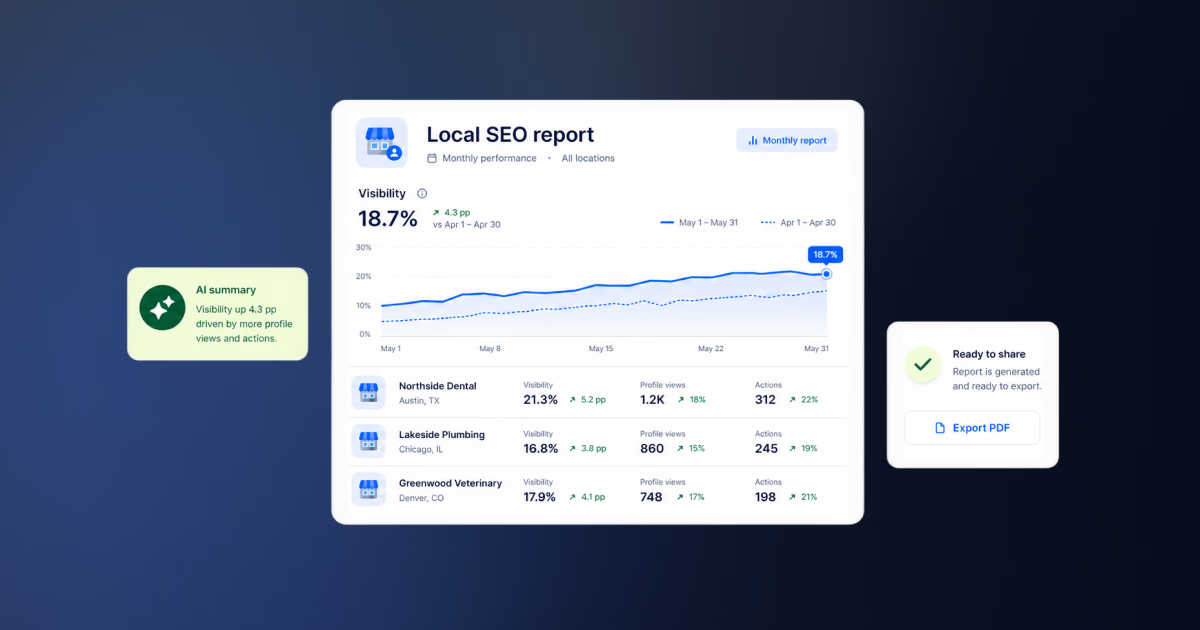


Local SEO reporting gets messy fast when every client, market, or location needs a different story. One report says calls are up. Another shows map views falling. A third has great reviews but no direction requests.
If you manage more than a handful of Google Business Profiles, you need more than screenshots and ranking charts. Localith brings Google Business Profile analytics, report exports, and AI-assisted workflows into one system so agencies can explain what changed, what matters, and what to do next.
This guide shows what to include in a local SEO report, which Google Business Profile metrics deserve attention, how to structure client-ready reports, and how agencies can use AI and MCP to create custom reports in Claude without changing live GBP data.

Turn Google review activity into reports your team can act on. Use Localith to compare locations, export review reports, track response activity, and surface the patterns behind rating changes.
Start free trialWhat Is Local SEO Reporting?
Local SEO reporting is the process of tracking and explaining how a business performs in local search across Google Search, Google Maps, reviews, customer actions, and location-level optimization work.
That makes it different from general SEO reporting. A broad SEO report may focus on organic traffic, backlinks, rankings, and technical site issues. Those still matter, but local reports need to answer a more specific question:
Are people finding this location, trusting it, and taking action?
For a single-location business, that may be simple. For an agency managing 30 restaurants, 80 clinics, or 200 franchise locations, it becomes harder. You need to show performance by location, by group, by market, and by action type.
Google’s own Business Profile performance documentation explains that profile performance data helps businesses understand how people find and interact with a profile in Search and Maps. That is the base layer of a good local SEO report. You are not only reporting traffic. You are reporting local demand and the actions that follow.
A useful local SEO report should connect four things:
- Visibility: how often people find the profile.
- Actions: what people do next, such as calls, clicks, or direction requests.
- Reputation: whether reviews, ratings, and replies build trust.
- Work completed: what your team changed, fixed, published, or optimized.
When those four pieces are connected, the report becomes easier for clients to understand. They can see not just whether numbers moved, but whether the work is helping locations earn more attention and more customer action.
Why Most Local SEO Reports Fail Clients
Most local SEO reports fail because they explain the agency’s activity instead of the client’s reality.
The report may have keyword rankings, domain metrics, charts from three tools, screenshots from Google, and a long task list. But the client still asks, “Are we getting more calls?” or “Which locations need help?”
That gap is the real reporting problem.
Clients do not usually need a 20-page report full of technical metrics. They need a clear answer to practical questions:
- Which locations improved?
- Which locations dropped?
- Did more people call, click, ask for directions, or book?
- Are reviews helping or hurting trust?
- What did the agency do this month?
- What should happen next month?
The SERP for this topic shows the same pain. Reddit and community results appear for reporting questions because people are still asking for examples, preferred reporting methods, and reports that clients actually understand. That is a signal. The market has plenty of dashboards, but teams still want a better way to explain progress.
The weak spots usually look like this:
- Rankings without customer actions.
- Account-wide totals without location-level detail.
- Charts without plain-language explanations.
- Review counts without response rate or sentiment context.
- Month-over-month movement without a note on seasonality or campaign timing.
- Recommendations that do not connect to the data.
Good reporting should reduce confusion. If the report creates more questions than it answers, the structure needs work.
This is a widespread problem. In our survey of 811 multi-location operators, only 20% could fully measure how each initiative contributed to visits and inquiries, which is exactly the clarity a good report is supposed to provide.
The Local SEO Reporting Metrics That Actually Matter
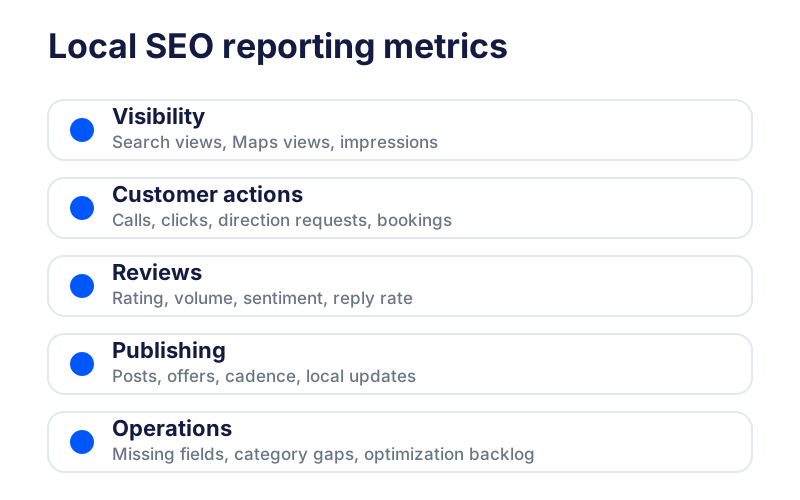
The best local reporting metrics are the ones that connect visibility to customer behavior and next actions. For Google Business Profile reporting, that usually means grouping metrics into five categories.
| Metric group | What to track | Why it matters |
|---|---|---|
| Visibility | Search views, Maps views, impressions, location visibility trends | Shows whether people are finding the business locally. |
| Customer actions | Calls, website clicks, direction requests, bookings, messages where available | Shows whether visibility is turning into intent. |
| Reviews | Average rating, review volume, positive/neutral/negative reviews, reply rate, response time | Shows whether reputation supports conversion. |
| Publishing | Posts published, post cadence, offers or updates by location | Shows whether the profile is active and maintained. |
| Operations | Missing fields, inconsistent data, category issues, photo gaps, optimization backlog | Shows what needs fixing next. |
Google’s Business Profile performance documentation is the right source for understanding profile interaction data. For reputation, Google’s review documentation explains how businesses can manage and reply to reviews. Those two data sources are often the core of a client-ready Google Business Profile report.
In Localith, the report exports workflow supports three common reporting needs:
- GBP Performance Report for visibility and customer actions.
- Review Metrics Report for ratings, review volume, sentiment, replies, and response activity.
- Export Reviews Report for raw review-level data that can be analyzed in a spreadsheet or shared with teams.
Review reporting deserves its own attention. A location with more views but a weak rating may still struggle to convert searchers. A location with strong reviews but slow replies may create risk for client relationships. Localith’s AI Review Reply Agent helps teams manage reply workflows across locations, which means your report can show not only what customers said, but how quickly and consistently the team responded.
The goal is not to include every metric available. The goal is to include the metrics that help the client make a decision.
A Simple Local SEO Report Template for Agencies
A good local SEO report template should be easy to repeat and easy for a client to scan. Use the same structure every month so readers know where to find the answer they care about.
Here is a practical structure for agencies:
-
Executive summary
- Three to five bullets that explain the most important movement.
- Call out wins, risks, and next actions.
-
GBP performance snapshot
- Search and Maps visibility.
- Calls, clicks, direction requests, and other customer actions.
- Month-over-month and year-over-year context where useful.
-
Location comparison
- Top improving locations.
- Locations that need attention.
- Notes by region, client group, franchise owner, or market.
-
Review and reputation section
- Review volume.
- Average rating.
- Positive, neutral, and negative review trends.
- Reply rate and response time.
-
Work completed
- Listings updated.
- Posts published, following the native post types in Google’s Business Profile posts documentation.
- Photos added.
- Review replies completed.
- Optimization actions taken.
-
Recommendations for next month
- Specific actions by location or group.
- Priority level.
- Owner or team responsible.
-
Appendix or raw data
- CSV exports.
- Full review list.
- Location-level metric table.
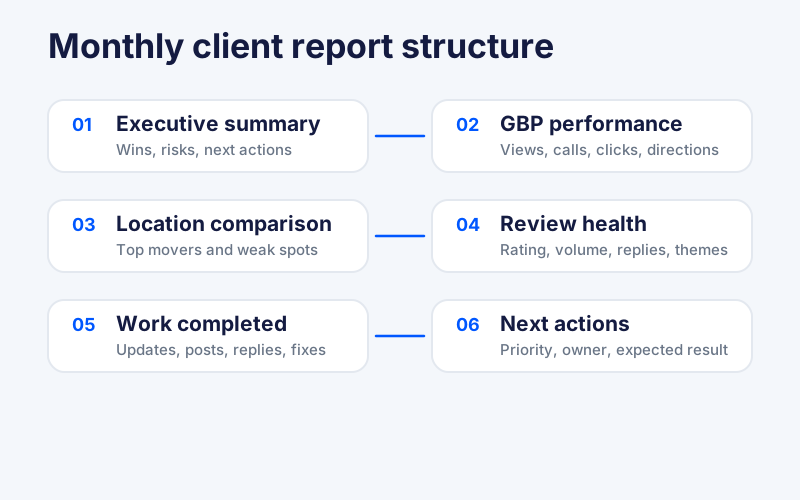
This structure works because it starts with the story, then supports it with data. A client can read the summary first and still understand what happened. If they want detail, the rest of the report is there.
The most common mistake is putting raw tables first. Raw exports are useful, but they should support the report. They should not be the report.
How To Build Custom Local SEO Reports From GBP Data
Custom local SEO reports should start with the client question, not the export button.
Before pulling data, ask what the report needs to explain:
- Are we proving monthly agency work?
- Are we comparing locations by region?
- Are we showing which franchisees need help?
- Are we explaining a traffic drop?
- Are we reporting review response performance?
- Are we preparing an executive summary for leadership?
Once the question is clear, the workflow becomes cleaner.
Start by choosing one date range for all included locations. Do not compare one location’s last 30 days against another location’s calendar month. Keep the reporting window consistent unless there is a clear reason not to.
Then group locations in a way the client understands. That may be by brand, owner, market, state, region, store type, or client account. A national client may care about market groups. A franchise client may care about owner groups. An agency team may care about account manager groups.
Next, export the data in the format that fits the job. Use PDF for a client-ready summary. Use CSV when you need to analyze raw data, combine reports, sort outliers, or build a custom view.
Localith’s report exports make this easier because teams can export GBP performance, review metrics, and raw review data from connected locations. The Google Business Profile analytics view is the working layer for spotting trends before those trends become a client-facing summary.
The strongest reports include both data and interpretation:
- “Calls increased 18%” is a data point.
- “Calls increased 18% after the team corrected holiday hours, published three local posts, and replied to 92% of new reviews” is a useful client explanation.
Be careful with cause and effect. If you cannot prove the cause, say what changed during the same period and what you recommend checking next. That keeps the report useful without turning it into guesswork.
How AI Changes Client Reporting
AI is useful for client reporting because the hard part is often not collecting data. It is explaining it.
Agency teams already spend hours turning exports into summaries, client notes, and next-step recommendations. AI can help with that work when it has access to clean data and clear instructions.
Use AI for tasks like:
- Summarizing the top three wins and risks across a client account.
- Finding locations with unusual changes in calls, directions, or reviews.
- Drafting a plain-language executive summary.
- Turning review themes into reputation insights.
- Creating a recommended action list for each underperforming location.
- Comparing similar locations by market or region.
Localith’s AI SEO Agent is built for this kind of local workflow. It can help teams analyze profile gaps, keyword opportunities, local visibility, and optimization proposals across locations.
But AI needs guardrails. A report should separate facts from recommendations. Facts come from source data. Recommendations come from the team’s interpretation.
Good AI reporting prompts include:
- the reporting period
- the location group
- the exact metrics to summarize
- the intended reader
- the format of the output
- a rule to avoid inventing causes
For example:
Summarize GBP performance for these 24 locations for March 2026. Focus on calls, direction requests, website clicks, review volume, average rating, and reply rate. Write this for a franchise marketing director. Separate confirmed data from recommended next steps.
That is much better than asking AI to “write an SEO report.” Specific prompts produce better reports because they match the way clients actually read them.
How Agencies Can Use Claude and MCP for Google Business Profile Reports
This is also the practical answer for agencies weighing up white label SEO reports, because the document is rendered in your own AI tool and never carries a vendor’s branding to strip.
This is the Localith-specific reporting workflow worth calling out.
MCP, short for Model Context Protocol, lets an AI assistant connect to approved tools and request data through a defined interface. In plain English: it gives Claude a structured way to ask Localith for connected GBP data instead of relying only on pasted spreadsheets or manual notes.
Localith’s Claude MCP connector is built for this use case. Once connected, Claude can retrieve Google Business Profile locations, listing details, metrics, review metrics, reviews, and Localith API documentation through natural language.
That means an agency can use Localith as the data layer and Claude as the report-writing layer. Localith holds the connected Google Business Profile data. Claude can ask for the data it needs, then turn it into a custom summary for a specific client, month, region, or location group.
How to build an agency SEO report in Claude in 5 simple steps?
If your Claude account has connector access, the workflow is simple.
- Connect Localith to Claude through our Claude MCP connector.
- You can find the Localith connector under Settings > Connectors in Claude, or by searching for it in the Claude Connectors Directory.
- Start by asking Claude to list the connected locations it can access.
- Ask for a performance summary for the reporting period you want to cover.
- Turn that summary into a client-ready report with:
- Include an executive summary, locations that need your attention, review highlights, and next actions.
- Review the final draft before sending it to the client so recommendations stay tied to confirmed data.
For example, an agency could prompt Claude like this:
Use Localith data to create a monthly local SEO report for all connected locations for March 2026. Include visibility, calls, direction requests, website clicks, review volume, average rating, and reply rate. Then write an executive summary, flag the locations that need attention, and separate confirmed data from recommended next steps.
This works best when you need a custom narrative or a fast first draft. For PDF exports, spreadsheets, or raw supporting data, Localith’s report exports can be part of the workflow.
The connector includes six read-only tools:
| Tool | What Claude can retrieve |
|---|---|
fetch_google_locations_listings |
All connected GBP locations |
fetch_google_location_listings_by_ID |
Details for a specific location |
fetch_google_location_listings_metrics |
Performance metrics such as impressions, clicks, calls, and direction requests |
fetch_google_location_listings_reviews_metrics |
Review summary metrics by location |
fetch_reviews |
Individual reviews with ratings, text, and dates |
api_documentation |
Localith API reference context |
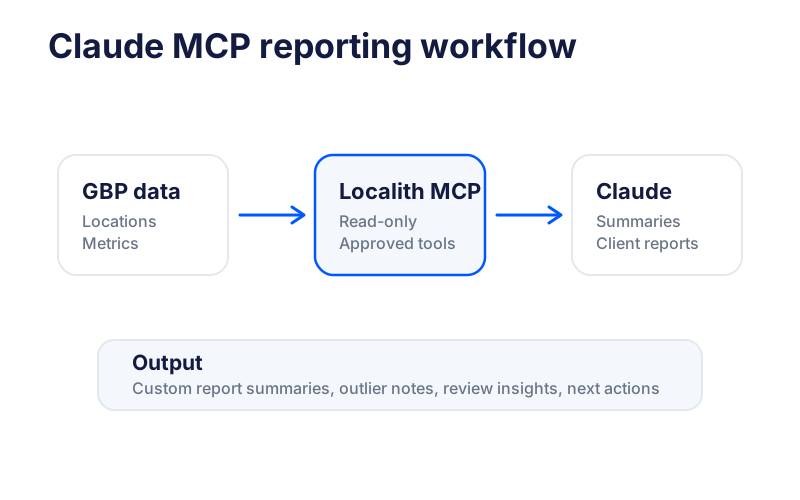
The read-only part matters. Claude can analyze and summarize data through the connector, but it cannot modify listings, reply to reviews, or change settings. That is exactly what agencies need for reporting. The AI can help explain performance without touching live client profiles.
Example prompts for custom GBP reports in Claude:
Create a monthly local SEO report for all connected locations for March 2026. Include visibility, calls, direction requests, website clicks, review volume, average rating, and reply rate. Flag the five locations that need attention.Compare these locations by region and write an executive summary for a franchise leadership team. Separate wins, risks, and recommended actions.Find locations where review response rate dropped this month. Summarize the risk and suggest next steps for the account manager.Create a client-ready Google Business Profile report for location ID 123. Use plain language and include a short action plan for next month.For more advanced data workflows, Localith also provides a Google Business Profile API tool for teams that want to connect listing, review, metrics, and publishing data into their own systems.
MCP should not replace every report export. It works best when you need a custom analysis, a fast summary, or a report narrative that would take too long to write manually.
Set up the Claude MCP connector
Where Localith Fits In the Reporting Workflow
Localith fits between raw Google Business Profile data and the report your client or leadership team can actually use.
In a typical agency workflow, Localith can help with:
- Performance Dashboard: Review Search and Maps performance without checking each profile one by one.
- Report exports: Download GBP Performance Reports, Review Metrics Reports, and raw review exports as PDF or CSV.
- AI SEO Agent: Analyze profile gaps, ranking opportunities, and optimization proposals.
- AI Review Reply Agent: Track and improve review response workflows across locations.
- Listings Management: Keep business info accurate before reporting on local visibility.
- Claude MCP connector: Ask Claude for custom summaries and client-ready report drafts from connected data.

This matters because reporting is not separate from operations. A report that says “direction requests dropped” is only useful if the team can decide what to check next.
Are hours wrong? Is the category off? Did reviews slow down? Was posting paused? Did one location have a data issue?
Localith connects those questions to the same system where teams manage listings management, reviews, reporting, and local SEO work.
For smaller teams, the entry point matters too. Localith pricing starts at $9/month for 2 locations, with a 7-day free trial that includes 100 AI credits so you can try the AI features before you commit. Extra credits are $0.15 each. That lets agencies test the workflow before moving larger client accounts into the system.
Reporting Best Practices for Local SEO Teams
Use these rules to make local SEO reports easier to trust and easier to act on.
-
Report by location and by group. Account-wide totals can hide problems. Show the full account view, then break performance down by location, region, or client group.
-
Keep date ranges consistent. Use the same reporting period across all locations. If you use a custom period, explain why.
-
Separate visibility from action. Search and Maps visibility tells you whether people found the profile. Calls, clicks, and direction requests tell you whether they did something next. Do not blend those into one vague “performance” number.
-
Explain review movement. A review section should include more than average rating. Track review volume, negative review count, reply rate, response time, and recurring themes.
-
Tie every recommendation to data. “Post more often” is weak. “Three locations with lower Maps visibility also had no posts in the period, so test weekly posts for the next 30 days” is better.
-
Lead with the story, then the data. Open with a short summary of what changed and what to do next. Put the detailed tables lower down so they support the report instead of becoming it.
-
Use AI for summaries, not certainty. AI can draft a strong first version of a report. It should not invent causes or hide source data.
-
Keep raw exports available. Clients may not read the CSV, but your team should have it. It helps when someone asks where a number came from.
-
Write for the reader. An owner, CMO, franchise field manager, and SEO specialist need different levels of detail. Build the report around the person who needs to act.
-
Send reports on a predictable schedule. Monthly works for most teams, while weekly fits active campaigns or reputation issues. A steady cadence keeps trends comparable and sets client expectations.
Google’s SEO Starter Guide gives the same broad principle for search content: make pages useful for people first. The same rule applies to reports. A report should help the reader decide what to do next.
Make local SEO reports easier to explain
Clients do not need more reporting noise. They need to understand which locations are gaining visibility, which ones need attention, and what your team is doing next.
Localith gives agencies and multi-location teams one place to track GBP performance, export reports, manage reviews, analyze local SEO opportunities, and create custom summaries with Claude through MCP.
Start with the metrics that matter. Keep the report tied to actions. Use AI where it saves time, but keep the data clear.

Turn Google Maps SEO into a repeatable workflow. Use Localith to audit profiles, track local heatmaps, prioritize weak locations, and keep every Google Business Profile moving.
Start free trial