

If you are searching for a Google Reviews API, you probably do not want another generic API explainer. You want review data in a table where you can filter it, join it, chart it, and share it with the people making decisions.
This request comes up often for agencies, franchise teams, and multi-location operators. Someone needs a Tableau dashboard, a Python script, a weekly CSV export, or a dependable way to pull reviews from multiple Google locations without opening every profile manually.
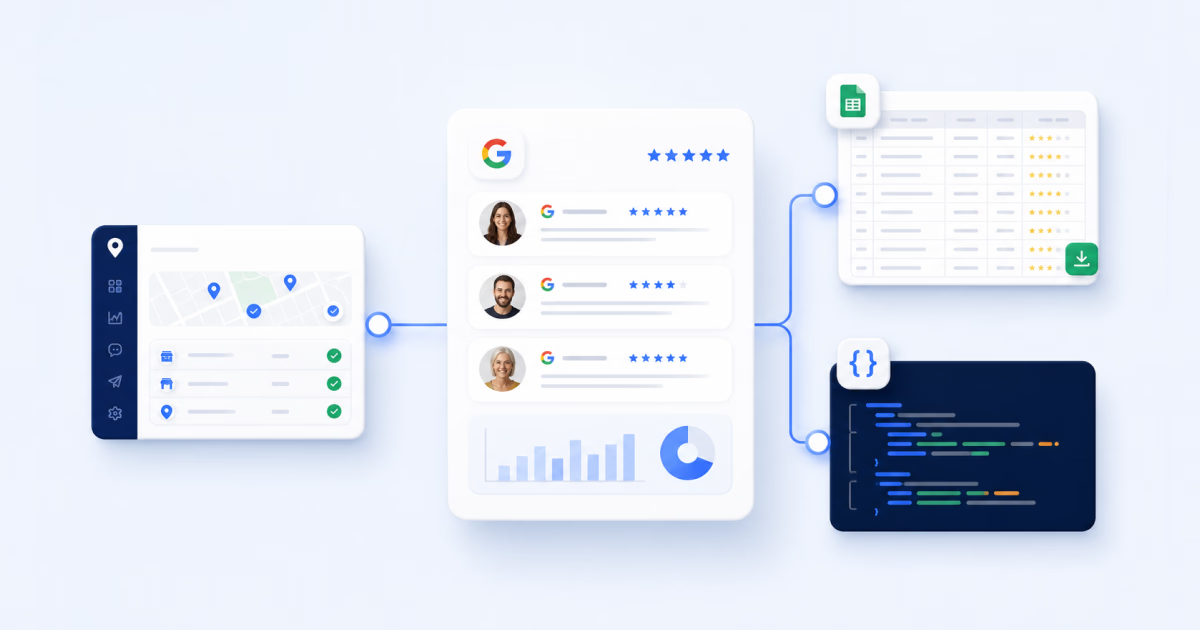
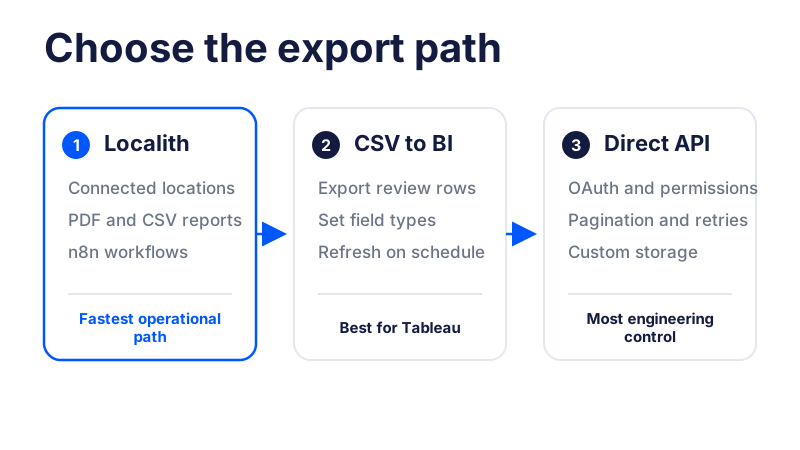
The short answer is yes: you can retrieve reviews with Google’s official Business Profile APIs when the project and user have the required access. The practical workflow depends on whether you want to build directly on Google, use Localith as the connected operating layer, or export a clean CSV for a business intelligence tool.
This guide covers those three realistic paths and shows how to structure Google review data for Tableau, Power BI, Looker Studio, spreadsheets, or Python.

Turn Google review activity into reports your team can act on. Use Localith to compare locations, export review reports, track response activity, and surface the patterns behind rating changes.
Start free trialIs there a Google Reviews API?
Yes, but the name causes confusion. Google does not position review access as a separate product called the Google Reviews API. For reviews on profiles you own or manage, the official route is the Google Business Profile API.
Google’s review data documentation covers listing reviews, retrieving one review, getting reviews from multiple locations, replying, and deleting a business reply. If your team still needs project approval and OAuth setup, start with this Google Business Profile API access guide.
For public place information, developers sometimes consider Places API or third-party data services. Those products serve different use cases. They are not a replacement for exporting the complete review history of Business Profiles your organization manages.
Google Business Profile API vs Places API vs Localith
Start with the ownership and reporting question: are you working with locations your organization manages, looking up public place information, or building recurring reports for connected profiles?
| Option | Best for | Review access | Main limitation |
|---|---|---|---|
| Localith reports and workflows | Multi-location reporting and review operations | Connected GBP review data, analytics, PDF/CSV reports, and workflow integrations | Profiles must be connected and syncing in Localith |
| Google Places API | Public place lookup and place details | Public place data within the selected endpoint’s rules | Not a complete owned-profile review export |
| Google Business Profile API | Owned or managed business locations | Reviews and business replies for accessible profiles | Requires API approval, OAuth, profile permissions, and engineering |
What review data can you pull?
For reporting, the shape of the data matters more than the API label. A useful export should contain row-level facts that analysts can normalize:
- Review ID
- Reviewer display name
- Star rating
- Review text
- Creation or update time
- Business location and a stable location ID
- Business reply text and reply time, when a reply exists
- Average rating and total review count for the location
Google’s reviews list method returns a paginated review collection plus the location’s average rating and total review count. Individual review resources expose fields such as the review ID, comment, reviewer, star rating, creation time, and reply.
Once the data is centralized, teams can also search Google reviews by keyword to identify recurring product, service, staffing, or accessibility themes.
Option 1: Export review data through Localith
Localith is the practical route when the business question is “Can we get clean multi-location review data every week?” instead of “Can we maintain another API integration?” Its managed Google Business Profile API tools keep review, listing, reporting, and automation workflows connected.
The workflow is straightforward:
- Create or sign in to your Localith account.
- Connect the Google Business Profile accounts and locations you manage.
- Open the reporting area.
- Select the date range, locations, and review report type.
- Download the report as PDF or CSV.
- Load the CSV into your spreadsheet, warehouse, or BI tool.
Localith review reports can include raw review data and summary metrics such as star breakdowns, sentiment groups, total reviews, replies, average rating, and the latest review date. That gives agencies and multi-location teams a repeatable online review reporting workflow without maintaining OAuth and pagination code.

Use Localith API access and n8n for recurring workflows
For recurring automations, teams can generate a Localith API key and connect Localith to n8n. The Localith n8n node supports review fetching, listing operations, and performance metrics that can feed Google Sheets, Airtable, Slack, email, or other workflow tools.

Use this route when you need scheduled review ingestion, alerts, or an approval workflow, but do not want every downstream tool to authenticate directly with Google.

Skip the Google API approval queue. Localith gives agencies a managed GBP layer for listings, reviews, metrics, and publishing across every client, without the Cloud project, OAuth, and quota management.
Start free trialOption 2: Export Google reviews as CSV for Tableau
If the requirement is a Tableau dashboard, confirm whether a CSV solves the problem before committing engineering time to an API build. For many monthly or weekly reports, it does.
Use this workflow:
- Export review-level data as CSV from Localith.
- Open Tableau and select Text file as the data source.
- Choose the review export.
- Set the rating field to a number and the review date to a date.
- Create a rating distribution chart by counting reviews by rating.
- Add location name or location ID as a filter.
- Create a monthly review-volume and average-rating trend.
- Add reply status or response time when those fields are available.
- Publish the workbook and refresh the source on your reporting cadence.
CSV works especially well when the reporting cadence is daily, weekly, or monthly rather than real time. It also gives analysts a visible source file they can inspect before a dashboard refresh.

Option 3: Pull reviews through the Google Business Profile API
Choose the direct API path when you have engineering resources, the profiles sit under the right account structure, and your application needs full control over ingestion and storage.
The current list endpoint is:
GET https://mybusiness.googleapis.com/v4/{parent=accounts/*/locations/*}/reviewsThe location must be verified. The method returns up to 50 reviews per page, supports sorting, and provides nextPageToken when more pages exist. It requires an OAuth scope such as https://www.googleapis.com/auth/business.manage.
Google also provides a batch method for accessible locations:
POST https://mybusiness.googleapis.com/v4/accounts/{accountId}/locations:batchGetReviewsTeams that manage Google reviews across multiple locations should solve account ownership, location access, and stable IDs before designing the dashboard.
Example Python workflow
A production workflow usually follows these steps:
- Create or select a Google Cloud project approved for Business Profile API access.
- Configure OAuth with the
business.managescope. - List the accounts available to the signed-in user.
- List the locations for the selected account.
- Request reviews for each location.
- Follow
nextPageTokenuntil every page is collected. - Normalize each review into one row.
- Save the rows to CSV, BigQuery, a warehouse, or a BI ingestion table.
The core pagination shape looks like this:
import requests


def fetch_reviews(access_token, location_name):
    url = f"https://mybusiness.googleapis.com/v4/{location_name}/reviews"
    params = {"pageSize": 50, "orderBy": "updateTime desc"}
    headers = {"Authorization": f"Bearer {access_token}"}
    reviews = []

    while True:
        response = requests.get(
            url,
            headers=headers,
            params=params,
            timeout=30,
        )
        response.raise_for_status()
        payload = response.json()
        reviews.extend(payload.get("reviews", []))

        page_token = payload.get("nextPageToken")
        if not page_token:
            return reviews

        params["pageToken"] = page_token


# location_name example: accounts/123/locations/456
Treat this as an integration pattern, not a complete production client. A live implementation also needs token refresh, retries with backoff, account and location discovery, secure credential storage, logging, and permission-error handling.
Recommended review data model for BI
Keep the model deliberately simple: one stable row per review and one stable ID per location.
| Field | Type | Why it matters |
|---|---|---|
review_id |
Text | Deduplicates imports and updates |
location_id |
Text | Joins reviews to listings, regions, and clients |
location_name |
Text | Provides a readable dashboard filter |
rating |
Number | Supports averages and star distribution |
review_text |
Text | Enables topics, sentiment, and qualitative analysis |
review_date |
Date/time | Supports trends and reporting periods |
reply_text |
Text | Shows whether the business responded |
reply_date |
Date/time | Supports response-time reporting |
source |
Text | Helps when combining multiple review platforms |
Do not mix location summary rows and individual review rows in the same table. Keep review facts in one table and location-level snapshots in another, then join them by location_id.
What can you build with exported Google review data?
This is where the export pays off. Once every review sits in one normalized table, a small team can build reporting that used to need a developer. Here are the builds agencies and multi-location operators set up most often, from the simplest to the most involved:
- A multi-location review dashboard. One view of average rating, review volume, and reply rate per location, so you can see which branches are slipping before the monthly call.
- Agency client reports. A clean, repeatable report per client showing rating trend, new reviews, and response rate. Schedule it and stop rebuilding decks by hand.
- Negative-review alerts. A rule that flags every new 1 or 2 star review by location, so the right manager hears about it the same day.
- Response-SLA tracking. Reply rate and average time to respond per location, so “we answer every review” becomes a number you can hold teams to.
- Sentiment and topic analysis. Group review text into themes like staff, wait times, pricing, and cleanliness to see what customers actually keep mentioning.
- Location performance comparisons. Rank locations or regions against each other to spot the outliers worth a closer look.
- Review backups and archives. A dated record of every review and reply, which matters when a review changes or disappears.
You do not need all of these on day one. Most teams start with the dashboard and the negative-review alert, then add the rest once the reporting habit sticks.
Review data is most useful when it stays connected to operations. A dashboard can reveal unanswered reviews, while a documented process explains how to respond to Google reviews and a Google review auto-reply workflow handles appropriate cases at scale. It can also complement local rank tracking when you want to compare review trends with visibility changes instead of treating reputation and local search as separate programs.
Build a Google reviews dashboard in Claude (no code)
If you do not have an analyst or a BI license, there is a faster path: connect Localith to Claude and ask for the dashboard in plain language. Localith publishes a read-only Claude MCP connector that lets Claude pull your connected Google review data directly, so you skip the API setup, the CSV exports, and the spreadsheet formulas.
This is the most practical option for agencies and operators who want answers, not infrastructure. Here is the whole workflow:
- In Localith, connect the Google Business Profile locations you manage.
- In Claude, open Settings, Connectors and add Localith. You can search the connector directory or add it as a custom connector.
- Ask Claude a plain-language question, for example: “Pull the last 90 days of reviews for all my locations and build a dashboard with average rating, review volume, and reply rate per location.”
- Claude uses the connector to fetch your reviews and metrics, then builds a chart or table you can read right in the chat.
- Follow up in the same conversation: “Which three locations have the lowest reply rate?” or “List every 1-star review from last month with the location and date.”
Because the connector is read-only, Claude can read and analyze your review data but cannot change reviews or post replies. That keeps it safe to hand to a junior team member. When you want to act on what you find, move the replies into the AI Review Reply Agent or your normal review workflow.
For a recurring report, save the prompt and re-run it each month, or feed the same data into a scheduled Localith and n8n workflow. Either way the result is the same: an agency can stand up a working review dashboard in an afternoon, without writing a line of code.
When should you use Google directly or Localith?
| Scenario | Best path |
|---|---|
| Custom application with approved Google API access | Google Business Profile API |
| Multi-location review reporting | Localith reports or API workflow |
| Tableau or Power BI dashboard | CSV export or scheduled ingestion |
| Slack, Sheets, Airtable, or email automation | Localith with n8n |
| Client-ready review reports | Localith PDF/CSV reports |
| Operational review response work | Localith review workflows |
Use Google directly when custom infrastructure is the product requirement and your team can own it. Use Localith when the business needs reporting, exports, alerts, and review operations without maintaining the complete Google integration stack.
For teams that also need profile governance, the broader workflow for managing multiple Google Business Profiles covers account structure, permissions, bulk updates, and operational controls.
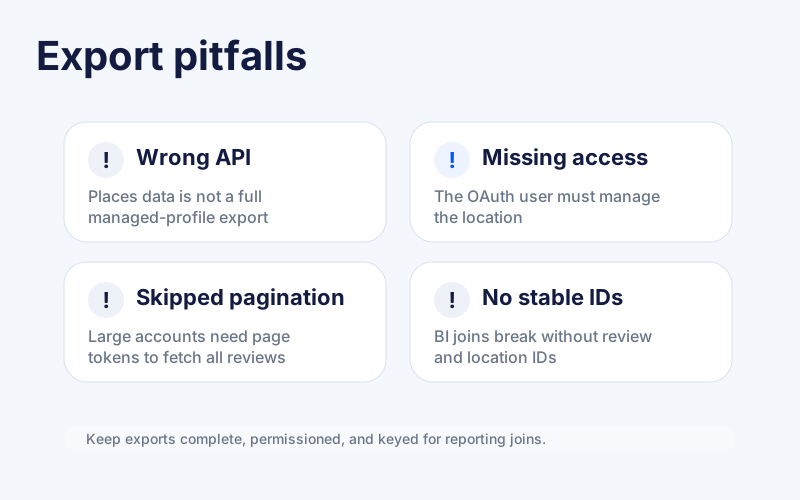
Common Google Reviews API pitfalls
Most failures come from workflow assumptions rather than Python syntax:
- Confusing Places API with the Google Business Profile API
- Requesting reviews for a profile the OAuth user cannot access
- Trying to list reviews for an unverified location
- Skipping pagination and exporting only the first 50 reviews
- Failing to store a stable review ID and location ID
- Mixing row-level review data with aggregate metrics
- Ignoring token refresh, retries, and quota behavior
- Assuming every reporting tool needs a real-time API
The final risk is organizational: building a dashboard without assigning anyone to act on the data. Review exports should feed a clear Google reputation management process with owners, response expectations, escalation rules, and recurring reporting.
Turn Google reviews into dependable reporting
A Google Reviews API workflow is valuable only when it gives the business a reliable way to act on review data. The result should show rating movement, review volume, recurring themes, unanswered reviews, and location-level outliers.
If you have engineering resources and approved Google Business Profile API access, you can build that pipeline directly. If you want to move faster, use Localith to connect the profiles, export review data, build reporting workflows, and keep analysis tied to the same system where the team manages reviews and location performance.
Before building anything, confirm that your team can see the Google reviews tied to its profiles, access every required location, and define the reporting decisions the dashboard needs to support.