
Asking for Google reviews is simple enough until you try to make it consistent across real customers, real teams, and real locations. One employee asks too late. Another forgets to send the Google review link. Someone uses wording that feels pushy. And before long, review generation becomes something the business does only when it remembers.
Consistency matters here. I approach Google review requests differently. The goal is not to pressure customers into leaving five-star reviews, but to create a simple, policy-safe workflow that helps happy customers share honest feedback.
I’ll show you how to ask for Google reviews the right way: how to create your Google review link, when to ask, what to say, which channels to use, and how to manage the full review process with Localith once reviews start coming in.

Replying at scale across locations? See how Localith drafts on-brand Google review replies with human approval when you need it. From $9/mo for 2 locations. 4.4 on G2.
See the AI reply agentWhat are Google reviews and why your brand needs them?
Google reviews are public customer ratings and written feedback that appear on a company’s Google Business Profile, in Google Search, and on Google Maps.
As such, they are very important since people almost always check them out when comparing products and services from different brands and establishments.
But they are more than just social proof. They constitute your whole local trust infrastructure. They influence how people judge credibility, how confidently they contact a business, and how easy it is for a location to stand out among competitors.
So the goal becomes: build a steady process of review collection that helps real customers describe real experiences and helps you improve your offer. If you want a broader playbook alongside this one, our guide on how to get more Google reviews covers 15 policy-safe methods you can layer onto the workflow below.
Why Google reviews matter for local trust, visibility, and conversions
Reviews help a brand in three connected ways:
- First, they build trust before a customer opens the website.
- Second, they give fresh signals about each location.
- Third, they improve conversion via recent social proof.
For multi-location brands, reviews also reveal operational differences. One location may have a response problem. Another may get glowing comments. A third may need a better handoff after service. When review requests and review responses are managed centrally, those patterns become easier to spot and act on, which is exactly why teams invest in managing Google reviews across multiple locations.
Google’s policies and guidelines around Google reviews
Google allows businesses to ask customers for reviews, but the request has to be honest and policy-safe.
The big rules are straightforward:
- Do not buy reviews.
- Do not offer incentives for reviews.
- Do not ask only happy customers.
- Do not write or post fake reviews.
I would also avoid asking for a specific star rating. A message like “Please leave us a five-star review” creates risk and weakens trust. Ask for honest feedback instead. If the customer had a great experience, their review will usually say that.
Before you ask: create your Google review link
Before you ask for Google reviews, you must create your direct Google review link.
This is the link that opens your review form directly instead of sending people to search for your business, click the profile, find the review section, and decide whether they still have the patience to help you.
It’s a big conversion lever since it removes friction for the customer. Plus, it keeps your review request templates short as you only have to add it to it.
How to find your Google review link
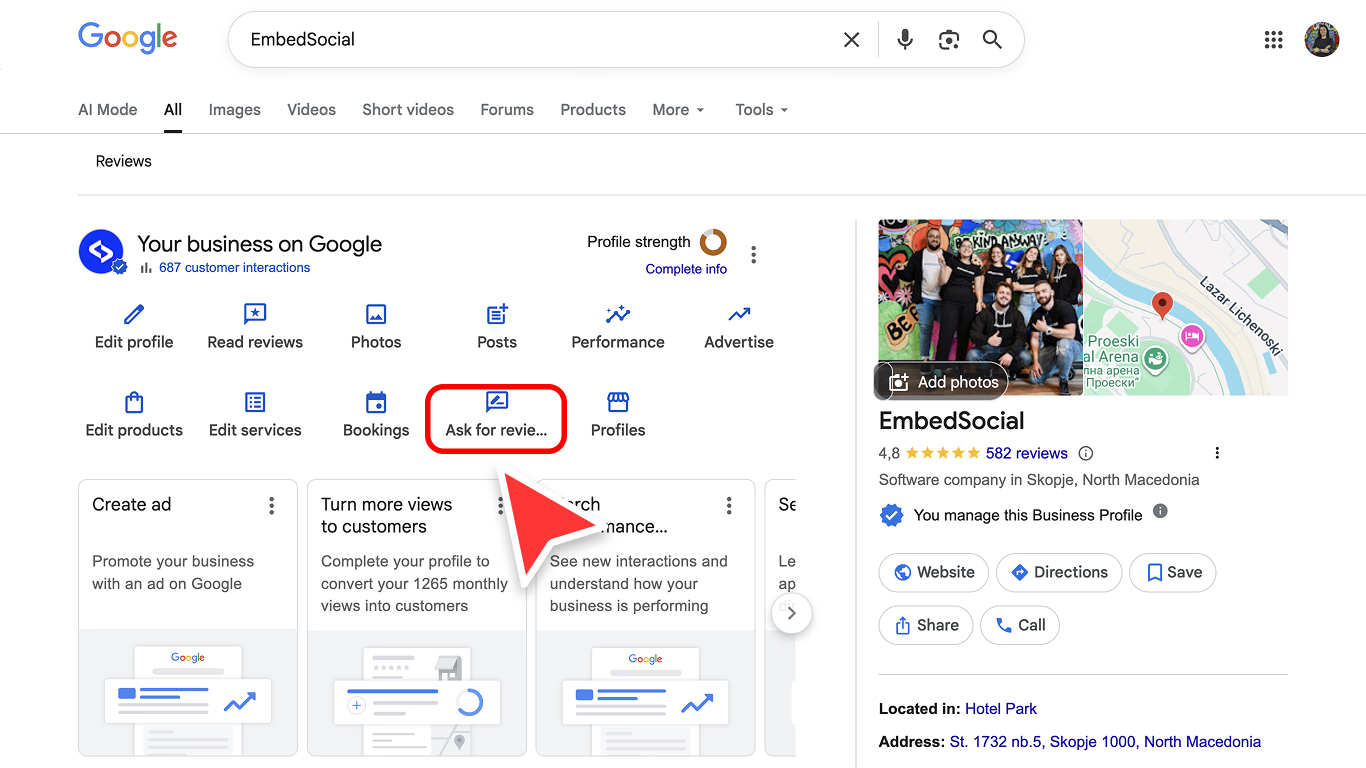
There are just a few simple steps:
- Go to Google.com and sign in with the account that manages your listings.
- Search with your business name or type ‘my business’ to open your Google Business Profile dashboard.
- Click ‘Ask for reviews’ to open the Google review link page.
- Copy the review form link.

Once you get it, you can save it in your review request templates, CRM, SMS tool, email signature, and location-level workflow.
How to create a Google review QR code
A Google review QR code is useful when the customer is physically present: at checkout, after an appointment, on a receipt, on a table tent, or inside a leave-behind card.
To get it, just follow the above steps and download the QR review link image from the review link page. You can then print it and place it in places like:
- Post-service SMS and email follow-ups.
- Receipts, invoices, and appointment completion emails.
- Email signatures for customer-facing teams.
- Checkout counters, table tents, and printed cards with a QR code.
- CRM workflows after a completed job, delivery, visit, or resolved support case.
How to ask for Google reviews in 5 simple steps
When I advise teams on how to ask for Google reviews, I focus on three things: timing, simplicity, and follow-through. Basically, you should ask when the value is fresh, make the link effortless, and respond after the review lands.
As for the actual steps in the process, I use a five-step workflow because it keeps teams focused on what actually moves the needle:
- Identify the right moment,
- Ask clearly,
- Make the link easy,
- Respond after the review,
- Close the loop.

Step 1: Identify happy customers
Look for clear signals that the customer is satisfied: a compliment, a successful delivery, a completed appointment, a support issue solved well, a repeat purchase, or a customer who says the work was exactly what they needed.
I do not use this as review gating. I use it as timing intelligence. You can still invite broad, honest feedback, but the most natural ask happens after a real positive moment.
Step 2: Ask them for a review
Ask directly, politely, and without making the customer feel cornered. The request can happen in person, by phone, by SMS, or by email.
The wording should feel human: “If you have a minute, would you mind sharing your experience on Google? It helps other local customers know what to expect.”
Step 3: Provide them the Google review link
After the ask, send the direct Google review link immediately.
This is where many businesses lose customers. If the person has to search for your business, find the right location, and hunt for the review button, the request becomes a chore.
Step 4: Respond to their review
Responding shows future customers that the business is active and attentive.
Thank positive reviewers by referencing the specific experience they mentioned. For critical reviews, acknowledge the issue, avoid arguing, and offer a clear next step. If you want a full playbook, see our guide on how to respond to Google reviews, and grab wording from these Google review response examples when you’re stuck.
Even Google puts review replies up there on the to-do list when it comes to collecting more reviews. Customers want to see you active and interested.
Step 5: Address their issues if there are any
A review request process will eventually surface problems.
That is not failure. It is operational intelligence. When a customer raises an issue, document it, route it to the right person, resolve what can be resolved, and look for recurring patterns across locations.
How to write a great Google review request
A great Google review request is short, specific, and easy to act on. It does not flatter too much, guilt the customer, or ask for a rating. It simply reminds the customer of the experience and gives them a direct path to share honest feedback.

Ask at the right time
Ask while the experience is still fresh. For restaurants and retail, that may be during checkout or shortly after the visit. For home services, it may be after the job is complete and the customer has inspected the work. For professional services, wait until the outcome is clear.
Use a polite and natural tone
The request should sound like a person, not a campaign. I prefer wording that says why the review helps without making the customer feel obligated.
Personalize the request
Mention the appointment, project, product, staff member, or location when you can. Personalization makes the request feel earned.
Keep the message simple
One ask, one link, one thank-you. Long messages lower the odds that the customer will act.
Avoid incentives, pressure, and review gating
Do not offer discounts, gifts, entries, or perks in exchange for a review. Do not ask for a five-star review. Do not filter customers into public and private paths based on sentiment.
Top 20 templates for asking for reviews across different channels
If you still don’t know how to write a great request, here are 20 policy-safe templates you can use right away. Just replace the bracketed fields, keep the direct Google review link, and adjust the tone to match your brand.
So keep reading to find different review request templates for different channels of communication, including email, SMS, social media comments and DMs, and in-person and phone situations.

1. Email templates for Google review requests
Each email below is ready to copy. Tap the copy button, paste it into your email tool, and replace the bracketed fields.
Post-purchase email
Subject: Thanks for choosing [Business name]
Hi [Name], thanks again for visiting [Location] today. If you have a minute, would you mind sharing your experience on Google? Your feedback helps nearby customers know what to expect: [Google review link]
Thank you,
[Your name]
Service completion email
Subject: How did we do?
Hi [Name], I am glad we could help with [service/project]. If everything went smoothly, I would appreciate your honest feedback on Google: [Google review link]
Thanks again for trusting us.
Professional services email
Subject: Quick favor after our work together
Hi [Name], I enjoyed working with you on [project/matter]. If you feel comfortable sharing your experience, here is the direct Google review link: [Google review link]
Your feedback helps future clients understand what it is like to work with us.
Follow-up email
Subject: Quick reminder
Hi [Name], just a quick reminder in case this got buried. If you have a minute, your honest Google review would mean a lot to our team: [Google review link]
Thank you either way.
Multi-location email
Subject: Thanks for visiting our [City] location
Hi [Name], thanks for visiting [Location name]. If you would like to share your experience with that location, here is the direct Google review link: [Google review link]
2. SMS templates for Google review requests
Short SMS: Hi [Name], thanks for choosing [Business]. Would you mind sharing your experience on Google? [Google review link]
Service SMS: Hi [Name], glad we could help with [service] today. If you have a minute, your honest Google review would really help us: [Google review link]
After compliment SMS: Thank you for the kind words today, [Name]. If you are open to sharing that on Google, here is the direct link: [Google review link]
Delivery SMS: Hi [Name], hope you are enjoying [item/service]. If everything looks good, we would appreciate your feedback on Google: [Google review link]
Reminder SMS: Hi [Name], quick reminder from [Business]. If you still want to leave feedback, here is the Google review link: [Google review link]. Thank you.
3. Social media comment and DM templates for Google review requests
Reply to public praise: Thank you, [Name]. I am glad you had a good experience. If you ever want to share that on Google too, it helps other local customers find us: [Google review link]
Instagram DM: Hi [Name], thanks for the message about [experience]. If you would be comfortable leaving that feedback on Google, here is the direct link: [Google review link]
Facebook DM: Thanks again for choosing [Business]. Your feedback was great to hear. If you have a minute, you can share a Google review here: [Google review link]
LinkedIn message: Hi [Name], I appreciated your note about [project]. If you are open to sharing a brief Google review about the experience, here is the direct link: [Google review link]
Community response: Thanks for recommending us. If you want to help others compare local options, a quick Google review would be very helpful: [Google review link]
4. In-person and phone scripts for asking for Google reviews
In-person at checkout: I am glad we could help today. If you have a minute later, would you mind leaving us an honest Google review? I can send or show you the direct link.
After service completion: Everything looks good from our side. If you are happy with the work, a Google review would really help our local team. I can text you the link now.
By phone after a positive call: I appreciate you saying that. Would you be comfortable sharing your experience in a Google review? I can send you the direct link so it only takes a minute.
At a front desk: Thank you for coming in today. If you would like to leave feedback, this QR code opens our Google review form directly.
Account manager script: It has been great working with you on [project]. If the experience has been helpful, would you mind sharing an honest Google review? It helps future customers understand what we do well.
How to manage Google reviews with Localith
After you start getting Google reviews, you must start managing them properly. This process includes: monitoring new reviews, responding quickly, identifying issues, comparing locations, and turning feedback into operational improvements.
However, while manual review management can work for a while for a single location, for multiple locations, agencies, franchises, clinics, restaurants, or local service networks, manual tracking becomes fragile.
This is where Localith fits naturally.

Once you create your Localith account, you can centralize Google review monitoring, use AI-assisted review replies to move faster, keep location-level visibility, and build a repeatable workflow for review response and Google reputation management.
Here’s everything you can do for your reviews:
Centralize reviews across locations
Bring review management into one operating view so teams do not have to jump between individual Google Business Profiles.
You can access all your reviews in a few steps:
- Add your Google locations via the ‘Listings’ tab.
- Navigate to the ‘Responses’ tab (left ribbon menu).
- Tap ‘All reviews’ at the top to see every location feedback.

Monitor new Google reviews in one dashboard
Track review activity by location and spot new feedback before it gets buried. You can search your reviews by keyword or name via the top ‘Search’ field.
Also, you can sort your reviews based on recency, location, date, and rating.
Respond faster with AI-assisted review replies
Draft helpful, brand-aligned replies faster while keeping a human in control of the final response. The best way to use Localith is to set up your AI review reply agent while using the ‘Responses’ tool. Here are the steps to follow:
- Tap ‘AI Agents team’ then ‘New AI agent’.
- Describe and save your agent.
- Tap ‘Automations’ then ‘New automation’.
- Set up your automation details and choose your AI agent.
Now, every incoming review will get a new unique reply based on your agent rules and brand voice. That’s one huge task off your hands! That said, you can always reply to Google reviews manually, should you wish to do so. For the full walkthrough, see our Google review auto-reply setup guide.

Track review performance by location
Compare review volume, rating trends, response habits, and recurring customer themes across the business. You can do so via the ‘Analytics’ tool in Localith’s ‘Responses’ section.
Once you access it, you’ll see data like the total number of reviews you’ve received, their overall rating, the rating distribution, review sentiment, etc.
That said, you can also access the ‘Reports’ section from the left ribbon menu to download your reviews metrics and the full reviews text in a .PDF or .CSV file, the same data that powers consistent online review reporting.

Improve your products and services
After analyzing your reviews, you can implement the changes that your customers are complaining about and keep doing what you’re doing well.
Remember: Online reviews are as important to you as they are to your customers, especially if you receive critical feedback that showcases areas of improvement.
Conclusion: turn review requests into a repeatable growth system
The best way to ask for Google reviews is to make the process honest, easy, and consistent. However, you must get your Google review link first.
Then, simply ask customers right after purchase and use simple wording. Remember to avoid incentives and five-star language. Also, you must respond to all your Google reviews. And best of all: you can learn from the issues that customers raise.
When this workflow is managed well, Google reviews stop being a random favor you occasionally ask for and become a reliable local growth signal.
For multi-location brands, you should get some help from platforms like Localith, which give you a real advantage in consistency: every location gets a fair process, every review can be seen, and every customer signal can teach the business something useful.

Manage Google reviews for all your locations from one dashboard. Centralize replies, automate with AI, and track review trends across every branch.
Start free trial