---
title: "Google Reviews Not Showing Up? Causes and Fixes (2026)"
date: 2026-10-28
canonical_id: google-reviews-not-showing-up
author: "Marija Azhderska"
category:
- reviews
- google-business-profile
tags:
- google-reviews
- google-business-profile
- review-management
- troubleshooting
- multi-location
- google-review-analytics
summary: "Google reviews not showing up? Learn how to tell a delay from a removal or a profile problem, how to escalate to Google, and how to spot drops per location."
draft: false
template: blog
image: "blog/google-reviews-not-showing-up/google-reviews-not-showing-up-featured.jpg"
faq:
-
question: "Why is my Google review not showing up?"
answer: "A new review can be pending while Google checks it, or it can be filtered or removed if it breaks Google's content policy, for example with links or phone numbers, an incentive or off-topic text. Open Google Maps, go to your Contributions, then Reviews, to see whether it is published or pending. If yours has a link or a number in it, edit it out."
-
question: "How long until a Google review is visible?"
answer: "Google says its policy check can take a few days in some cases, so plan for a delay of up to a few days, not minutes. Google's policy treats unusual volumes of reviews as a sign of manipulation, so space out your requests. If a review has not appeared after a few days, check the reviewer's contributions, then use the contact steps in this guide."
-
question: "Why can't I see Google reviews anymore?"
answer: "Often it is a navigation problem: the wrong Google account, the wrong location, or the wrong view. It can also be a profile problem, such as a recent merge or a profile that was suspended and reinstated. Start with our guide to [seeing the reviews on your Google Business Profile](/blog/how-to-see-my-google-reviews/), then check your profile status."
-
question: "How do I contact Google about a review not showing up?"
answer: "Sign in with the Google account that manages the profile and start from Google's [missing reviews help page](https://support.google.com/business/answer/10313341). Use the contact option it offers, such as the Contact us form in the Help panel. Include your profile link, the approximate date, the reviewer's first name and a screenshot if you have one."
-
question: "Did Google remove my reviews, and can I get them back?"
answer: "Google says reviews removed for policy violations will not be restored, so do not count on it. Asking the customer to post the same review again can count as repetitive content. Fix the pattern behind the removal, then earn new reviews the policy-safe way."
-
question: "Why did my Google reviews disappear overnight?"
answer: "Google says finding and removing fake or biased content is an ongoing part of keeping Maps trustworthy, so a count can drop when existing reviews are taken down for breaking policy. A merge can delay reviews for a few days, and Google says reviews are sometimes removed after a profile is reinstated. Check your profile status first, then compare the dropped reviews against the policy triggers in this guide."
-
question: "A fake review is showing but my real ones are not. What do I do?"
answer: "Treat them as two separate problems. Work through the causes in this guide for the missing real reviews, and report the fake one on its own. Our guide on how to [remove a Google review](/blog/how-to-remove-a-google-review/) covers the reporting path and what to expect, including what Google decides."
seo:
title: "Google Reviews Not Showing Up? Causes and Fixes (2026)"
description: "Google reviews not showing up? Learn to tell a delay from a removal, what Google will and won't restore, how to escalate and how to spot drops by location."
og_image: "blog/google-reviews-not-showing-up/google-reviews-not-showing-up-featured.jpg"
structured_data: article
---
"My Google reviews are not showing up." You ran a review campaign, customers told you they posted, and your profile looks exactly the same. Or you opened it this morning and the count was lower than yesterday.
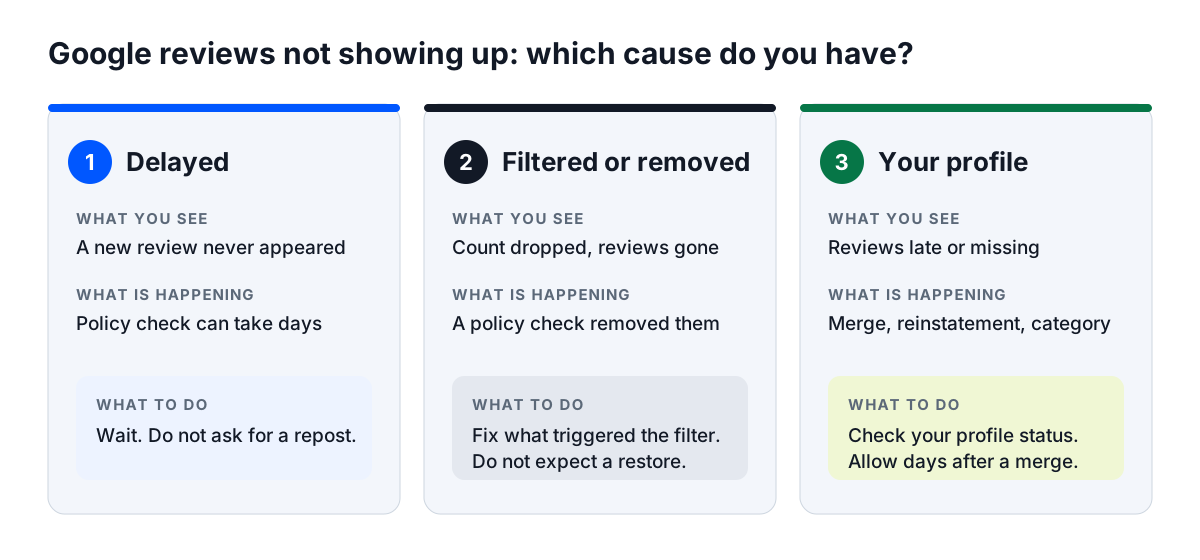
When a Google review is not showing up, it is almost always one of three things:
- **Delayed:** the review is still being checked and has not gone public yet.
- **Filtered or removed by Google:** a policy filter held it back or took it down.
- **Affected by your profile:** a recent merge, a reinstated profile or a category where Google limits reviews.
If you manage reviews for many locations, Localith's [AI review reply agent](/ai-reviews-reply-agent/) is built for that work. The last section shows how to catch a drop early.
Cannot find your reviews page at all? First [see the reviews on your Google Business Profile](/blog/how-to-see-my-google-reviews/), because a missing page is often a navigation problem.
It feels personal, and owners often suspect a competitor or a Google bug. Most of the time it is neither.
This guide shows you how to tell which cause you have in about five minutes, what to do about each one, and when to escalate to Google. It is written for business owners first. If you wrote a review and cannot see it, a labelled section for you sits further down.
## Why are my Google reviews not showing up? Start here
Match what you see to the most likely cause. Then jump to that section.
| What you see | Most likely cause | Go to |
|--------------|-------------------|-------|
| Your review count dropped overnight | Filtered or removed by Google (cause 2), or a profile problem (cause 3) | Cause 2 or cause 3 |
| A new review never appeared | Delayed (cause 1), or filtered (cause 2) | Cause 1 or cause 2 |
| You cannot find your reviews at all | A navigation problem, not a missing review | [See the reviews on your Google Business Profile](/blog/how-to-see-my-google-reviews/) |
| You can see reviews but cannot reply | An access or permissions issue | [Why you can't reply to a Google review](/blog/why-cant-i-reply-to-google-review/) |
Most "missing" reviews are either delayed or filtered by policy. A profile issue is the third cause, and it is the one you can check yourself.
Not sure which row fits? Run this five-minute triage:
1. Ask the customer to check their own Contributions on Google Maps. Is the review published, pending or missing?
2. Check your profile status. Is it verified, active and the only listing for the location?
3. Look for a pattern. Did the missing reviews share a campaign, a device, a kiosk or a day?
4. Compare the date. Did the problem start right after a profile edit, a merge or a name change?
Your answers point to one of the three causes below.
## Cause 1: your Google review is delayed, not missing
A review can be written and still not be public. Google says reviews are checked to make sure they comply with its policies, and in some cases that takes a few days.
### How long Google reviews take to show up
Google says the policy check can take a few days in some cases, so plan for a delay of up to a few days, not minutes.
Google's policy lists unusual volumes or patterns of reviews as a sign of rating manipulation. A burst after a campaign can look like that, so space out your review requests.
A delayed review is not a removed review. Nothing is wrong with your profile yet.
Owners often panic at this stage and ask customers to post again. That does not speed anything up, and it can create a duplicate that Google then has to sort out.
If you sent a large batch of requests, expect the reviews to trickle in unevenly. Some will appear sooner and others a few days later.
### How to check with the reviewer
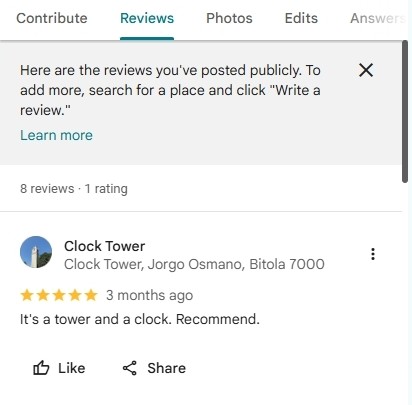
Ask the customer to open Google Maps and find their Contributions. Menu labels change, so look for their profile and the Reviews tab.
A reviewer's Contributions on Google Maps: the Reviews tab lists what they posted publicly.
Their own list shows the review as published or pending. If it is published for them but you cannot see it, give it a little longer, then check the profile for the problems in cause 3.
If it is pending, the review is still in processing. If it is missing from their list, it may have been filtered, which is cause 2.
Customers on an older phone or old software can have trouble leaving reviews. Google recommends they update the Maps app to the latest version.
**What to do:** wait, and do not ask the customer to post the review again. A duplicate review only adds a second item for Google's systems to check.
## Cause 2: Google reviews removed by Google's spam filters
This is the heaviest cause, and the one most owners get wrong. Google removes or hides reviews that break its contribution policies, even when a real customer wrote them. Google's own help page says missing reviews are usually removed for policy violations like spam or inappropriate content.
Google says a review should reflect a genuine experience, and that fake or biased content will be removed. Its rules are written down, and some are easy to break by accident.
### Why Google removes real reviews
Google's prohibited and restricted content policy is the rulebook. The reasons a review is removed that matter most to businesses are:
- **Fake engagement:** content not based on a real experience, paid-for reviews, or one person posting from multiple accounts.
- **Rating manipulation:** incentives such as payment, discounts or free goods, selectively asking for positive reviews, or unusual volumes or patterns of reviews.
- **Conflict of interest:** current or former employees, family members, competitors and other affiliated people.
- **Advertising and solicitation:** links, phone numbers, email addresses or social media links in the review text.
- **Repetitive content:** the same content posted more than once, from one account or several.
- **Off-topic content:** general, political or social commentary or personal rants instead of the customer's own experience.
The policy also covers offensive content, profanity, personal information about someone else and unsubstantiated allegations of wrongdoing.
Your own wifi or device is not named as a violation. Google does say merchants should not require or pressure customers to leave reviews on the premises.
Read the policy itself before you act. We summarize it here, but Google's page is the source of truth for what counts as a violation.
### Reviewer accounts that trigger the filter
Sometimes the account, not the text, is the problem. Google does not publish the signals its filters use, so these are patterns owners report behind "my real customer's review vanished":
- A brand-new Google account.
- An account with no other activity.
- Many reviews posted from one device or IP address.
- Reviews posted on your own wifi.
- Reviews posted on a review kiosk in the store.
A kiosk or a counter tablet feels helpful. In practice it can look like one source posting many reviews, and it puts customers under pressure on the premises.
### How review requests can get reviews filtered
How you ask matters as much as who answers. These habits put reviews at risk:
- **Gating:** only sending happy customers to Google, which the policy calls selectively soliciting positive reviews.
- **Incentives:** discounts, gifts or payment in return for a review, or for changing or removing one.
- **Scripted text:** handing customers the words to paste, or asking staff to collect reviews with specific content.
- **Pressure on the premises:** asking customers to review while in your store, or setting staff review targets.
- **Bursts:** hundreds of requests the day after a campaign.
Google does allow you to ask customers to review a genuine experience, without incentives or any attempt to steer the rating or the text.
Our guide to [policy-safe ways to get Google reviews](/blog/how-to-get-google-reviews/) lists methods that stay within the rules.
Then see [how to ask for Google reviews](/blog/how-to-ask-for-google-reviews/) for wording that does not push customers toward a script.
### Why Google reviews disappeared overnight
Many owners describe the same pattern. They wake up, and the review count is lower than the night before.
Owners in Reddit threads and Google's own help forums report waves like this. Google says finding and removing fake or biased content is ongoing work, so a count can fall when existing reviews are taken down.
Most of the time that is a policy removal, not a bug. It is also why Google reviews that disappeared overnight often belong to a campaign, a kiosk or a burst of new accounts.
Dated note, October 2026: Google's policy names unusual volumes or patterns of reviews as rating manipulation. Owners also report stricter handling of brand-new accounts and bursts, but Google has not published a change, so treat that as anecdotal.
### Can removed Google reviews come back?
Google's help page is direct: reviews removed for policy violations will not be restored. Google says this keeps reviews on its products relevant, helpful and trustworthy. That is the honest answer, and it is the part many guides soften.
Asking the customer to post again can make things worse, because posting the same content more than once is itself listed as repetitive content. No tool, service or trick brings back Google reviews removed for policy reasons.
Neither Google page describes an appeal for a removed review. If you think one was removed by mistake, use the contact steps below, then fix the cause and move forward.
Some things are still in your control:
- You can reply to the reviews you still have, and keep your profile active.
- You can ask real customers for new reviews, in a way that follows the policy.
- You can check whether the reviews were actually removed, or only delayed, for example after a merge. A delay clears by itself.
Be wary of anyone who promises to bring removed reviews back for a fee. No tool or service can honestly make that promise.
**What to do:** fix the pattern that triggered the filter. Stop gating, stop incentives, stop in-store pressure and kiosk reviews, and spread requests over time.
## Cause 3: Google reviews not showing because of your profile
Sometimes the reviews are fine and the profile is the problem. Google's help page names a few profile situations that affect reviews, covered below.
If you are still on the old name, this is the "Google My Business reviews not showing" problem. The profile is called Google Business Profile now, and the fixes are the same.
Before you dig in, check these three things on your profile:
- Is it verified?
- Is it active, with no suspension notice?
- Is it the only listing for this location?
Each "no" points to one of the sections below.
### Unverified or suspended profile
Google's help page does not say that an unverified or suspended profile hides reviews. It does say that reviews are sometimes removed after a Business Profile is reinstated, and to contact support if that happens.
Check your verification status first. If the profile is suspended, our guide to a [suspended Google Business Profile](/blog/google-business-profile-suspended/) walks through the reinstatement steps.
### Duplicate or merged profiles
Google says that after you merge Business Profiles, it might take a few days for reviews from both profiles to display on Search and Maps. Wait a few days before you treat them as missing.
Search your business name and address on Google Maps. If you find a second listing, check it too, in case customers reviewed that one.
### Recent name, address or category changes
Google reviews your changes before they go live, and after you change your business name or move to a new address you might need to verify the business again. Its help page does not say these changes hide reviews, but an edit you did not make is worth reversing.
Anyone can suggest changes to a public profile, and some of them go live. Our guide to [suggested edits](/blog/google-business-profile-suggested-edits/) shows how to review and reverse them.
### Reviews limited for your category
Google says it might temporarily disable user-created content, including reviews, for certain Business Profiles or business categories to protect owners. Profiles primarily categorized as schools for students aged 6 to 18 have their reviews and ratings removed and disabled.
If that does not describe your business, you can change your category.
If you can see reviews but cannot reply to them, that is a separate access issue. Read [why you can't reply to a Google review](/blog/why-cant-i-reply-to-google-review/).
**What to do:** check the profile status, give a merge a few days, and contact support if reviews went missing after a reinstatement. Then recheck the review count.
{{inline-cta:analytics|Managing many profiles? See review volume and ratings per location in one place.|See analytics}}
## How to contact Google about missing Google reviews
If you think the problem is Google's mistake, ask Google. Start from the official missing reviews help page.
1. Sign in with the Google account that manages the Business Profile.
2. Open the missing reviews help page and follow the contact option it offers for your situation.
3. If the page offers no contact option for your situation, use the **Contact us** form in the Help panel and add the details below.
4. Keep your profile link and screenshots handy, because you may be asked for them.
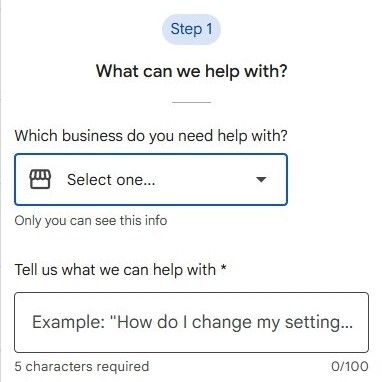
The Help panel's **Contact us** form opens with **Step 1**, where you pick the business and describe the problem in a few words. **Resources** and **Contact options** come next.
The Contact us form in Google Business Profile Help, Step 1.
Support options change over time, so follow the labels you see on screen.
### What to include in your request
A clear request gets a clearer answer. Include:
- Your Business Profile URL.
- The approximate date the review was posted or went missing.
- The reviewer's first name.
- A screenshot from the reviewer, if you can get one.
### What Google support can and can't do
Google says to contact support if reviews were removed after your profile was reinstated. It also says reviews removed for policy violations will not be restored, so do not ask support to reverse a policy removal.
Be patient about timing. Google's help page gives no response time, so keep working on the causes you can check.
Keep the tone factual. Describe what you see, attach the evidence and avoid accusing Google of anything. A short, clear message is easier to act on than a long complaint.
Do not open several requests for the same review. Follow up on the first one instead, so your history stays in one place.
## Wrote the review? Why your Google review is not showing up
This section is for customers. If you wrote a review for a business and other people cannot see it, here is what to check.
Open Google Maps and look at your Contributions. Your review is either published or pending.
Some reviews get filtered or removed. Based on Google's policy, the usual reasons are:
- Links, phone numbers, email addresses or social media links in the text.
- Text that is off-topic, such as general or political commentary or a personal rant.
- Profanity, personal details about someone else, or allegations of wrongdoing you cannot back up.
- A review that was paid for, or came with a discount or gift.
- The same review posted more than once, or from several accounts.
Owners also report filtering of brand-new accounts and of several reviews posted in a short burst, but Google does not publish those signals.
The policy page describes no appeal for a removed review. If yours may break a rule, edit out the problem, such as a link or a phone number. Google does not say whether an edited review is checked again.
If you are on an older phone or old software, update the Maps app to the latest version first. Google says that can cause trouble when leaving reviews.
Keep the edit honest and about your own visit. Do not add links or contact details.
If you want to give a review the best chance of staying up:
1. Write about what actually happened during your visit.
2. Post it from your own account only, and do not accept anything in return.
3. Leave out links, phone numbers and promotional wording.
4. Do not repost it. Edit the original instead.
Those four habits cover most of the reasons a review gets filtered.
## How multi-location teams catch missing Google reviews early
Picture a 40-location brand. One store loses 30 reviews, and nobody notices for a month.
By then the trail is cold, the campaign is over, and the cause is hard to find. The fix is to notice the change in days, not weeks.
That is much harder across dozens of profiles than on one. Opening each profile by hand does not scale, so the checks need a routine.
A routine also helps agencies, because a client can ask why reviews dropped and you can answer with the date it started.
### Track review volume per location
Localith's Review Analytics tracks review volume, average rating and response time. It updates as reviews sync from your connected Google Business Profiles.
Pick a date range and look at one location at a time. The [Review Analytics guide](/docs/analytics/review-analytics/) walks through the dashboard.
A location that suddenly gets far fewer reviews than usual is your cue to check that profile today. For the reporting side, read our guide to [online review reporting](/blog/online-review-reporting/).
### Watch rating distribution and sentiment shifts
The same dashboard shows a rating distribution chart for each period. A sudden change in the mix of stars is worth a look.
Localith's sentiment analysis surfaces tone trends, recurring themes and sentiment shifts per location. A location that turns negative while its neighbors stay steady needs a closer look.
### Run a weekly review check
A short weekly routine is enough:
- Compare review volume per location with the previous period.
- Check each profile's status: verified, not suspended, no duplicate.
- Export the reports and look at the review counts and the latest review date per location.
The Review Metrics Report lists the star counts, total reviews, average rating and the date of the latest review for each listing. Pair it with the GBP Performance Report for the full picture.
For a repeatable process across many profiles, see how to [manage Google reviews for multiple locations](/blog/google-reviews-multiple-locations-how-to-manage/).
Localith shows you the change for each location, so you know which profile to check. It does not restore reviews, and it does not contact Google for you.
{{inline-cta:ai-reviews-reply-agent|Keep every location's reviews, replies and ratings in one workspace.|See the AI review reply agent}}
## Conclusion: Find and fix missing Google reviews fast
When Google reviews are not showing up, it is a delay, a policy filter or a profile problem. Wait for the first, fix the pattern behind the second, and check the profile for the third.
Do not plan on policy-removed reviews coming back, so the best fix is catching the drop early and removing the cause. If a Google review not showing up looks like Google's mistake, contact support with the details above.
If you manage many locations, a weekly check per location is how you stop a quiet drop from lasting a month.
Start your free trial
Want to compare plans first? See Localith pricing.
{{product-cta:review-reporting}}