---
title: "Businesses in ChatGPT: How to Claim Your Profile"
date: "2026-11-13"
canonical_id: "businesses-in-chatgpt"
author: "Katerina Bojkov"
category:
- "ai"
- "multi-location"
- "google-business-profile"
tags:
- "multi-location"
- "google-business-profile"
- "local-seo"
summary: "Claim and verify your business in ChatGPT, then keep every location accurate across the sources it reads. A practical playbook for multi-location brands."
draft: false
template: "blog"
image: "blog/businesses-in-chatgpt/businesses-in-chatgpt-featured-v3.jpg"
hero_ground: "photo"
image_alt: "Business profile in ChatGPT with the blue verified check and website and email details, illustrating Businesses in ChatGPT"
faq:
- question: "Is claiming my business in ChatGPT free?"
answer: "Yes. Claiming, verifying, managing your profile and seeing insights are free during the beta. Advertising is a separate, paid product. OpenAI hasn’t said whether any of it will cost money later."
- question: "Does claiming my business get me recommended more often?"
answer: "No. OpenAI says claiming doesn’t guarantee higher placement or sales, and ChatGPT keeps making independent recommendations. Claiming gives you control over your profile details and access to insights."
- question: "Can I claim all my locations at once?"
answer: "No. Each brand and each location is a separate claim, and claiming the brand doesn’t claim its locations. There’s no bulk tool or API yet. Use a [claim tracker](#build-a-location-claim-tracker) to manage the rollout."
- question: "Can an agency claim a profile for a client?"
answer: "The cleaner setup is for the client to claim and verify, then add the agency as a teammate. Each person signs in with their own ChatGPT account. That way, nothing needs to transfer when the contract ends."
- question: "What if someone already claimed my business?"
answer: "Open the profile, select the more actions menu (…), then ‘Dispute ownership’ and follow the steps. You’ll need to verify your identity. In franchise networks, agree on who holds claims before rollout to avoid disputes."
- question: "Does ChatGPT use my Google Business Profile?"
answer: "Not directly. ChatGPT draws on other sources, including Bing data, Yelp’s licensed reviews and websites. GBP still matters because Bing can import it and many other listings copy it. Keep it accurate with [GBP management best practices](/blog/google-business-profile-management-best-practices/)."
- question: "Why can’t I find my business in Business Hub?"
answer: "Local stores and restaurants can only claim an existing US listing right now. Eligible online businesses may be able to add a missing one. If your listing shows ‘Contact support’, it can’t be claimed through the standard flow."
- question: "Is Businesses in ChatGPT the same as ChatGPT Business?"
answer: "No. Businesses in ChatGPT is the program for claiming your business profile. ChatGPT Business is OpenAI’s paid workspace plan for teams. They’re unrelated."
seo:
title: "Businesses in ChatGPT: How to Claim Your Profile (2026)"
description: "Claim and verify your business in ChatGPT step by step, then keep every location accurate across the sources ChatGPT reads. Playbook for multi-location brands."
og_image: "blog/businesses-in-chatgpt/businesses-in-chatgpt-featured-v3.jpg"
structured_data: "howto"
howto_steps:
- name: "Step 1: Open Business Hub"
text: "Sign in to ChatGPT and open ‘Business Hub’ from the sidebar."
- name: "Step 2: Find and select your listing"
text: "Search for your business name and select the listing that matches. You’ll hit one of four situations:"
- name: "Step 3: Verify the claim"
text: "Next, prove the business is yours. Depending on your business, ChatGPT offers some of these methods:"
- name: "Step 4: Wait for OpenAI’s review"
text: "OpenAI reviews the claim and emails you a decision, or asks for more information. You can cancel the claim while it’s pending."
- name: "Step 5: Complete the Persona identity check"
text: "After approval, one person verifies their identity through Persona, OpenAI’s ID verification partner. You can’t publish changes, connect a product feed, see insights or create an agent until this is done."
- name: "Step 6: Fill in and submit your profile"
text: "Now complete every tab: ‘About’, ‘Hours’, ‘Contact’, ‘Location’ and ‘Photos’. The description field takes up to 300 characters. Copy the details from your Google Business Profile, character for character."
---
On November 10, OpenAI opened Businesses in ChatGPT, a free way to claim and verify your business inside an assistant that 1.2 billion people use every week.
That’s the good news. The catch: claiming your brand doesn’t claim a single one of your locations.
If you run 5, 50 or 500 locations, each one is a separate claim, with no bulk tool and no API. And ChatGPT keeps reading other sources about you whether you claim or not.
This guide covers both halves: how to claim your business in ChatGPT step by step, and how to keep every location accurate across the sources ChatGPT reads. If AI answers are already part of your [multi-location SEO](/multi-location-seo/) plan, this is the next layer.
{{product-cta:gbp-dashboard}}
## What is Businesses in ChatGPT?
> **Businesses in ChatGPT** is OpenAI’s program that lets owners claim, verify and update their business profile inside ChatGPT. You manage it from Business Hub, a new area in the ChatGPT sidebar. Verified profiles get a blue check, and Business Hub shows how often ChatGPT mentions you.
Think of it as a business listing for AI answers. When ChatGPT names your business, people can click through to your profile. If you’ve claimed it, the details on that profile come from you.
One thing to clear up early: this has nothing to do with ChatGPT Business, OpenAI’s paid workspace plan for teams. Same words, different product.
### What you can control after claiming
Once your claim and identity check are approved, you can update:
- Website, description and category
- Logo and photos
- Location, contact details and hours
- Policies, such as delivery and returns
- Product feeds with prices and stock (retailers)
OpenAI reviews every edit before it goes live, so changes don’t publish the moment you save.
### What you still can’t control
OpenAI is direct about this. In its own words, “Claiming does not guarantee higher placement or sales.”
ChatGPT keeps making independent recommendations and comparisons. It can show your business whether you’ve claimed it or not, and it still pulls from other sources when it answers. Ads don’t change that either: sponsored placements are labeled and kept separate from answers.
### How much does it cost?
Claiming, verifying and managing your profile are free. So are Business Hub insights.
Advertising is the only paid piece, and it’s separate. OpenAI hasn’t promised the rest stays free after the beta, so treat “free” as “free for now.”
## Who can claim a business in ChatGPT right now?
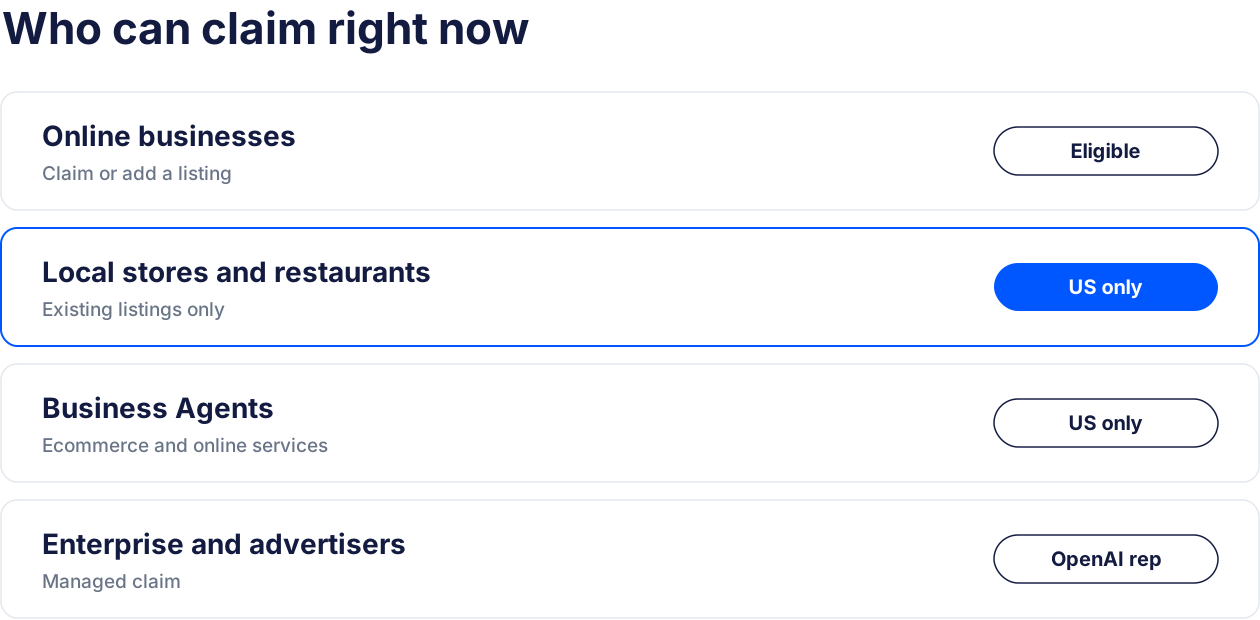
Eligibility depends on your industry, location and OpenAI’s verification and integrity checks. You also have to own the business or be authorized to represent it. During the beta, claiming opens first to eligible businesses with a website.
Here’s how it breaks down by business type:
- Online businesses: can claim an existing listing. If yours isn’t there, you may be able to add it.
- Local stores and restaurants: can only claim a listing that already exists, and only in the US for now.
- Business Agents (your own AI chat agent inside ChatGPT): limited to eligible US ecommerce and online service businesses.
- OpenAI Enterprise customers and advertisers: claim through their OpenAI representative instead of the self-serve flow.
> Tip: If you’re a physical business outside the US, you can’t claim yet. Use the time to clean up the sources covered later in this guide. That work pays off whether or not ChatGPT expands to your market.
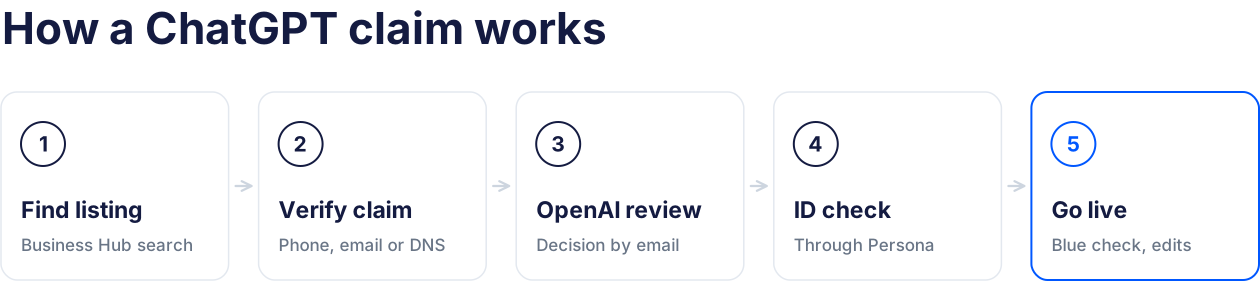
## How to claim your business in ChatGPT: step by step
The flow takes six steps. The claim itself is usually quick. The two review waits are what take time.
### Step 1: Open Business Hub
Sign in to ChatGPT and open ‘Business Hub’ from the sidebar.
Sign in with the account that should own the profile long term. The claim attaches to that account, so a personal login that leaves with an employee is a problem waiting to happen.
### Step 2: Find and select your listing
Search for your business name and select the listing that matches. You’ll hit one of four situations:
- You find it: select it and continue.
- You got a claim invitation: follow the steps in the email. You don’t need to search.
- The listing shows ‘Contact support’: it can’t be claimed through the standard flow. Contact OpenAI support.
- You can’t find it: eligible online businesses may be able to add a new listing. Local stores and restaurants can only claim one that already exists.
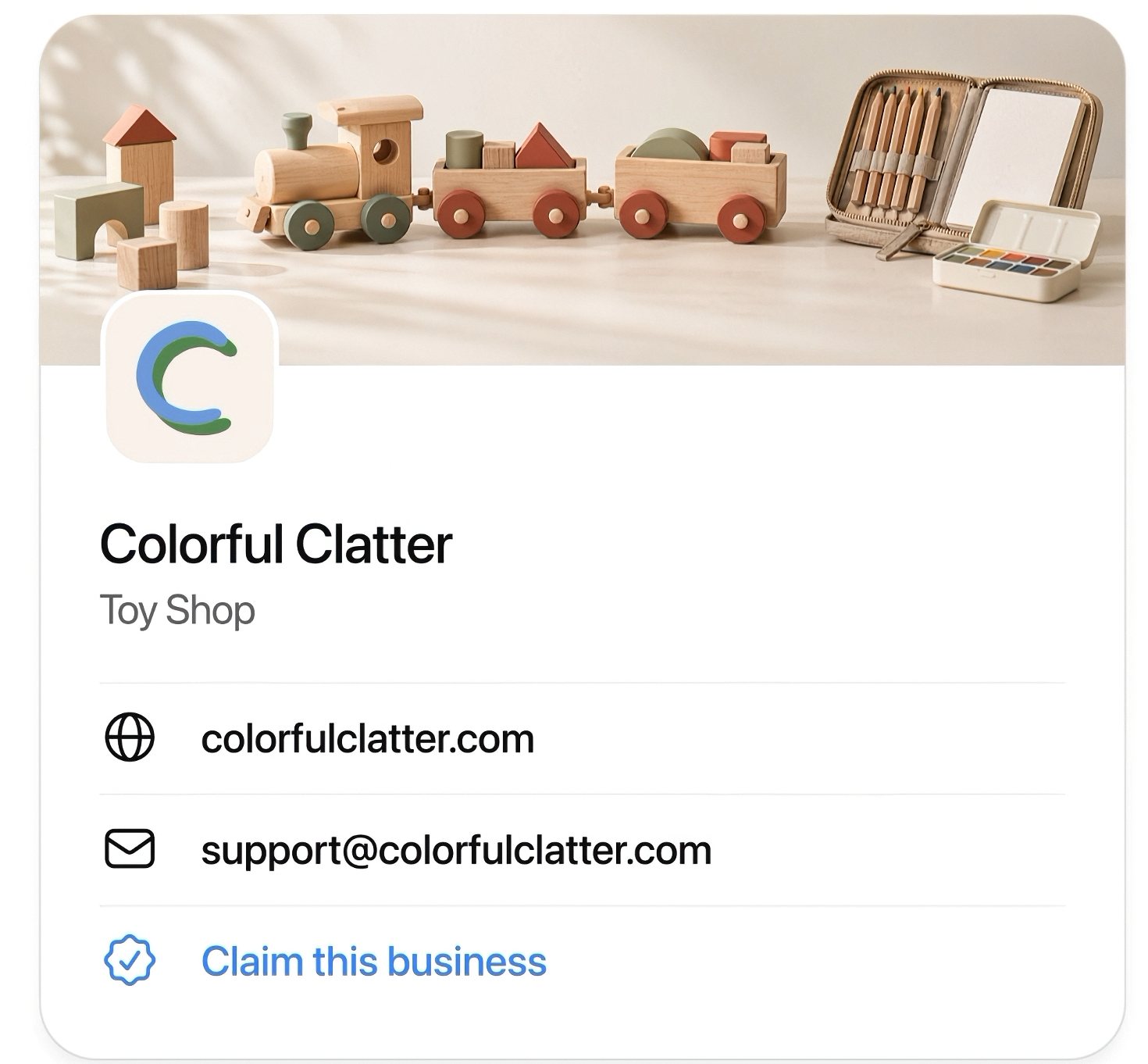
In OpenAI’s demo, an unclaimed profile in ChatGPT also shows a ‘Claim this business’ link, so you can start from the profile itself.
Source: OpenAI
### Step 3: Verify the claim
Next, prove the business is yours. Depending on your business, ChatGPT offers some of these methods:
| Method | How it works | Best for |
| --- | --- | --- |
| Business phone | A code by text or call | Local businesses with a direct line |
| Business email | A code sent to a business address | Teams with a domain email |
| Website domain | Add a TXT record to your DNS, then verify | Brands with IT or DNS access |
| Shopify store | Sign in to Shopify and approve | Shopify merchants |
> Tip: With the DNS method, check how your provider handles the host field. Some add your domain automatically, so pasting the full value can double it and the check fails.
### Step 4: Wait for OpenAI’s review
OpenAI reviews the claim and emails you a decision, or asks for more information. You can cancel the claim while it’s pending.
### Step 5: Complete the Persona identity check
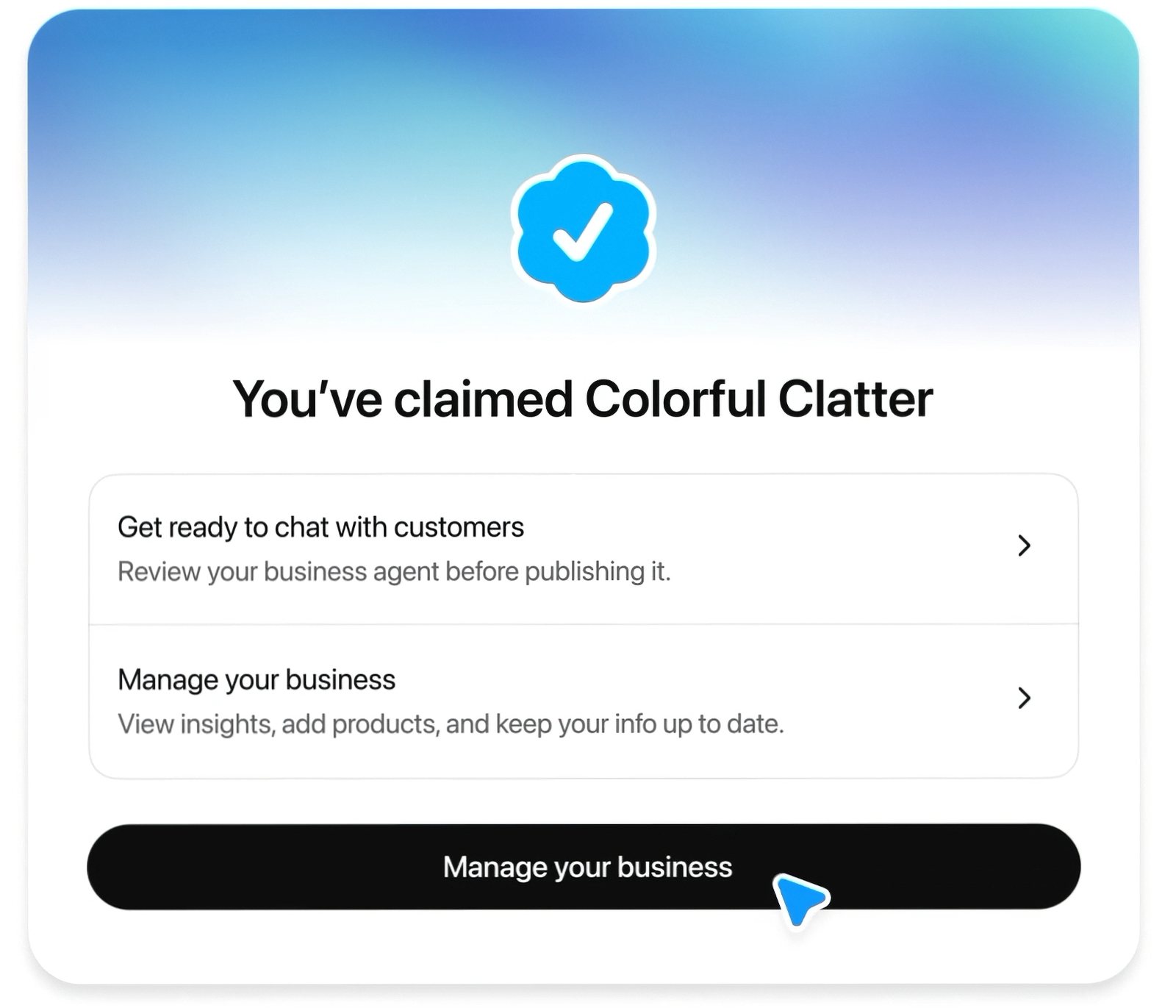
After approval, one person verifies their identity through Persona, OpenAI’s ID verification partner. You can’t publish changes, connect a product feed, see insights or create an agent until this is done.
You can start it right away or come back later from your business overview. Once Persona approves you, the blue check appears on your profile.
Choose this person carefully. In a company with high turnover, the person who verifies should be someone who’ll still be around next year.
Source: OpenAI
### Step 6: Fill in and submit your profile
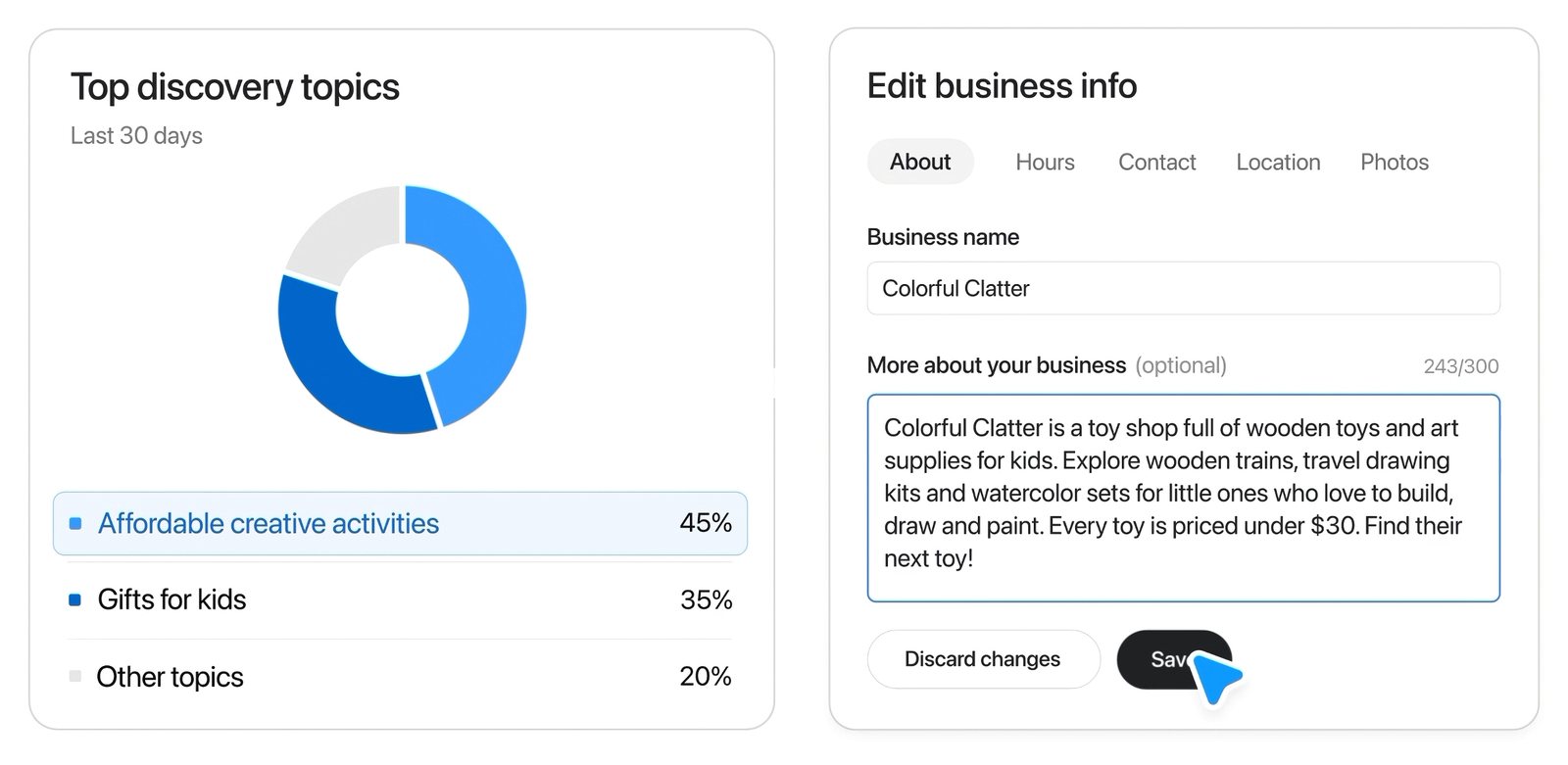
Now complete every tab: ‘About’, ‘Hours’, ‘Contact’, ‘Location’ and ‘Photos’. The description field takes up to 300 characters. Copy the details from your Google Business Profile, character for character.
OpenAI reviews each update before it appears, and some answers may keep showing older information for a while after that.
> Tip: Profiles go live automatically once approved, and only unpublished drafts can be deleted. Get the details right before you submit.
Source: OpenAI
## Claiming 10, 50 or 500 locations: the multi-location playbook
> Claiming the brand doesn’t claim a single location.
This is where every other guide stops. For a single shop, the six steps above are the whole job. For a brand with dozens of locations, they’re the easy part.
### Why every location is a separate claim
OpenAI manages each brand and each location separately. There’s no central management across a parent company’s brands, no bulk claim and no public API.
If you work with OpenAI through a managed claim (enterprise and advertisers), location profiles may be locked by default until your account contact sets them up.
OpenAI says it plans to “build tools for organizations with more complex needs.” There’s no date yet. Plan for manual claims now.
### Who should hold each claim: brand, franchisee or agency
Decide this before anyone starts claiming. Otherwise a franchisee, a former agency and head office can all end up holding different locations.
| Who claims | Works well when | Watch out for |
| --- | --- | --- |
| Brand (head office) | Corporate controls listings and data | One team doing 50+ manual claims |
| Franchisee | Owners manage their own location | Inconsistent details across the network |
| Agency | The agency already runs your GBP | Access stuck with the agency if you part ways |
For most networks, the cleanest setup is a brand-owned account holding the claims, with agencies and franchisees added as teammates.
### When a location is already claimed: dispute ownership
In franchise networks, someone has often claimed a location first: a franchisee, a former agency or a local manager.
If you have the right to manage it, open the profile, select the more actions menu (…), then ‘Dispute ownership’ and follow the steps. Identity verification is part of the process.
> Tip: Settle claim ownership in your franchise agreement or agency contract before you roll out. Disputes cost weeks you don’t need to lose.
### Build a location claim tracker
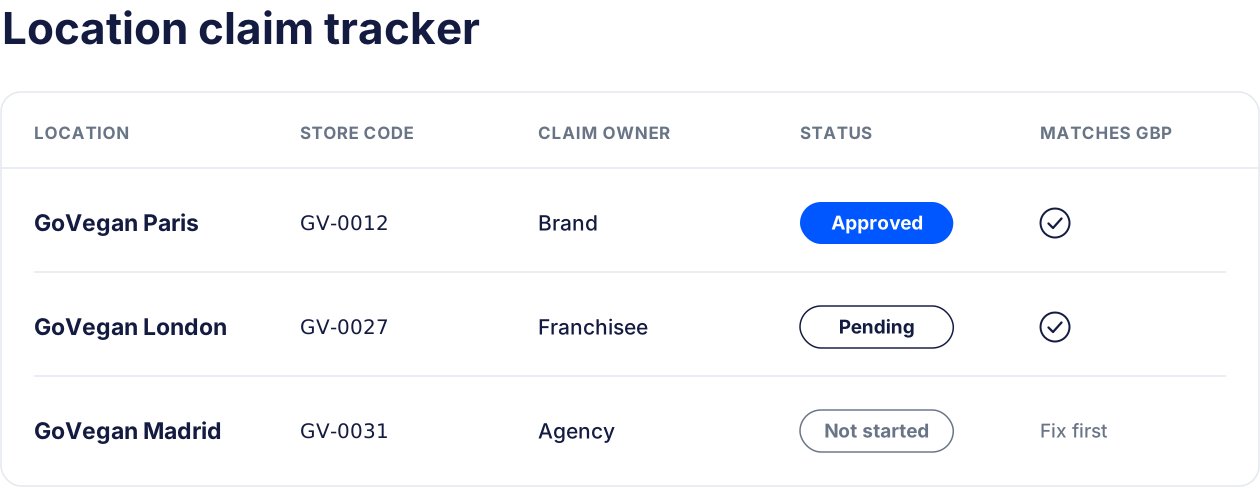
At 50 locations, you can’t keep the rollout in your head. Track it in one sheet:
- Store code: the same ID you use in Google Business Profile
- Listing found in ChatGPT: yes, no or ‘Contact support’
- Claim owner: who holds the claim
- Verification method: phone, email, DNS or Shopify
- Claim status: not started, pending, approved or disputed
- ID check done: yes or no
- Matches GBP: name, address, phone, hours and category all identical
- Last checked: date of your last review
### Which locations to claim first
Don’t go alphabetically. Prioritize:
- Locations with wrong details in ChatGPT today. Ask ChatGPT about each one and log what’s wrong.
- Your highest-revenue locations. That’s where a wrong answer costs the most.
- Locations in competitive markets. That’s where people compare options before choosing.
> Tip: Run the check-and-log pass before you claim anything. It gives you a baseline to compare against once insights start coming in.
## For agencies: managing client profiles without owning them
Agencies will be tempted to claim client listings themselves. Don’t.
The cleaner setup is the one you’d use for GBP: the client claims and verifies, then adds your team. Business Hub supports adding teammates and agencies, and each person signs in with their own ChatGPT account.
A few rules that save headaches:
- Have the client hold the claim. Your agency is added as a collaborator.
- Don’t forward invitations. Each person accepts their own, on their own account.
- Plan offboarding on day one. When the contract ends, the client removes your access. Nothing needs to transfer.
It’s the same model as [adding users to a Google Business Profile](/blog/add-users-to-google-business-profile/). If you already run GBP for clients at scale, the [agency setup in Localith](/agencies/) follows the same pattern.
## Where ChatGPT gets your location data (claimed or not)
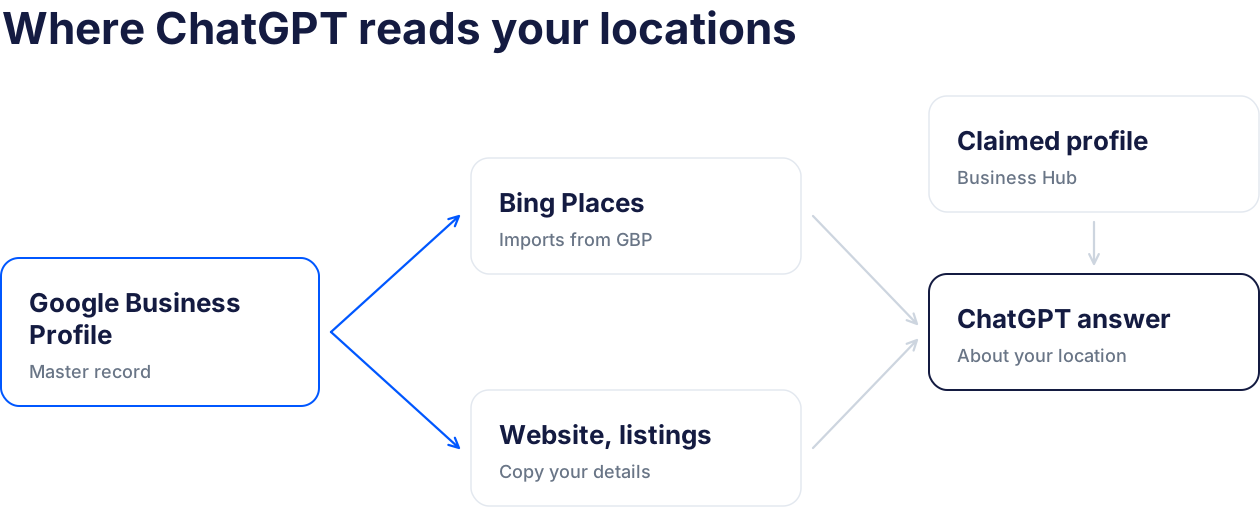
Your claimed profile is one input. ChatGPT reads several others, and you don’t control most of them.
> ChatGPT can only be as accurate as the least accurate source it reads about you.
### Bing Places
Local SEO practitioners who test ChatGPT’s local answers [consistently point to Bing data](https://www.localfalcon.com/blog/chatgpt-local-search-data-sources-where-does-business-info-come-from) as a major input.
Microsoft relaunched Bing Places in October 2025, and it [lets you import your listings from Google Business Profile](https://ppc.land/bing-places-for-business-migrates-to-bing-com-domain-with-import-tools/). The import looks like a one-time copy, not an ongoing sync, so later Google changes won’t follow on their own.
### Yelp’s licensed reviews and listings
In July 2026, Yelp confirmed a [non-exclusive licensing deal with OpenAI](https://www.techwyse.com/news/platform-updates/yelp-openai-licensing-deal-chatgpt-local-reviews). It covers about 330 million reviews and more than 8 million business listings.
When people ask ChatGPT for local recommendations, Yelp ratings, reviews and photos can show up in the answer. Business Hub has no reviews feature, so Yelp is effectively where your ChatGPT review story comes from.
### Your website and third-party sites
ChatGPT also cites your own location pages, directories, local media and “best of” lists.
Your website is the one you fully control. Give every location its own page with consistent details and [LocalBusiness schema for each location](/blog/local-business-schema-for-multiple-locations/).
### Where Google Business Profile fits
ChatGPT doesn’t read your Google Business Profile directly. GBP still matters, because it’s the source the rest copy from: Bing imports it, aggregators scrape it, and your team uses it to build location pages.
If GBP is wrong, the error spreads. If it’s right, every copy starts right.
## Keep every source ChatGPT reads consistent
Claiming fixes one profile. Consistency fixes the answers.
> Tip: Fix Google Business Profile first, then mirror it to your ChatGPT profile, Bing Places and your website, in that order.
### Make Google Business Profile your master record
You need one record that every other listing copies from. For most brands that’s GBP: it’s the most complete record you have, your team already updates it, and Bing can import it.
At 20+ locations, keeping that master record identical is a workflow problem, not a writing problem. [Bulk CSV Updates](/bulk-updates/) in Localith let you change hours, categories and descriptions across every location in one pass, with a preview before anything goes live.
### Mirror it everywhere else
Use this checklist for every location:
- ChatGPT profile (once claimed)
- Bing Places
- Your website location page and its schema
- Yelp
- Apple Business Connect
- Industry directories that matter in your category
Name, address, phone, hours, primary category and website URL should be identical across all of them. “St.” on one listing and “Street” on another is enough to create a mismatch.
### Stop edits you didn’t make
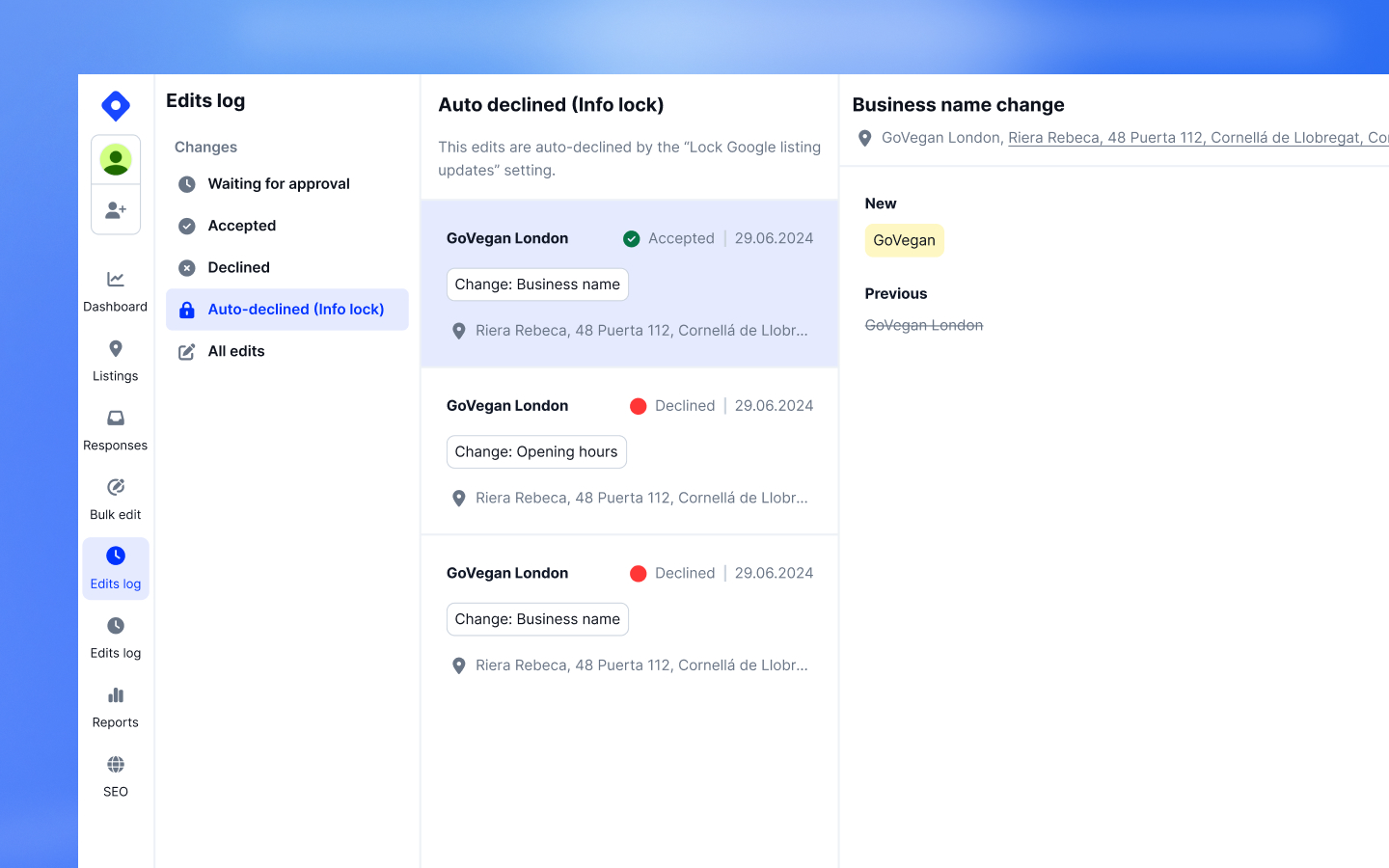
Google lets anyone suggest edits to your profile, and some get applied without your approval. A changed phone number or category then spreads to every source that copies GBP.
Localith’s Profile Locking blocks those changes. Lock the fields that matter, and unapproved edits are declined automatically and logged so you can review them. More on how this works in our guide to [Google Business Profile suggested edits](/blog/google-business-profile-suggested-edits/).
## How to read Business Hub insights
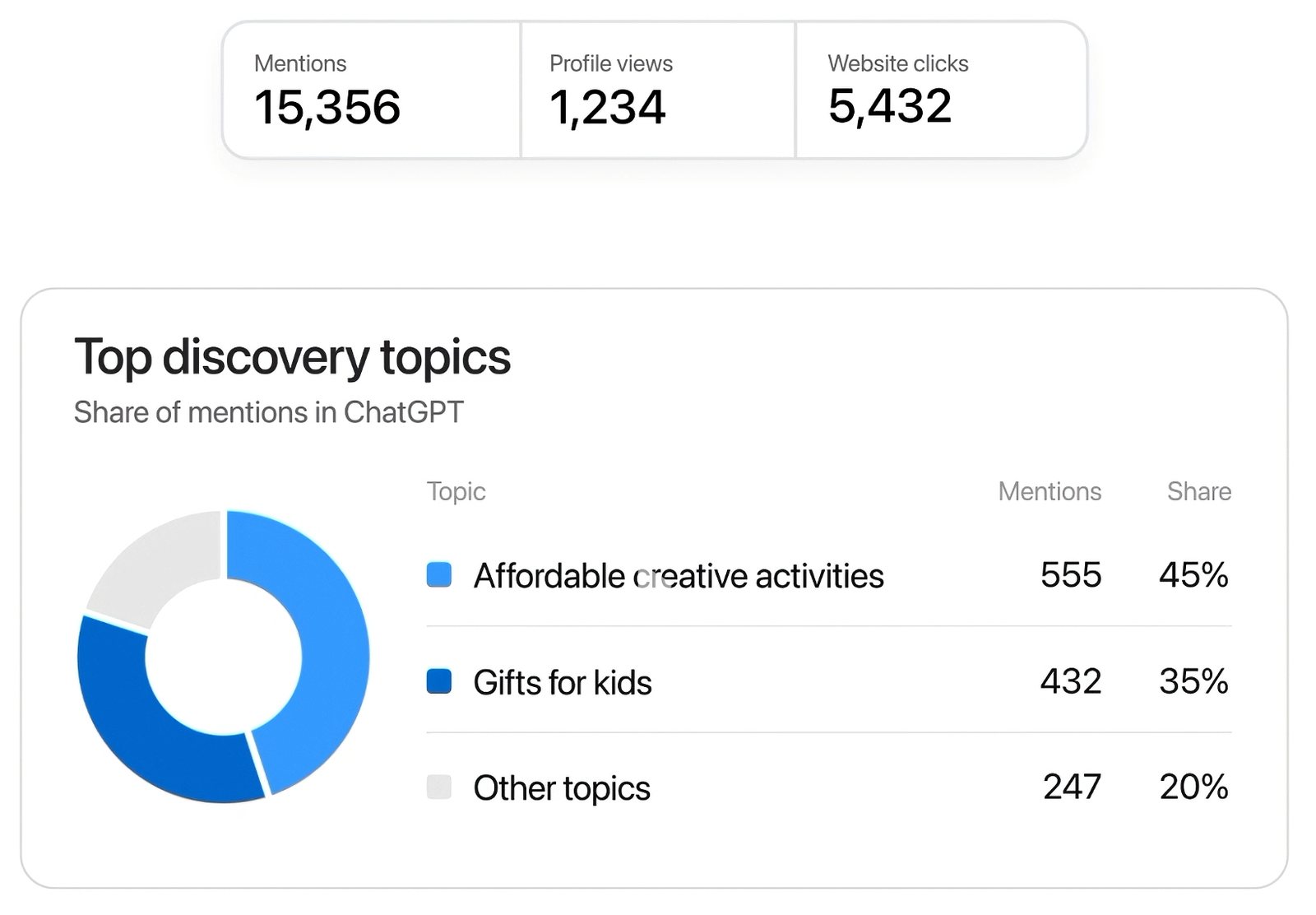
After you pass the ID check, Business Hub shows how people engage with your business in ChatGPT over the past 28 days.
Source: OpenAI
- Mentions: for online businesses, a mention counts when ChatGPT references your website. Your brand name alone doesn’t count. For local businesses, it counts when ChatGPT shows your location as a result.
- Profile views: how often people opened your ChatGPT profile.
- Website clicks: clicks from ChatGPT through to your site.
- Discovery topics: common themes across conversations where your website is cited.
### What the numbers don’t tell you
You won’t see individual conversations. As OpenAI puts it, “We don’t share users’ conversations or Business Agent chats with businesses.”
Data only appears above certain thresholds. A blank metric doesn’t mean nothing happened. It may mean you’re under the reporting limit or the data is still coming in.
> Tip: Track insights per location next to your [GBP performance reporting](/analytics/). If mentions rise in a market but clicks don’t, check that location’s details first.
## Do Business Agents and product feeds matter for local brands?
Not yet, for most multi-location brands.
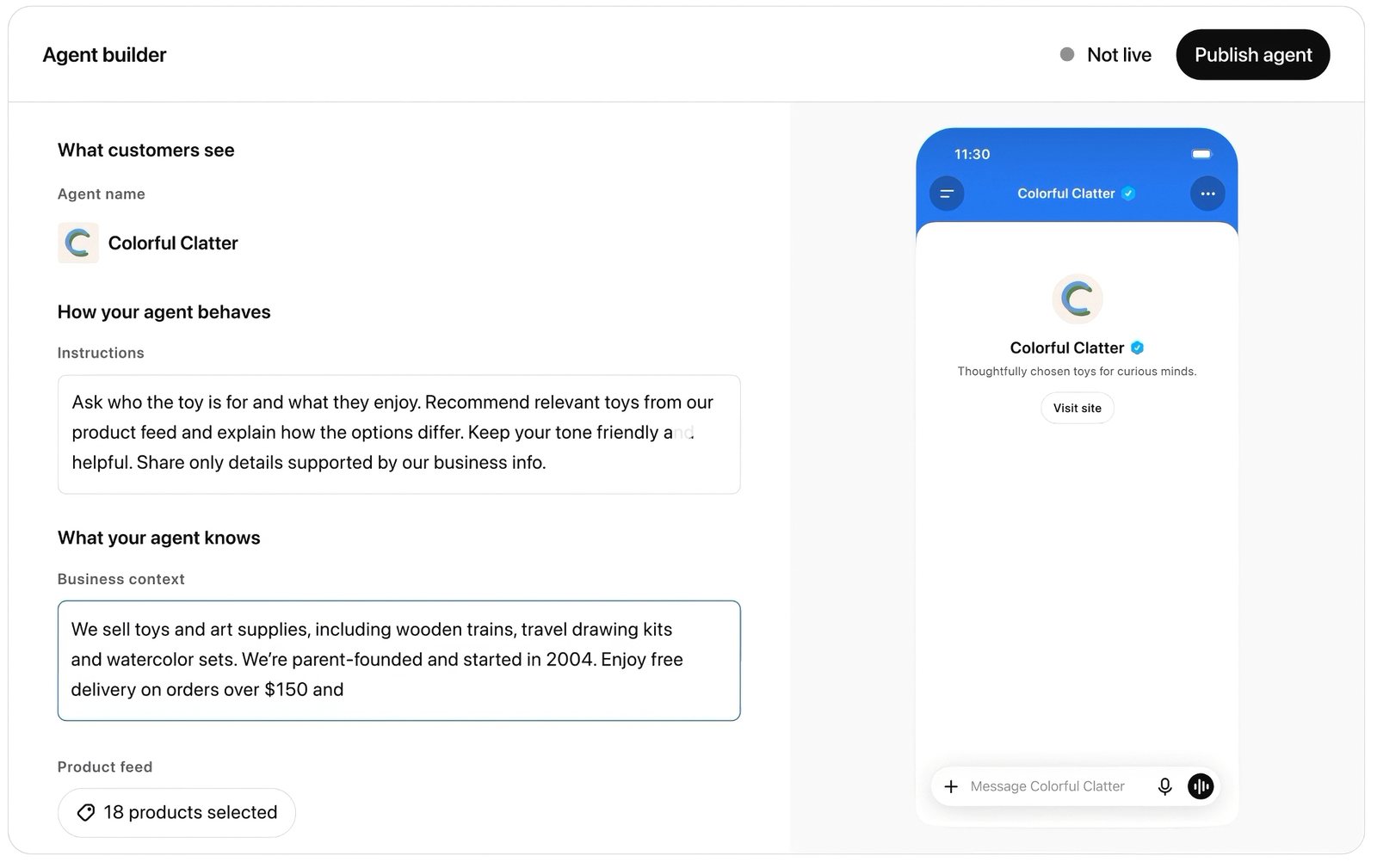
Business Agents are your own chat agent inside ChatGPT. They answer questions about your products and policies, and the conversation is clearly labeled as separate from ChatGPT’s own answers. They can’t complete purchases, take bookings or check orders. Right now they’re limited to eligible US ecommerce and online service businesses.
Source: OpenAI
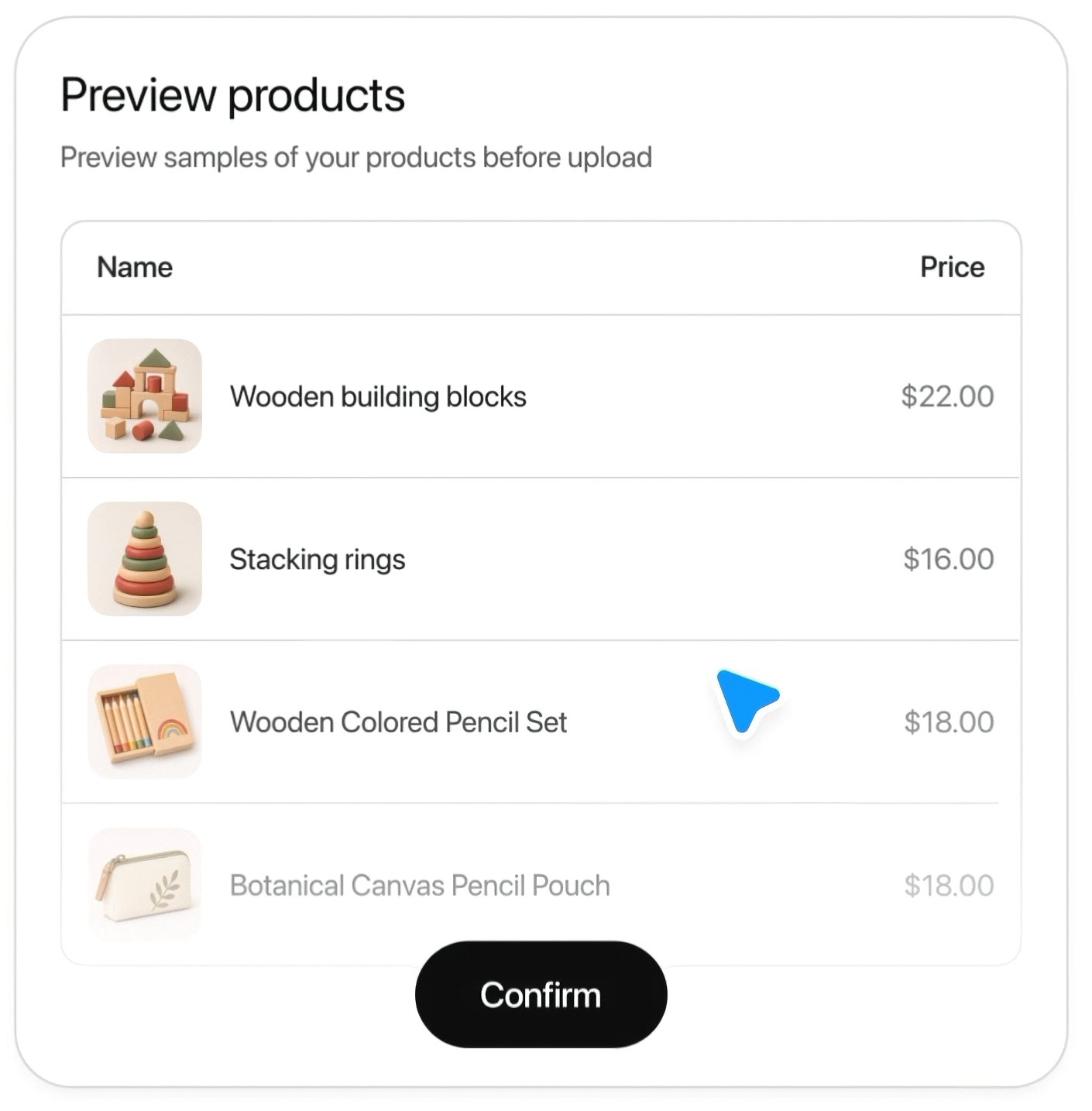
Product feeds let retailers share prices and stock. You upload a product data file and preview it before it goes live, and Shopify stores connect from Business Hub or the Shopify admin.
Source: OpenAI
If you’re a retail chain with an online store, it’s worth a look. If you’re a restaurant group, clinic network or service franchise, put it on your watch list and come back when OpenAI expands it.
## Your first 30 days with Businesses in ChatGPT
Week 1: Audit
- Ask ChatGPT about your brand and your top 10 locations. Log every error.
- Decide who holds the claims: brand, franchisee or agency.
- Set up your claim tracker.
Week 2: Fix the master record
- Correct every error at the source in Google Business Profile.
- Lock the fields you don’t want changed.
- Update Bing Places and your website location pages to match.
Week 3: Claim
- Claim the brand and your priority locations.
- Complete the Persona check with a long-term owner.
- Submit profiles that match GBP exactly.
Week 4: Measure
- Check insights for each claimed location.
- Re-ask ChatGPT the questions from week 1 and compare.
- Schedule a monthly consistency check.
## Conclusion: Claim the profile, then fix the records ChatGPT actually reads
Businesses in ChatGPT is a real new channel, and it’s free to claim. Claim your brand and your priority locations now.
Don’t stop at the claim, though. OpenAI says it won’t lift your ranking on its own.
The answers ChatGPT gives about your locations come from many sources. Keep them consistent, starting with Google Business Profile.
{{inline-cta:trial|Manage GBP across many locations? Get your master record right with a free 7-day Localith trial.|Start free trial}}
Want to compare plans first? See [Localith pricing](/pricing/).